AppLess · a phone with no apps. just ask.
Every screen is generated the moment you ask, streamed live, and rendered in real native UI: Cupertino on iOS, Material 3 on Android.
openui.com · Demo · Quick start · How it works



Demo
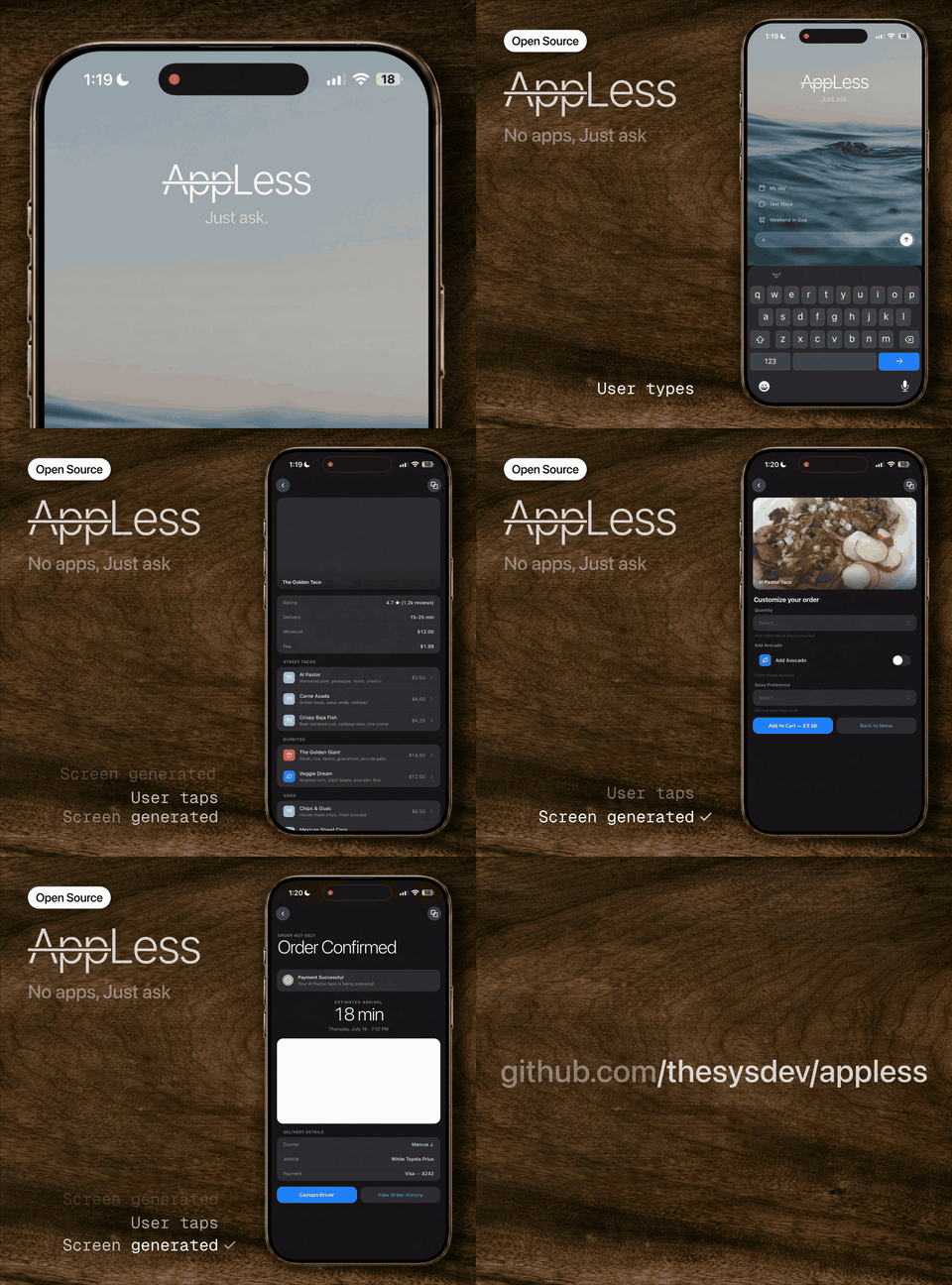
There are no apps to install, no menus to learn, no home screen full of icons. You open AppLess and ask for what you want, and the screen for it is generated on the spot: a weather dashboard, a restaurant list with live search, a booking form, a chat thread. Tap anything and the next screen is generated too, already prefetched so it appears instantly.
It is a demo of what a generative UI operating system feels like, built entirely on OpenUI, the open standard for LLM-generated interfaces. The model does not return JSON or hand-written screens; it writes openui-lang, a compact streaming-first UI language that the OpenUI renderer turns into live, interactive native components.
[!WARNING] AppLess is an experiment by the creators of OpenUI to push the boundaries of Generative UI, with no real integrations behind it. Screen content is generated by the model: turn on the optional web and image tools and it can be grounded in real data (real places, prices, news, photos); without them it is plausible fiction. The actions are always simulated, though. "Order placed", "flight booked", "payment sent", and live health stats do nothing and reflect no real state, because nothing is wired up yet. It is a glimpse of what a generative-UI OS could feel like, not a working replacement for your apps, at least until someone makes it real.
Quick start
git clone https://github.com/thesysdev/appless.git
cd appless
npm install            # postinstall applies the react-lang patch
npm run ios            # or: npm run android, or npm start for Expo Go
Screens are generated by OUI-1, served with vLLM 0.24 or newer on a GPU host. The phone connects directly to that server; the model does not run inside the Expo app. On the GPU host:
pip install "vllm>=0.24"
bash scripts/serve-oui.sh
The script serves the merged checkpoint as OUI-1, with FP8 weights, a
16,384-token context, four concurrent sequences, and the gemma4 tool-call
parser. It uses the checkpoint's diffusion sampler settings. Follow the
model card for hardware
requirements (FP8 weights occupy about 25.8 GiB, plus runtime/cache memory).
Override VLLM_HOST, VLLM_PORT, VLLM_MAX_MODEL_LEN, or VLLM_MAX_NUM_SEQS as
needed; additional arguments are forwarded to vllm serve.
Copy .env.example to .env.local and set the address reachable from your app:
EXPO_PUBLIC_MODEL_BASE_URL=http://192.168.1.100:8000/v1
EXPO_PUBLIC_APPLESS_MODEL=OUI-1
EXPO_PUBLIC_APPLESS_MAX_TOKENS=4096
EXPO_PUBLIC_APPLESS_PREFETCH_LIMIT=1
# EXPO_PUBLIC_EXA_API_KEY=             # enable web_search (Exa)
# EXPO_PUBLIC_UNSPLASH_ACCESS_KEY=     # semantic photos (else LoremFlickr)
Replace the example IP with your GPU host's LAN address, or use its HTTPS URL.
The built-in defaults target localhost:8000/v1 on iOS simulator/web and
10.0.2.2:8000/v1 on the Android emulator; these work when the server is on the
development host. On a real phone, localhost is the phone itself. For a
standalone native build, prefer an HTTPS endpoint; cleartext HTTP/local-network
access may require platform-specific build permissions. Web builds also need
the server to allow their origin. Restart Expo after changing environment values.
Local servers without authentication open immediately. For a protected endpoint,
start vLLM with bash scripts/serve-oui.sh --api-key your-server-key and set
EXPO_PUBLIC_MODEL_AUTH_REQUIRED=1 to prompt for that key in the app. A server
401/403 also opens the key prompt. Entered keys are stored per endpoint in
Keychain/Keystore (localStorage on web); old Cerebras credentials are not reused.
For development, EXPO_PUBLIC_MODEL_API_KEY skips entry, but all EXPO_PUBLIC_*
values are included in the app bundle. Remote deployments should put vLLM behind
authenticated HTTPS access; see vLLM security.
OUI-1 streams committed 256-token blocks. It ignores request temperature and seed,
so the client sends neither. The original prefetch logic generates likely next
screens ahead of a tap. EXPO_PUBLIC_APPLESS_PREFETCH_LIMIT controls how many
destinations to generate per screen: 1 by default, 0 to disable, up to 6.
This is optional and trades extra model requests for faster navigation.
If the server rejects the context length, the app retries after dropping the
oldest complete ancestor exchange, preserving the current request and tool
results. If those alone exceed the limit, it reports an actionable error.
Expo SDK 54 is pinned to match the Expo Go build on the App Store and Play Store. If your Expo Go reports a different SDK, run
npx expo install expo@^<version> && npx expo install --fix.
How it works
flowchart LR
  A["ui/contract.tsx<br/>(one contract)"] --> B["system prompt<br/>(generated)"]
  B --> C["OUI-1 / vLLM<br/>(streaming)"]
  C --> D["openui-lang<br/>(the DSL)"]
  D --> E["Renderer<br/>(react-lang)"]
  E --> F["native UI<br/>(Cupertino / Material)"]
One contract, ui/contract.tsx, is the single source of truth for every
component the model can use: its name, its props, and a description. That
contract generates the system prompt, so the model always knows exactly the UI
vocabulary the app can render. As tokens stream back, the OpenUI
<Renderer> parses openui-lang incrementally and paints
real native components, live, before the response has even finished.
Two design systems implement that one contract, so the same generated screen renders as Cupertino on iOS and Material 3 on Android with no change to the prompt. Tapping a row, chip, or button streams the next screen; the app speculatively prefetches likely destinations so navigation feels instant.
Real tools, in the app. When a screen needs live facts (news, prices, real
places), the model calls a web_search tool (Exa) mid-stream
and composes the screen from the results, sources cited. Images are referenced
as semantic queries the app resolves on-device.
Packages
AppLess is a thin, native shell over the OpenUI runtime. The heavy lifting is the OpenUI stack:
| Package | Role |
|---|---|
@openuidev/react-lang | The OpenUI runtime: parses streaming openui-lang and renders it through a pluggable component library. The core of the whole app. |
@openuidev/cli | Generates the system prompt from the component contract (npm run generate:prompt). |
expo / react-native | The native app runtime (Expo SDK 54, New Architecture). |
react-native-svg | Chart geometry shared across both design systems. |
react-native-webview | Keyless Google Maps embed for MapView. |
expo-linear-gradient | Card and hero gradients. |
lucide-react-native / phosphor-react-native | Icon sets for generated rows and the home shell. |
expo-secure-store | On-device storage for the user's API key (Keychain / Keystore). |
zod | Prop schemas in the component contract. |
@react-native-community/slider | Native slider input for forms. |
Screens are generated by OUI-1 on your vLLM server; optional live search is powered by Exa with your own Exa key.
Design systems
The model-facing contract and the design languages are deliberately separate so platforms can look native without ever drifting the prompt:
ui/contract.tsx- component names, prop schemas, and descriptions. The single source that generates the system prompt.ui/cupertino/- iOS renderers: inset grouped lists, icon badges, segmented tabs, iOS switch.ui/material/- Android renderers: Material 3 tonal surfaces, ripple, filter chips, underline tabs, native switch.ui/shared/- chart, map, form, and image logic shared by every design system.
Tests
npm test    # renders exemplar generated screens through the full
            # parser -> Renderer -> native component pipeline (jest-expo,
            # headless), for both Cupertino and Material renderer sets
For a live check, start vLLM and the app, open a screen, tap a detail row, submit
a form, and (with an Exa key) request current weather. Confirm that the tool
result becomes the next screen. Set the prefetch limit to 0 to check generation
only when the user requests a screen.
Fork it and make it yours
The actions and state are simulated only because nothing is wired to a real service yet, and that missing piece is usually just one integration. We would love for you to fork AppLess and make it real:
- Real food ordering - wire in the DoorDash or Uber Eats API and the food screens order you actual dinner.
- A real Yelp - add the Google Places API so "restaurants nearby" returns real venues, hours, photos, and reviews.
- A real wallet - connect Plaid and the banking screens show your real balance and transactions.
- A real day - hook up the Google Calendar API and "what does my day look like" becomes actually your day.
- Real music - drop in the Spotify API and the player controls real playback.
Pick a screen, give the model a tool that returns real data and somewhere to send the action, and the demo turns into a working app. Open a PR - we would love to see what you build.
Learn more
AppLess is one of many things you can build on OpenUI. To use the same generative-UI stack in your own product, start at openui.com and the OpenUI repository.
Telemetry
AppLess sends one anonymous appless_app_launched event to
PostHog on startup, so we can see how many people build
and run the experiment. It carries
only an anonymous per-device id and your platform (iOS / Android / web). No
prompts, screen content, API keys, or personal data are ever collected. Opt out
any time:
EXPO_PUBLIC_POSTHOG_DISABLED=1 # or the standard DO_NOT_TRACK=1License
MIT. See LICENSE.