Star 历史趋势
数据来源: GitHub API · 生成自 Stargazers.cn
README.md
IKEA Temperature / Humidty Sensor
This is the code for the Matter Temperature and Humidity sensor I build over on my YT Channel. Code is built on the Seeed Studio Xiao nrf52840 using the nrf Connect Sdk
Components
- Seeed Studio Xiao nrf52840
- Sensirion SHT41 (I2C Addr: 0x44) (Any SH4X model will work)
- Adafruit MAX17048 Lipo Fuel Gauge (I2C Addr: 0x36)
Pin Mapping
The default I2C pins on the xiao have been remapped so that the clock and data pins (SCL and SDA) are next to the GND and 3V3 pins for convenience
| Xiao nrf52840 | SHT4X | MAX17048 |
|---|---|---|
| GND | GND | GND |
| 3V3 | VIN | VIN |
| D10 (P1.15) | SDA | SDA |
| D10 (P1.14) | SCL | SCL |
Build
- Install v3.2.1 of the nrf Connect SDK and Toolchain for VS Code using the instructions for the nordic semi conductor website here
- Open the project in VS code and create a new build configuration. Change the following settings:
- Board Target: xiao_ble/nrf52840 (toggle to "Nordic SOC" for this to be visible)
- System Build (sysbuild): No sysbuild
- Click Generate and Build to compile the firmware
Flash
- Locate the firmware:
./build/zephyr/zephyr.uf2and open file location in file explorer - Plug in the xiao and double tap on the reset button. It should appear as a USB mass storage device
- Drag the
zephyr.uf2file onto the xiao and wait for the flash to complete (You may get an error about this failing due to the device disappearing, this is usually a false positive and the firmware flashed successfully)
Commissioning
Set this up like any other matter device. You can use either the default pairing code of 20202021 or you can use the QR code from the nordic docs here
Modifications
Temperature and Humidity Reading Frequency
This project is configured to report temperature and humidity every 5 minutes. To change the frequency modify the following line in src/app_task.cpp. Value is in milliseconds.
constexpr size_t kMeasurementsIntervalMs = 300000;Remove LIPO Fuel Gauge
To build this project without the Lipo fuel gauge, make the following changes
- Modify the
prj.conffile and delete these two lines
CONFIG_FUEL_GAUGE=y
CONFIG_MAX17048=y- Remove the MAX17048 from the device tree. Open
./board/xiao_ble_nrf52840.overlayand delete the following code:
	max17048@36 {
		compatible = "maxim,max17048";
		reg = <0x36>;
		status = "okay";
}; - Remove the Power Source cluster from endpoint 0 in the zap profile
- click on the "nrfConnect" extension in VS Code
- Under "Welcome" click "Open termnial" to open an nrf Connect Termnial
- type
west zap-guiwhich will open the ZAP GUI - Navigate to endpoint 0 (zero) and filter on enabled clusters
- Uncheck the "Server" button next to the Power Source cluster
- Save the ZAP profile
- Exit ZAP
- In the nrfConnect terminal type
west zap-generate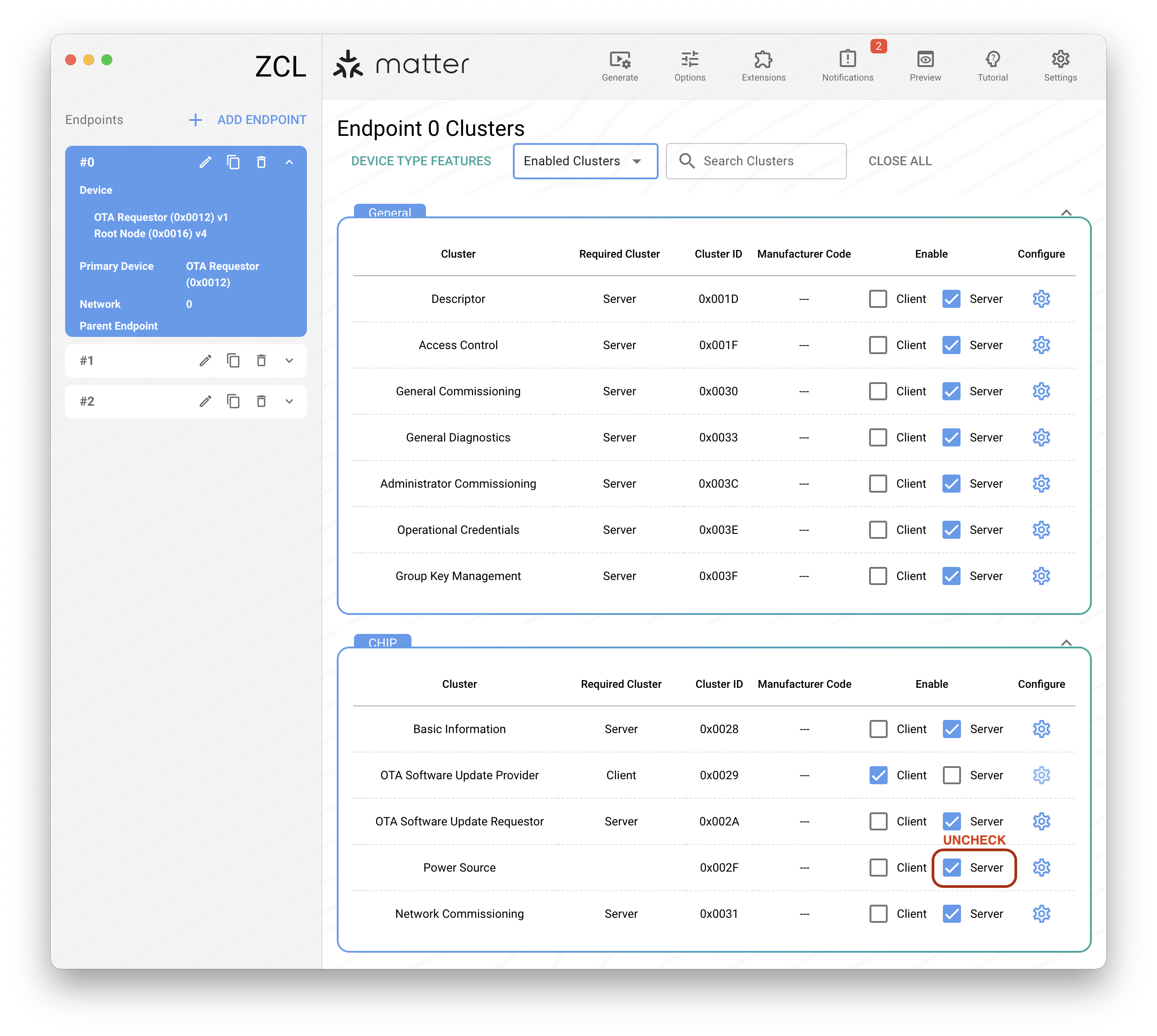
- build project