
Hermex
Control your self-hosted Hermes agent from your iPhone.
Your server. Your iPhone. No middleman.




Website · App Store · Report a bug · Contributing
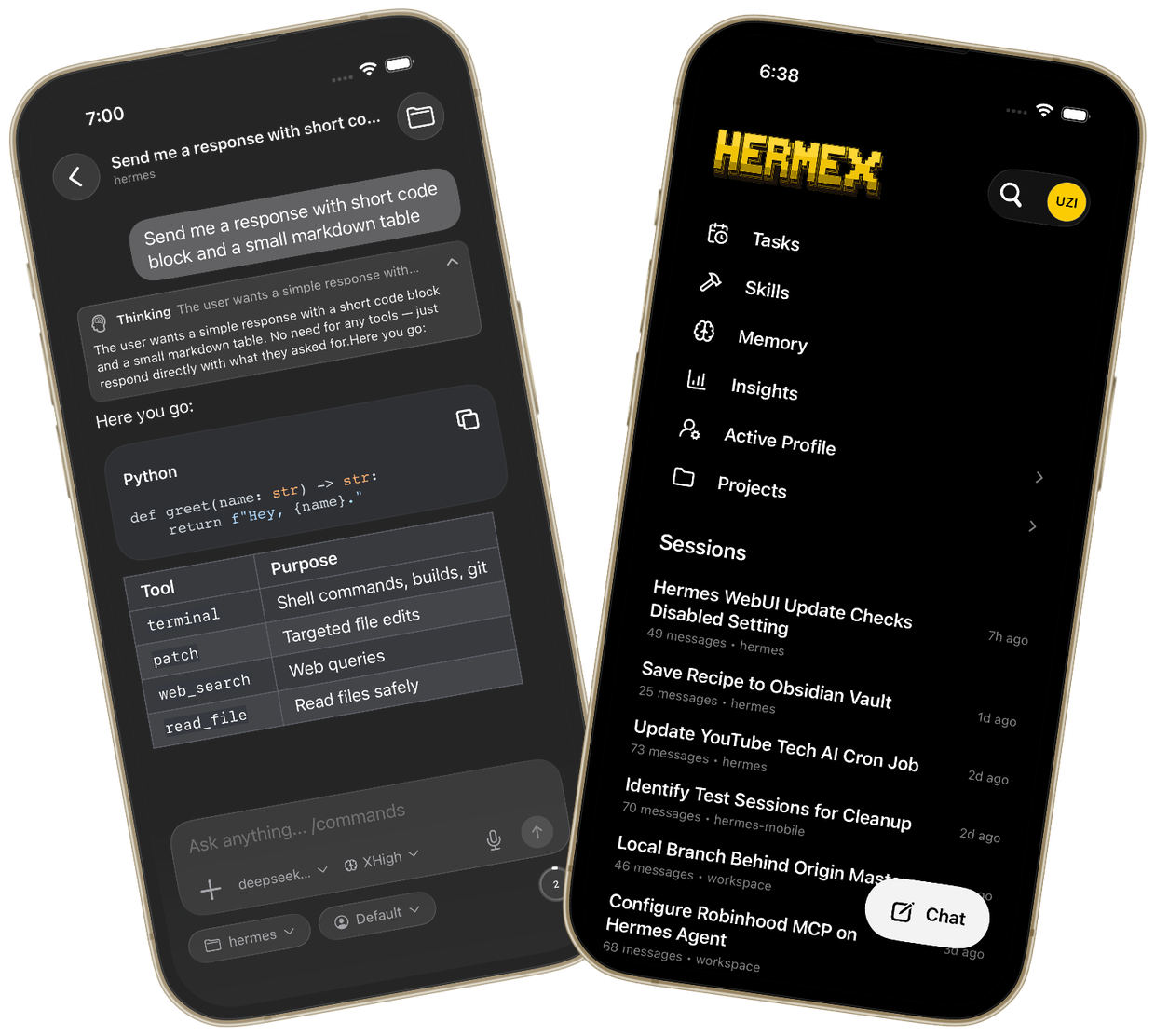
Hermex is a native SwiftUI iPhone app for driving a self-hosted hermes-webui server — a mobile cockpit for an AI agent that lives on a machine you control. The phone is the control plane, not the compute plane: the agent, its tools, and your data stay on your own hardware.
- Free. No subscriptions, no in-app purchases.
- Private. No analytics, no tracking, no third-party relay — the app talks only to your server.
- Native. Real SwiftUI, built for iOS 18+, not a web wrapper.
Features
- Chat with your agent — send messages with model, reasoning-effort, workspace, and profile options; attach files and images; watch responses stream in real time with thinking and tool-call detail.
- Steer or stop a run mid-flight.
- Sessions — browse, search, and resume every conversation on your server; cached sessions stay readable offline.
- Pick your models — switch between any model or provider your server is configured for, with recents and favorites.
- Profiles & projects — switch agent profiles and organize sessions into projects.
- Tasks — view and edit your agent's scheduled cron jobs from your phone.
- Skills — browse and search the agent's installed skills.
- Workspace browser — explore your server's file system from the app.
- Memory & Insights — read-only panels for agent memory and usage analytics.
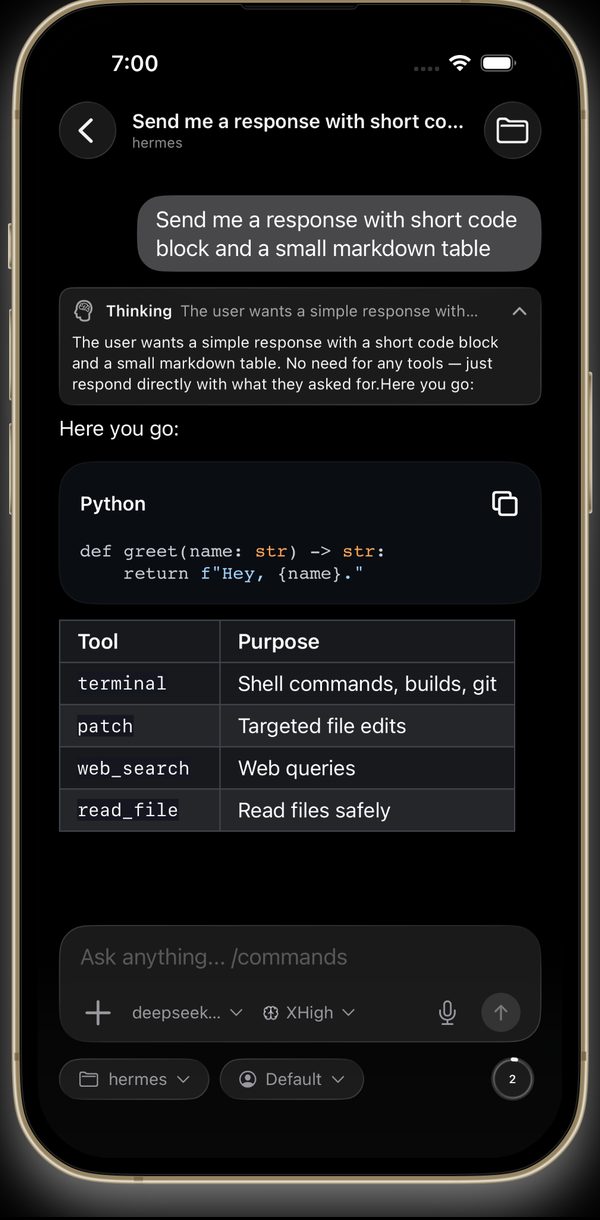 Stream responses in real time | 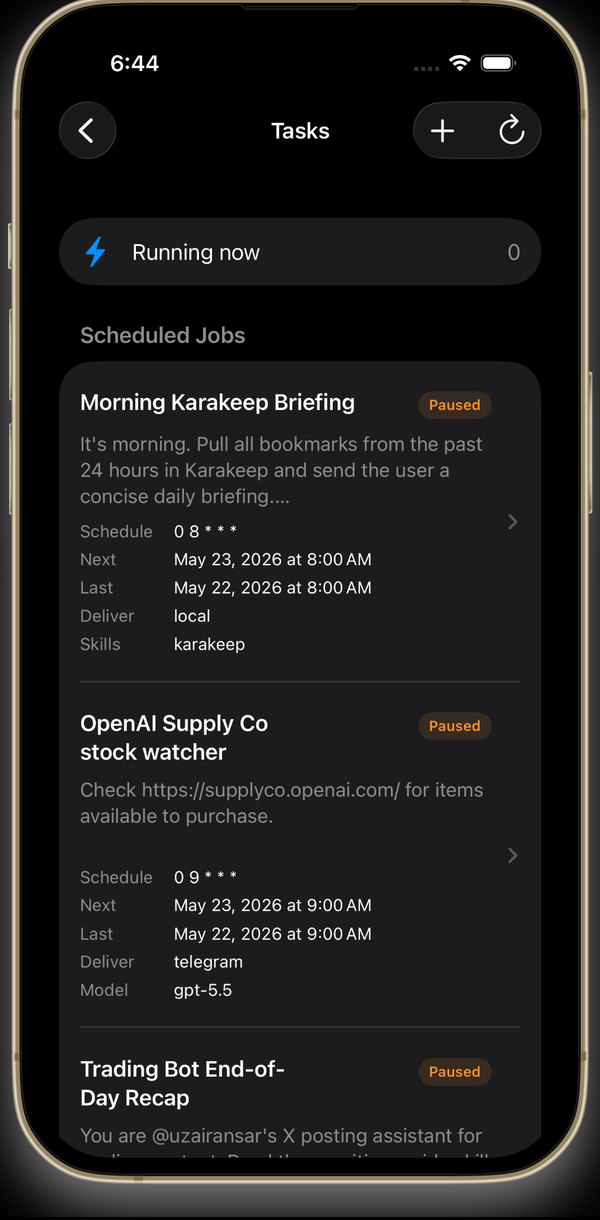 Manage scheduled tasks | 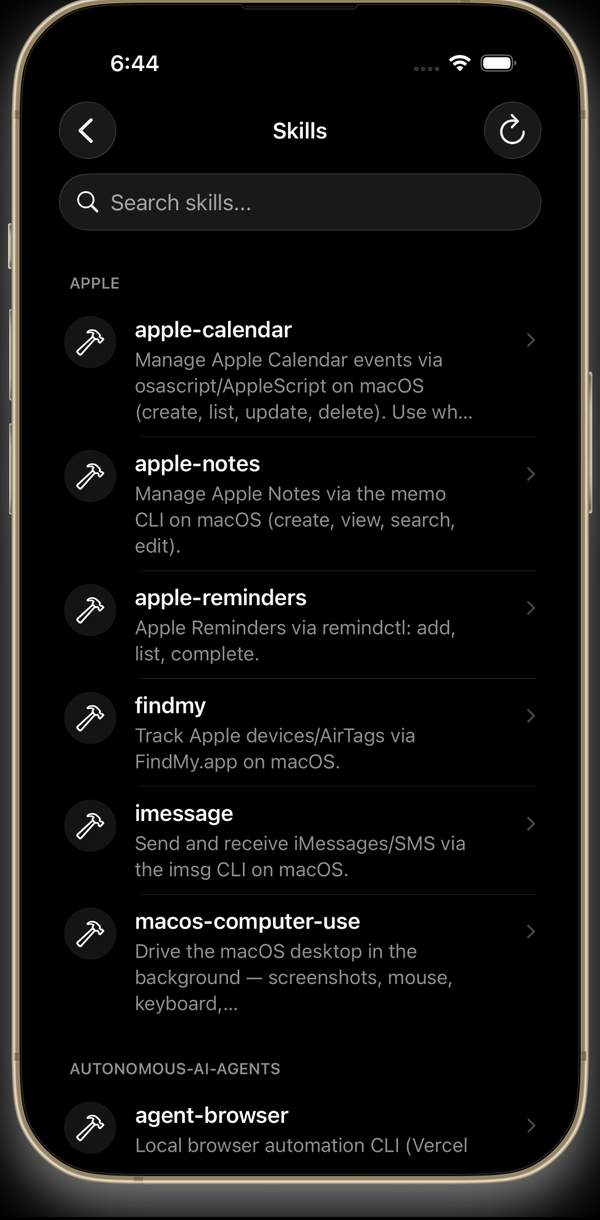 Browse agent skills |
More screenshots at hermexapp.com.
Getting started
Hermex is a client only — it does not ship with, host, or provision a backend. You bring your own hermes-webui server (a third-party, MIT-licensed open-source project) running on a machine you control. Setup takes about 15 minutes:
- Run the server. Install and start
hermes-webuion macOS, Linux, or Windows/WSL2 (Python 3.11+). SetHERMES_WEBUI_PASSWORD. - Make it reachable from your phone (see options below).
- Connect. Download Hermex, enter your server URL (e.g.
https://hermes.yourdomain.com) and password, and you're in.
Self-hosting the server, securing it, and keeping it reachable are your responsibility.
Making the server reachable
- HTTPS via a tunnel or reverse proxy (recommended). Expose the server through Cloudflare Tunnel or any reverse proxy that terminates real TLS at a hostname you own. Real HTTPS keeps iOS App Transport Security happy with no exceptions. On a publicly reachable hostname the password is your only app-level defense — set a strong one.
- Tailscale. Run the server bound to all interfaces with a password, install Tailscale on both the server and the iPhone, and connect to
http://<tailnet-ip>:8787. The app allows plain HTTP only for Tailscale's100.64.0.0/10device range. - Simulator-only local testing can use
http://localhost:8787when the server runs on the same Mac.
Troubleshooting the connection
If connection testing fails, check these first:
- The machine hosting
hermes-webuiis awake. hermes-webuiis running and serving/health(curl https://<your-server>/health).- The tunnel, reverse proxy, or Tailscale route is connected.
- The server URL and password are correct.
Building from source
Prefer the App Store build unless you're developing. To build yourself you need Xcode 26 or newer (iOS 18 SDK) and an iPhone or simulator on iOS 18+.
Clone the repo, open HermesMobile.xcodeproj, and run the HermesMobile scheme on an iPhone simulator (the Xcode target is HermesMobile; the app's display name is Hermex). Dependencies are resolved automatically via Swift Package Manager.
From the command line:
xcodebuild -project HermesMobile.xcodeproj -scheme HermesMobile -destination 'platform=iOS Simulator,name=iPhone 17' buildxcodebuild test -project HermesMobile.xcodeproj -scheme HermesMobile -destination 'platform=iOS Simulator,name=iPhone 17'If that simulator is not installed, list available devices and choose a nearby iPhone simulator:
xcrun simctl list devices availableLocal validation defaults for XcodeBuildMCP users live in .xcodebuildmcp/config.yaml; the standard post-change flow is in DEVELOPMENT.md.
Server compatibility
The app is developed and tested against the hermes-webui commit pinned in UPSTREAM_TESTED_SHA. Upstream does not yet guarantee API stability (its README declares version skew unsupported pending their stable-API work), so newer or older server versions may break individual features — please include your server version in bug reports. The app decodes tolerantly (unknown fields never crash it) and endpoint shapes are verified against upstream source, never invented; see CONTRACT_TESTS.md for the contract-testing approach.
Documentation map
PROJECT_SPEC.md: source of truth for product scope, API behavior, dependencies, and architecture decisions.PROJECT_INTENT.md: short orientation; useful for product tradeoffs, not implementation details.DEVELOPMENT.md: local development workflow, server setup notes, and the maintainer release runbook.TESTFLIGHT.md: maintainer-only TestFlight/App Store Connect operations.CONTRACT_TESTS.md: upstream contract-test readiness and the pin-advance policy.SECURITY.md: how to report a vulnerability.docs/agents/: repo-local agent workflow conventions (issues, triage labels, domain notes).- GitHub Issues: source of truth for active bugs, polish notes, and feature requests.
Contributing
Contributions are welcome — see CONTRIBUTING.md for how to pick up work and open a PR, AGENTS.md for the working agreement coding agents follow in this repo, and the Code of Conduct. The short version:
- Do not invent API endpoints or JSON shapes; verify against the upstream server source or a running server.
- Every
Codablemodel decodes tolerantly — never crash on unknown fields. - Add no third-party dependencies beyond the locked list in
PROJECT_SPEC.mdwithout explicit approval. - Do not modify the upstream
hermes-webuiserver from this repo.
Support the project
Hermex is free and built in the open. If it's useful to you:
- ⭐ Star this repo — it helps others find the project.
- 🐦 Follow @uzairansar on X for updates and dev logs.
- ☕ Buy me a coffee to support development.

License
MIT — see LICENSE.
Hermex is an independent client and is not affiliated with the upstream hermes-webui project. Apple, the Apple logo, and App Store are trademarks of Apple Inc.