Markdown Experience Guidelines (MDXG)
A specification for how interfaces should present and interact with markdown documents.
Markdown is the most widely supported document format in software. Every AI model speaks it. Every developer reads it. Every platform renders it. But the experience of using markdown has barely changed in twenty years.
A 50-line README and a 3,000-line technical spec get the same treatment: a flat scroll of rendered text. No navigation. No structure. No sense of where you are.
MDXG fixes this.
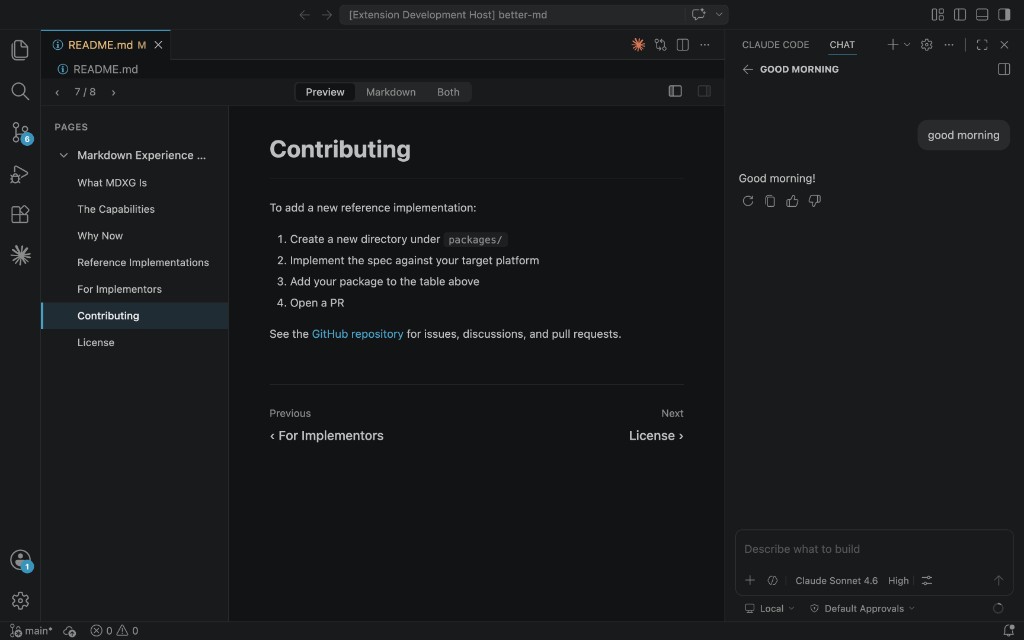
The MDXG VS Code extension, one implementation of the spec, turning a single markdown file into a navigable, multi-page experience.
Read the spec live at mdxg.org →
What MDXG Is
MDXG is a specification for how interfaces should present and interact with markdown documents. It is not a syntax. It does not compete with CommonMark, GFM, or MDX. It sits one layer above, defining the experience, not the format.
| Layer | |
|---|---|
| MDXG | presentation + interaction spec |
| GFM / MDX | syntax extensions |
| CommonMark | base syntax spec |
MDXG works on any existing .md file with zero modifications. The spec operates at the presentation layer. Your files don't change, the way they are rendered does.
Any interface that displays markdown (editors, documentation platforms, note-taking apps, AI interfaces, CMS systems) can implement MDXG.
How MDXG is different
From doc site generators (VitePress, MkDocs, Docusaurus): MDXG is purely about the reading experience. It works on any .md file regardless of how your content is organized.
From markdown viewer tools (VS Code extensions, desktop apps): many already provide great features, but each defines its own conventions. MDXG standardizes those conventions so implementations are consistent across platforms.
The Capabilities
The full specification is in SPEC.md. Here's the summary:
Virtual pages. H1 and H2 headings split a document into navigable pages. A single markdown file becomes a multi-page experience. No file splitting, no config, no build step.
Page navigation. The user can see all pages, jump to any page, and tell which page they're on. How this is surfaced (sidebar, dropdown, command palette, gesture) is up to the implementation.
Theme adaptation. No custom colors. The interface inherits from its host: light, dark, or anything in between.
Code block rendering. Fenced code blocks with a language tag get syntax highlighting. Every code block gets a copy button.
Task lists. - [ ] and - [x] render as checkboxes.
Page outline. H3–H6 headings within the current page are navigable, with the current heading indicated. Could be a sidebar, a floating panel, a dropdown, or anything else.
Sequential navigation. Previous/next page movement with visible page titles. Could be footer links, toolbar buttons, keyboard shortcuts, or swipe gestures.
Search. Find text across all pages with match highlighting, match count, and next/previous navigation.
Preview and source modes. Toggle between rendered HTML and editable syntax-highlighted markdown, in place. No new tabs or windows.
Document links. Clicking a link to another .md file opens it in the same MDXG-conforming viewer.
Math, diagrams, footnotes. Encouraged extensions for $...$ math, ```mermaid diagrams, and [^1] footnotes, with graceful fallbacks when unsupported.
Why Now
Markdown is the primary interface between humans and AI agents. When an agent generates documentation, explains code, writes a report, or drafts a proposal, it writes markdown. When a human reads, reviews, or edits that output, they're reading markdown.
Markdown is already ideal for agents: low token cost, simple to generate, trivial to parse. The missing piece is the human side. Without navigation, structure, and a polished reading experience, people reach for heavier formats. MDXG closes that gap so markdown can serve both audiences with one format.
Every company building an AI product, a developer tool, a documentation platform, or a knowledge base is rendering markdown somewhere. Most use the default rendering. MDXG defines what a complete markdown experience looks like so every team doesn't have to figure it out independently.
Reference Implementations
| Package | Description | Status |
|---|---|---|
| @mdxg/parser | Shared markdown parser | Core library |
| @mdxg/vscode | VS Code extension | Reference implementation |
| @mdxg/web | Documentation site (mdxg.org) | Reference implementation |
For Implementors
MDXG is designed to be implementable in any environment that renders markdown. The spec defines two conformance levels:
MDXG Viewer: read-only. Theming, code block rendering, task lists, virtual pages, page navigation, page outline, sequential navigation, and search.
MDXG Editor: full. Everything in Viewer, plus mode toggle (preview/source/both) and document links.
Start with the spec. Look at the VS Code reference implementation for a working example. The shared parser (@mdxg/parser) handles document splitting, heading extraction, and slug generation. It is framework-agnostic and can be used as-is or adapted to any platform.
Contributing
Contributions are welcome: spec feedback, bug reports, new implementations, and code changes. See CONTRIBUTING.md for details.
See the GitHub repository for issues, discussions, and pull requests.