




WhatsApp Desk is a fast, ultra-lightweight, privacy-respecting desktop client for WhatsApp Web.
Built with native operating system web engines — WebKit on macOS, WebView2 on Windows, and WebKitGTK on Linux.
Zero Electron bloat • Zero telemetry • Zero message relay servers • Complete local privacy.
Downloads
Get the latest stable release for your operating system (updated automatically):
| Platform | Recommended Installer | Portable / Archive | Requirements |
|---|---|---|---|
| macOS | Universal DMG | Universal ZIP | macOS 12.0+ (Apple Silicon & Intel) |
| Windows 10 / 11 | Setup Wizard (.exe) | Portable EXE | Windows 10/11 x64 (WebView2 runtime) |
| Linux (x64) — via v1.5.9.9 | DEB (WebKitGTK 4.0, Ubuntu 22.04) · DEB (WebKitGTK 4.1, Ubuntu 24.04+) | tar.gz 4.0 · tar.gz 4.1 | GTK 3 & WebKitGTK 4.0 / 4.1 |
[!TIP] Download links point automatically to the latest release assets. You can also view all past versions and architectures on the Releases page.
Linux note: the 1.6.4 pipeline builds macOS and Windows only. Linux packages keep riding with v1.5.9.9 until the next Linux build; their fixed links above always resolve.
Key Features
- Two Accounts, One Window: Link a second WhatsApp account with a fully isolated browser profile and switch from the account dock (
Ctrl+Shift+1/2/Cmd+Shift+1/2) — with per-account unread badges and a seamless, blink-free swap. One live engine at a time keeps memory low. - Ultra-Lightweight Engine: Built directly on native OS webviews (WebKit on macOS, WebView2 on Windows, WebKitGTK on Linux) instead of bundling a whole browser, so the app's own process stays around 100 MB.
- Frees Memory While Hidden (macOS): WhatsApp Web keeps every image and video it has displayed alive in the renderer, which reaches a couple of gigabytes over a long session. Once the window has been off screen for 15 minutes the page reloads and that memory comes back — only while hidden, at most every 30 minutes, and never during an upload or an open preview. Toggle it under Settings → Maintenance.
- Zero Telemetry & Private by Design: Communicates straight with
https://web.whatsapp.com. No analytics tracking, no user profiling, and no proxy or relay servers. - Instant Privacy Mode & Auto-Lock: Quickly redact chat previews, sender names, and media thumbnails with a shortcut (
Ctrl+Shift+P/Cmd+Shift+P) or automatic lock on idle. - Built-in Document & Office Preview: Instant in-app previews for PDFs, Word docs, Excel spreadsheets, PowerPoint slides, and text attachments without cluttering your drive with duplicate files.
- Windows Setup Wizard: Per-user installer with branded artwork, Start Menu and desktop shortcuts, and clean uninstallation in Windows Apps & Features.
- Keeps Running in the Tray (Windows): Closing the window hides it instead of quitting, so messages and notifications keep arriving; right-click the tray icon to reopen or quit. macOS and Linux already kept a status-bar item.
- Unified Settings & Module Guard: Single accessible settings control (
Ctrl+,/Cmd+,) protected by runtime module isolation (waRunModule) against unexpected DOM changes. - Built-in Self Updater: Automatic update notifications with cryptographic
SHA256SUMSvalidation before applying updates. - Per-Monitor Window Memory: Automatically remembers window position and dimension across multi-monitor setups.
Application Preview
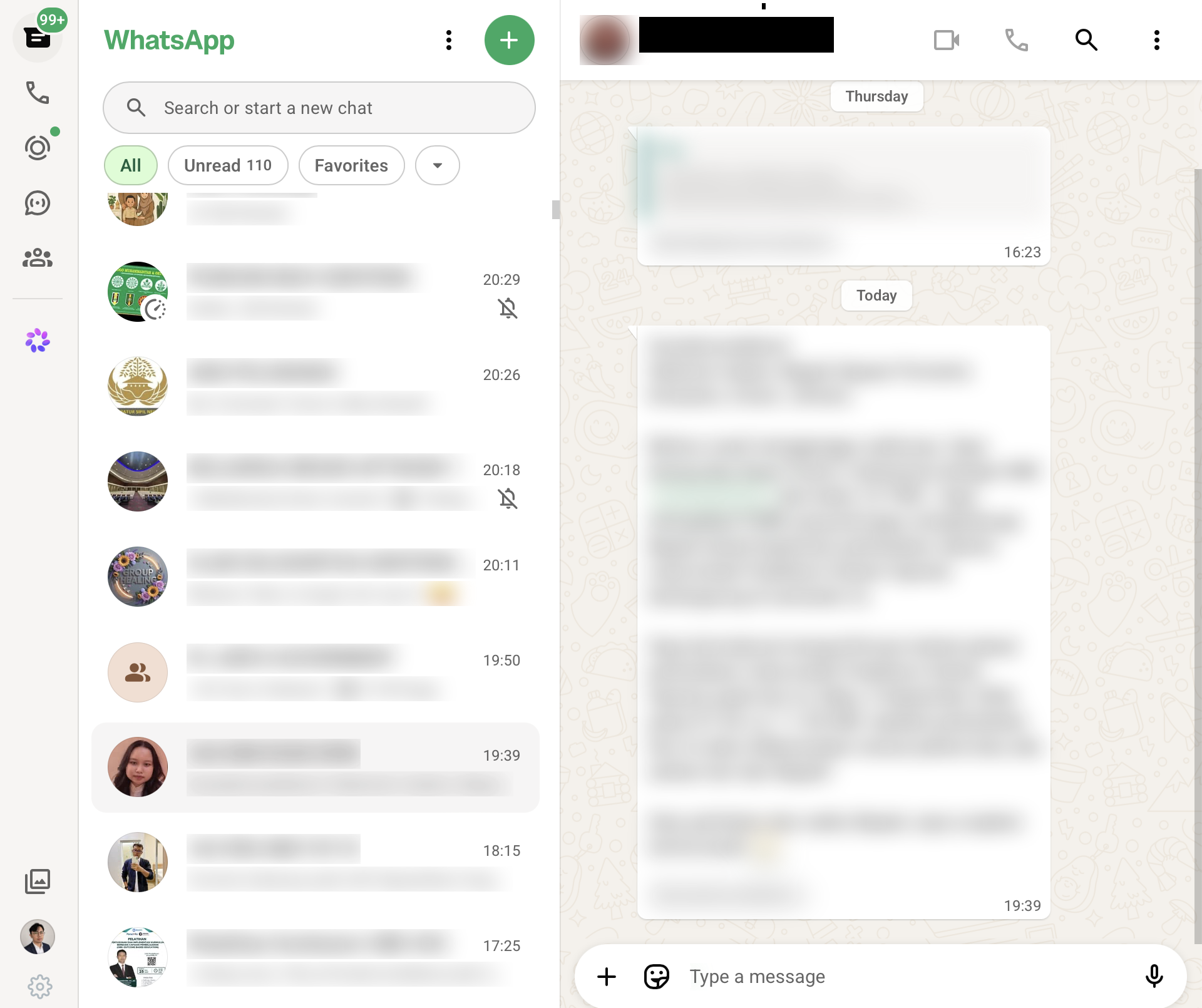
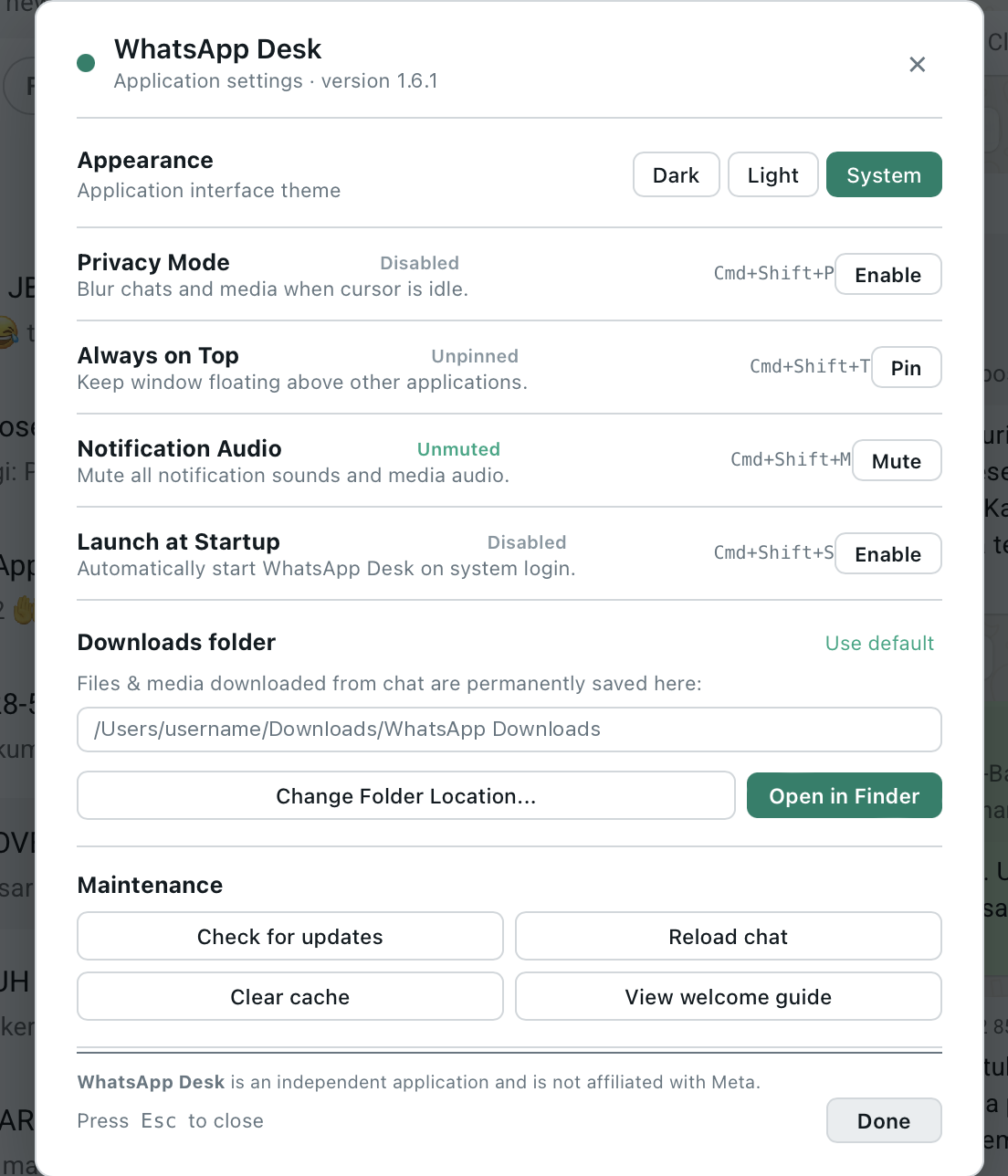
Note: Screenshots use blurred chat content to protect personal information.
Keyboard Shortcuts
| Feature | macOS | Windows & Linux |
|---|---|---|
| Open Settings | Cmd + , | Ctrl + , |
| Toggle Privacy Mode | Cmd + Shift + P | Ctrl + Shift + P |
| Toggle Always on Top | Cmd + Shift + T | Ctrl + Shift + T |
| Mute / Unmute Audio | Cmd + Shift + M | Ctrl + Shift + M |
| Open Downloads Folder | Cmd + Shift + D | Ctrl + Shift + D |
| Check for Updates | Cmd + Shift + U | Ctrl + Shift + U |
| Hard Refresh Web View | Cmd + Shift + R | Ctrl + Shift + R |
| Zoom In / Out / Reset | Cmd + + / - / 0 | Ctrl + + / - / 0 |
Installation & Setup
macOS (Universal)
- Download WhatsApp-Desk-macOS-Universal.dmg.
- Open the DMG and drag WhatsApp Desk into Applications.
- First launch: If macOS Gatekeeper alerts you, right-click the application and select Open.
Windows 10 / 11 (x64)
- Download and run WhatsApp-Desk-Windows-x64-Setup.exe.
- The setup wizard installs WhatsApp Desk per-user (no Administrator rights required) and adds Start Menu and desktop shortcuts.
- SmartScreen Note: Since community binaries are unsigned (no EV certificate), choose More info → Run anyway.
Linux (Debian / Ubuntu / Fedora)
[!NOTE] The latest Linux packages are published with v1.5.9.9 — download them from that release's Assets section, then follow the steps below.
# Debian / Ubuntu (x64)
sudo dpkg -i WhatsApp-Desk-Linux-amd64.deb
sudo apt-get install -f

# Fedora / RHEL (x64)
sudo dnf install ./WhatsApp-Desk-Fedora-x64.rpm
[!NOTE] Ubuntu 24.04 (Noble), Linux Mint 22.x, Fedora 39+ ship WebKitGTK 4.1 only — use the
-webkit4.1assets:WhatsApp-Desk-Linux-amd64-webkit4.1.deb(or the portableWhatsApp-Desk-Linux-x64-webkit4.1.tar.gzon Fedora/RHEL, where DEB does not apply). Older distros (Ubuntu 22.04, Debian 12) use the default 4.0 assets. Verify a package before installing:dpkg-deb -f <deb> Depends(expectlibwebkit2gtk-4.1-0for the 4.1 variant) andldd dist_linux/whatsapp-desk | grep webkitfor the portable archive. RPM packages and arm64 Linux builds are not currently published; build them withbash build_linux.sh(see Building & Releasing).
Blank window on older Intel graphics
If the window opens but stays blank — the sign-in screen never appears, or the QR code appears and then the page goes empty — WebKitGTK's DMABUF renderer is the usual cause. It fails on older Intel integrated graphics (Broadwell and earlier, the Gen-8 "BSW" chips included) and leaves the page unpainted. Disable it:
WEBKIT_DISABLE_DMABUF_RENDERER=1 whatsapp-deskTo make it permanent for a desktop launch, add the variable to the Exec line of
~/.local/share/applications/whatsapp-desk.desktop (or the system-wide copy under
/usr/share/applications/):
Exec=env WEBKIT_DISABLE_DMABUF_RENDERER=1 /usr/bin/whatsapp-desk %U
Rendering falls back to a software-composited path, which is slower but paints correctly. Related: #63, #9.
Verifying Release Integrity
Every release ships with a signed SHA256SUMS checksum list:
# macOS
shasum -a 256 -c SHA256SUMS

# Linux
sha256sum -c SHA256SUMS

# Windows PowerShell
(Get-FileHash .\WhatsApp-Desk-Windows-x64-Setup.exe -Algorithm SHA256).Hash.ToLower()
Privacy
WhatsApp Desk loads https://web.whatsapp.com directly. Session and cache data remain inside the application's local profile. The application does not add an analytics service or a message relay server.
Errors and crash logs stay on your machine. Nothing is ever uploaded automatically: the Control Center's Report button (or the post-crash nudge) only opens a pre-filled GitHub issue in your browser, which you review before submitting.
Default profile locations:
- macOS:
~/Library/Application Support/WhatsAppDesk/UserData/ - Windows:
%APPDATA%\WhatsAppDesk\UserData\ - Linux:
~/.config/whatsapp-desk/
Release Notes & Changelog
Every version's changes are recorded in CHANGELOG.md, which follows the Keep a Changelog format. The published release notes are generated from it, so the two can never disagree.
Read the Changelog · View All Releases on GitHub
Building & Releasing
Releases are built and published from a local machine, not from hosted CI. This keeps the release path independent of any runner account and makes every published artifact reproducible on the maintainer's machine.
bash release.sh --check           # verify the toolchain
bash release.sh 1.5.9.9 --dry-run # build and checksum, publish nothing
bash release.sh 1.5.9.9           # build, publish, and verify the download
release.sh refuses to publish unless updater.go already declares the same
version, so a release can never advertise a version its binary does not report.
It builds the macOS universal DMG/ZIP and the Windows portable EXE, ZIP, and
Setup wizard, generates SHA256SUMS from the published asset list, and finally
re-downloads an artifact to verify its digest.
Individual targets are also available: build_mac.sh, build_windows_installer.sh,
and build_linux.sh (Linux packaging is currently maintained separately).
The Release workflow in .github/workflows/build.yml is manual-only for this
reason; its job definitions are kept for use on a host with working runners.
License and disclaimer
Licensed under the MIT License.
This is an independent project and is not affiliated with, authorized by, or endorsed by WhatsApp or Meta Platforms, Inc. WhatsApp is a trademark of its respective owner.