




A macOS app that pins a small black notch to a screen edge, showing how much of each coding assistant's usage limit you have burned — and whether it is still working, done, or waiting on you.
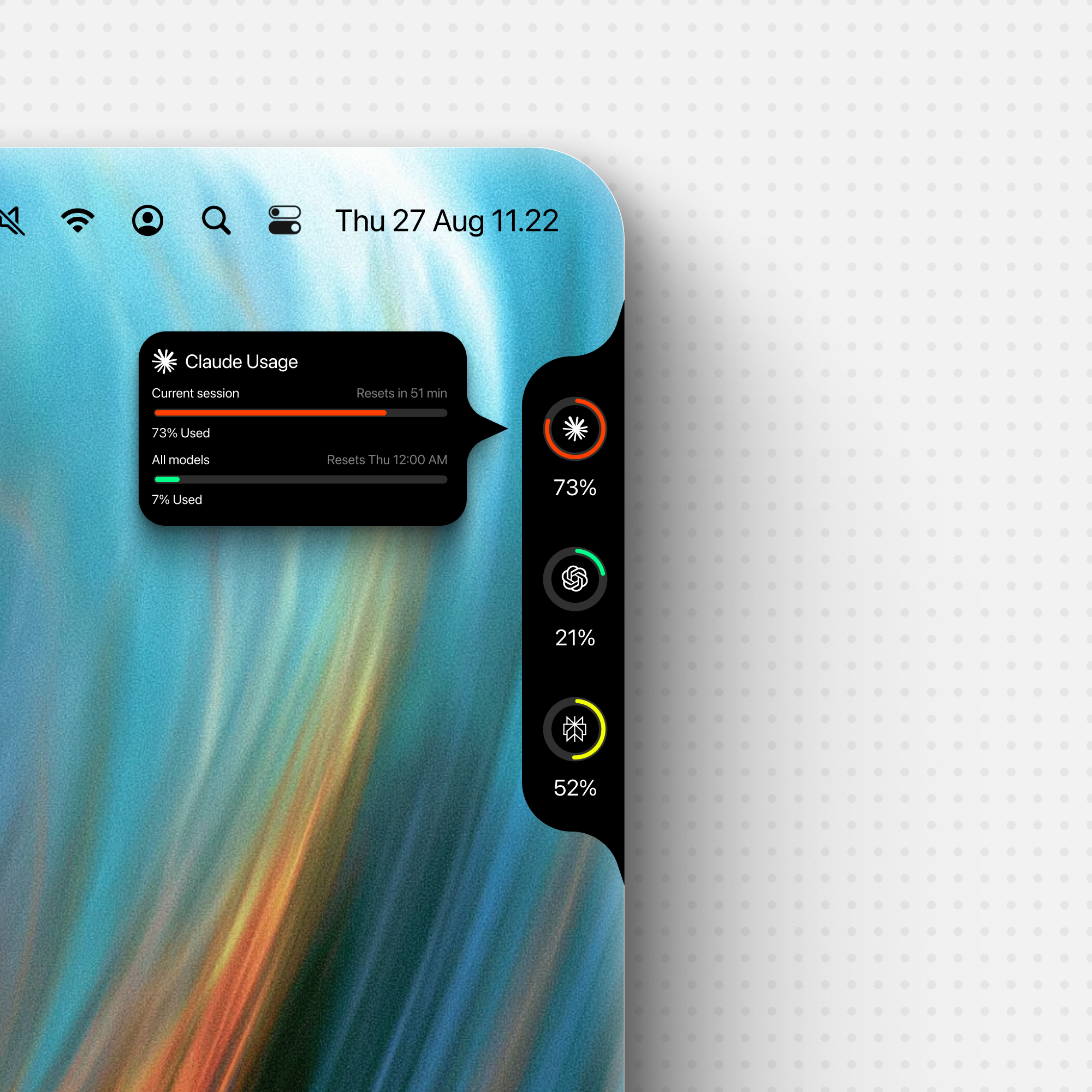
Hover a ring for its limit windows and when they reset. Claude's ring shows the
same current session window Claude Code's own /usage leads with, so the
two never disagree.
Download

That button is the disk image itself, not the page it sits on — the asset is
named Codenotch.dmg in every release, so releases/latest/download/ always
resolves to the newest one and the link never needs updating. Signed,
notarized, and updating itself from then on. Take this one unless you have a
reason not to; the release page has the notes.
To try unreleased main without an Xcode install, the preview
build is rebuilt from every commit, and the
Package workflow keeps a per-commit disk image on each of its
runs. Neither is notarized — they are
ad-hoc signed, because the Developer ID certificate exists on one machine — so
macOS quarantines the download. Clear the flag once, after dragging the app to
Applications:
xattr -dr com.apple.quarantine /Applications/Codenotch.appIf macOS says the app is damaged, that is the quarantine flag rather than a bad download — run the command above.
Universal binary. macOS 15 or later. To build and install a copy from source instead, see Building.
Windows

A Windows port — Rust/Tauri 2, same design and providers — lives in windows/.
The button is the installer itself, named Codenotch-Setup.exe in every release for the same
reason the dmg keeps one name. It installs for the current user without administrator rights,
and fetches WebView2 if Windows does not already have it.
The installer is not code-signed, so the first time it runs SmartScreen says Windows protected your PC. Choose More info, then Run anyway. Every Windows change also leaves an installer on its Windows Package run.
Connect your phone
The Codenotch phone app (iOS and Android) can show the same usage percentages, reset times and session states as the notch on your Mac. It reads only what the notch already displays — never tokens, credentials or raw API responses.
To pair, open Settings › Phone › Connect a Phone… (or the menu item) on your Mac. A QR code appears with a five-minute countdown; scan it with the Codenotch phone app, or copy the link and paste it into the app. The Mac and phone must be on the same Wi-Fi network — the server answers only local-network addresses and rejects anything routed over the internet.
Each code is single-use and expires after five minutes. Reopening the window always mints a fresh one.
To remove a paired phone, open Settings › Phone, find the device in the list and click Remove. Its credentials are deleted immediately and any subsequent request from that phone is rejected.
See docs/phone-link-protocol.md for the wire-level details.
What it reads
| Provider | Source | How |
|---|---|---|
| Claude Code | official | Claude Desktop's own cached usage response, where Desktop is running and signed into the same account. Then Claude Code's own /usage, asked of the installed claude. Then the OAuth token in the login keychain, against the endpoint that command uses. |
| Cursor | official | The editor's signed-in session in its local SQLite state, or the cursor-agent login in the keychain — no separate sign-in. |
| Codex | official | Using the local Codex sign-in. Shows the 5-hour and weekly limits when available, plus extra limit windows when the account has them. |
| DeepSeek Platform | derived from official Platform responses | Explicit sign-in in Codenotch's own WKWebView, then the Platform account summary and API-key/model usage endpoints. Shows funded/spent balance, 30-day tokens/cost, requests and API-key count. |
| Antigravity | official where licensed, otherwise a request count | Antigravity's local language server first, then Google's quota endpoint; a plain count when neither will answer for the account. |
| GLM | official | Z.ai's Coding Plan monitor endpoint, with a key borrowed from whichever coding tool already holds one — Claude Code's settings.json, ZCode, or OpenCode. |
| MiniMax | official where a Coding Plan key is used, derived from official Platform responses for the in-app sign-in | A Coding Plan key pasted in Settings, or explicit sign-in in Codenotch's own WKWebView. |
| QianwenAI | derived from official console responses | Explicit sign-in in Codenotch's own WKWebView, then the console's own Token Plan gateway. Shows the plan's credits window for whichever period the console reports — weekly or monthly. |
| Ollama (Local) | local runtime | Automatically detected local models, RAM/VRAM, unload time and context. Optional response capture adds thinking and generation speed. |
| LM Studio | local runtime | Loaded models from LM Studio's own listing, what each one is doing (prompt, generating, queue) from its SDK socket, and speed, context use and tokens per day from its server log. No relay needed. |
| oMLX | local runtime | Loaded models from oMLX's own status listing, what each one is doing (prompt, generating, queue) from its admin activity endpoint, and speed and tokens from ~/.omlx/logs/server.log. |
| Grok | official | The Grok CLI session in ~/.grok/auth.json, against the same credits billing endpoint /usage uses. Once that session has expired it is renewed in memory from the file's own refresh token, the way the CLI would; the file itself is never written. |
| OpenCode | official | The Go plan's official usage endpoint, with the opencode-go key OpenCode itself stores on sign-in. |
| Command Code | official | The GOAT plan's /alpha billing endpoints, with the key the Command Code app writes to ~/.commandcode/auth.json. Further accounts are read from ~/.commandcode-<slug> homes. |
| GitHub Copilot | official | GitHub's Copilot quota endpoint, authenticated with the GitHub CLI session already on the Mac (gh auth login). |
| Kimi | official | The Kimi Code CLI session in ~/.kimi-code/credentials/kimi-code.json, against the same /usages endpoint the CLI's /usage asks. Shows the 5-hour rate window and the weekly quota. |
| Kiro | official | The kiro-cli session already on this Mac, against the same /usage that command prints. Shows monthly credits. |
| Amp | official subscription percentages; derived free-allowance percentage | The Amp CLI login in ~/.local/share/amp/secrets.json, against Amp's userDisplayBalanceInfo endpoint. Shows Agent and Orb usage, or the Free allowance and replenishment rate. See Amp details. |
| Apify | official | The apify login session already on this Mac (~/.apify/auth.json, or the token the CLI keeps in the keychain), or a token pasted in Settings or exported as APIFY_TOKEN, against the /v2/users/me/limits endpoint the Console's Billing page draws from. Shows this cycle's platform spend against the account's monthly usage limit. See Apify details. |
| Kilo | official | The Kilo CLI's own sign-in (~/.local/share/kilo/auth.json), against the same coding-plan quota and balance endpoints the CLI asks. Shows the plan's quota windows and the credit balance. |
| Custom endpoints | provider-reported or manual | Configure OpenAI-compatible, Anthropic Messages, or Google Gemini model discovery. Usage can be entered manually or read from a configured JSON endpoint; successful readings are kept locally as a daily hover graph. |
Most providers borrow a credential or session from a tool already on your Mac. DeepSeek is the explicit browser-login exception: it never reads a browser's cookies or credentials, and only makes requests after you choose Sign in to DeepSeek from Codenotch. MiniMax is the same kind of exception — a key you paste in Settings, or an explicit WKWebView sign-in. QianwenAI is a third: it publishes no usage API and has no key to paste, so that WKWebView session is the only way in. None of them opens a browser's cookie store.
Ollama Cloud accepts an API key in Settings. Apify borrows the apify login
session when there is one and otherwise takes a token pasted in Settings or
exported as APIFY_TOKEN. Switching a provider off stops its usage polling
and forgets its readings; borrowed accounts stay signed in to the tools that
own them.
Local Ollama is detected automatically. Configure its address or stop monitoring in Settings → Ollama. Each loaded model gets a notch cell; reorder or hide it in Settings → Accounts. Hover for RAM/VRAM, unload time, context limit and quantization.
For generation speed (tok/s) and live Thinking, enable Measure speed and thinking in Settings → Ollama, keep Codenotch open and connect through its local relay:
OLLAMA_HOST=http://127.0.0.1:11435 ollama run gemma4:e4b --thinkSpeed updates after completed native Ollama responses; thinking requires streamed
reasoning. Direct requests to Ollama's default port (11434) only provide model
detection. Monitoring never initiates inference or saves prompts, reasoning or replies.
See Ollama details.
Local LM Studio is detected automatically on the port LM Studio's own settings name (1234 unless you moved it). Configure the address or stop monitoring in Settings → LM Studio. Each loaded language model gets a notch cell; embedding models are left out. The cell shows the last response's tok/s and its ring fills with how much of the loaded context the last request used. A white arc turns while the model reads a prompt or generates, and becomes a ring of dots when requests are queued behind it. Hover for context used, tokens and requests today, reasoning share, speculative-decoding acceptance, model size, quantization and context limit.
Nothing has to be pointed at Codenotch: what a model is doing comes from LM Studio's SDK socket
on the same port (the one lms ps uses), and speed and tokens come from ~/.lmstudio/server-logs,
which LM Studio writes for every request from any client. Only counts and timings are read from
those files, never a prompt or a reply. Responses through the OpenAI-compatible endpoint carry no
clock, so their speed is timed from the generating phase and marked ~. If LM Studio's server is
set to require an API token, paste one in Settings → LM Studio (or export LM_API_TOKEN); without
one, requests are sent with no Authorization header at all.
See LM Studio details.
Local oMLX is detected automatically on the port ~/.omlx/settings.json names (8000 by
default). The API key is borrowed from the same file, or from OMLX_API_KEY, and is never
stored or logged by Codenotch. Configure the address or stop monitoring in Settings → oMLX.
See oMLX details.
Settings lists the connected providers in the order the notch draws them, and you can drag one by its handle to move it. The order is remembered across launches. A provider you switch back on joins the end of that list rather than reclaiming an older position, so nothing you cannot currently see jumps ahead of something you placed deliberately.
It also answers "is it still working?" — a thin arc spins inside a provider's ring while a session is busy, and becomes a pulsing amber ring when one is blocked waiting on you. Hover for every live session by name, where it is running, and what it wants.
Two Claude Code logins are two rings. Anyone who keeps a work account apart with
CLAUDE_CONFIG_DIR=~/.claude-work claude gets a Claude (work) ring beside the
personal one, with its own limits, its own sessions and its own row in Settings.
Any ~/.claude-<slug> directory Claude Code has run against is found at launch;
the default ~/.claude always comes first, the rest in alphabetical order, so the
rings never swap places.
Codex accounts work the same way: ~/.codex stays the Codex ring, and each
used ~/.codex-<slug> directory adds a Codex (slug) ring with its own limits,
activity and Settings row. Profiles are discovered at launch, default first,
then alphabetically. To connect a second account, sign in through Codex CLI
using a separate home directory:
mkdir -p "$HOME/.codex-work"
CODEX_HOME="$HOME/.codex-work" codex -c 'cli_auth_credentials_store="file"' login
Choose the second account during sign-in, then restart Codenotch. Run that
account's CLI sessions with CODEX_HOME="$HOME/.codex-work" codex as well.
Repeat with another name, such as .codex-personal, for more accounts.
Settings shows each account's email and profile directory; each ring can be
reordered or switched off independently. Switching one off forgets only its
Codenotch readings and leaves the Codex login intact.
Codenotch reads each profile's auth.json; keychain-only or API-key-only
logins cannot provide these ChatGPT account limits. It never copies, refreshes
or writes Codex credentials. If a login expires, use that profile's Codex CLI
to renew it. Directories outside the ~/.codex-<slug> convention are not
discovered automatically, and adding a profile requires restarting Codenotch,
just as it does for Claude.
Command Code has no setting for a second configuration directory: it keeps its
login in $HOME/.commandcode/auth.json. A second account therefore lives in a
second home. ~/.commandcode stays the Command Code ring, and each
~/.commandcode-<slug> directory adds a Command Code (slug) ring with its
own limits and Settings row:
mkdir -p "$HOME/.commandcode-work"
HOME="$HOME/.commandcode-work" commandcode login
Choose the second account during sign-in, then restart Codenotch. The login
lands in ~/.commandcode-work/.commandcode/auth.json, and that is the file
Codenotch reads; an auth.json placed directly in ~/.commandcode-work is read
too. COMMAND_CODE_API_KEY names one account, so it applies to the default
ring only. Codenotch never copies, refreshes or writes these logins.
When a session ends
The notch opens itself for five seconds when an agent stops working, or stops to ask you something, and sounds the system alert. Clicking it while it is open brings that session's application to the front.
The app, not the tab. A session publishes its pid and nothing else — no window, no tab, no tty — so the app is found by walking up the process tree from the agent to whatever launched it. Choosing the tab inside that app needs the terminal's own scripting interface, and there is no general one: Terminal.app and iTerm2 can match a tab by tty, Warp and Ghostty publish no scripting dictionary at all. So the app is raised for everybody and the tooltip names the session, which leaves the last hop one keystroke rather than working for two terminals and silently doing nothing in a third.
Both halves switch off separately in Settings, because they fail differently: the peek is no use behind a full-screen window, and the sound is no use in a meeting. Each of the two events — finished, and waiting on you — picks its own sound there, with a preview button beside it.
The sound is played as a file on the ordinary output rather than handed to
NSSound as a system alert. A system alert goes through the interface
sound-effects channel, which System Settings → Sound can switch off — and on a
Mac where it is off, NSSound.play() reports success and nothing is heard.
Only leaving busy counts. A question being answered is not a piece of work ending, and a session whose file disappears mid-turn — which is what quitting Claude Code looks like — is not announced at all, since there is no window left to jump to. Nothing is announced from the first reading either: every session already running at launch arrives with no history, and treating that as a transition would ring once per open window on every start.
Alerts
A provider's headline limit crossing 80% — and reaching 100% — becomes a system notification: once per crossing, never repeated while it stays crossed, and again only after the window has genuinely rolled over. Each provider can be muted from its own row in Settings, and macOS permission is asked on the first real alert rather than at launch.
Placement
The notch lives on any of the four screen edges. Right and left keep a vertical column; top and bottom lay the readings out side by side. It pins itself to the physical screen edge, so showing or hiding the Dock does not move it. Hold Option and drag to move along the selected edge; each edge remembers its position. On a Mac with a hardware notch, the top placement takes its exact shape, so the two read as one rather than as a bar parked underneath it.
Along that edge it sits wherever you put it: hold ⌥ and drag the notch to slide it, and each edge remembers where you left it, so moving the notch to the top and back does not lose the place you chose on the right. Recentre in Settings → Appearance puts the current edge back in the middle.
Size in the same place draws the whole notch — rings, text, tooltip and all — smaller or larger. Medium is the size it was designed at.
At rest it is a small pill on the screen edge that unfolds when the pointer reaches it — configurable in Settings to always show, or to hide entirely. Settings live in an orb below the notch: an arc at rest, a gear on hover.
Clicking the notch while it is open keeps it open, so it stays put while you read it; clicking it again lets it fold away as usual. That click has to land on the body itself, since a ring takes its own click to refetch that provider and the orb takes one to open Settings. Right-clicking offers the same thing as a menu item, Keep open, ticked while the notch is being held open, which is the surer way to release one that was kept open by accident. The item is greyed out when Settings says Always show, because that choice is Settings' to change.
In Settings → Appearance → Reset time, choose Time remaining for countdowns like "Resets in 3 Days 3h". Reset date keeps the reset date and time, with minutes shown when less than an hour remains.
Appearance also carries the ring's accent colour. The device accent is the default; fixed presets are available for pink, red, orange, yellow, green, teal, blue, indigo, purple and off-white.
The app itself can show a Dock icon, a menu bar item, or neither. The menu bar
item is the Codenotch icon until you switch on Show limit information in
menu bar under Settings → Appearance → App; then it shows the five-hour
limits of the providers you choose there — the provider's mark, the share used
and the time until it resets, like 72% · 2h 18m | 41% · 4h 05m. Choosing
what the bar shows never changes what Codenotch reads, and with nothing chosen
the icon comes back. Its menu has the full readings either way.
Updates
Codenotch updates itself. Sparkle checks daily and installs in the background without prompting; Settings says so and can switch it off. Every update is EdDSA-signed, so nothing installs that wasn't built and signed by the maintainer.
Building
brew install xcodegen create-dmg   # once
make run                # generate, build, launch a Debug build
make test               # unit tests
No signing identity is required for either. make release — which archives,
notarizes, and produces a signed auto-update feed — needs a Developer ID
certificate and an App Store Connect notary profile, and is only ever run by
the maintainer to cut an official release. See
CONTRIBUTING.md. CI runs the same unit tests unsigned via
make test-ci.
A Debug build is ad-hoc signed, which means it has no stable code identity, so macOS cannot match it to a saved keychain "Always Allow" — the prompt to read a tool's token returns on every launch. To make the grant stick during local development, sign the built app with a stable self-signed identity:
Scripts/sign-local.sh # signs /Applications/Codenotch.app (pass a path to override)It creates a reusable Codenotch Local Signing certificate in your login
keychain (no Apple Developer account needed) and re-signs the app. Grant the
keychain prompt once more after signing; it will not ask again.
Run with CODENOTCH_DEMO=1 to see fixed sample data instead of live readings.
Architecture
Every provider implements UsageProvider (Sources/Providers/) and declares
its own Fidelity — .official, .derived, or .manual — so the UI never
presents a guess as if a vendor had published it. UsageStore
(Sources/Model/) polls them on a timer, keeps the last good reading across
launches, and degrades every failure to a visible status rather than a
made-up percentage.
The notch itself works in one-dimensional stack space (along/across)
regardless of which screen edge it's on; NotchPlacement is the only place
that maps that back onto real screen coordinates. NotchLayout holds every
measurement, quoted from docs/design/frame-124-hover-tooltip.png so the
layout can be checked against the design frame directly.
- Design spec:
docs/specs/2026-08-28-usage-notch-design.md - Implementation history:
TASKS.md
The honest caveat
No vendor publishes a clean "your session limit is N% used" API for any of
these tools. Each adapter reads whatever the owning app itself reads from —
an internal endpoint, a local database, a language server's own RPC — and
those can change without notice. Every adapter's response shape is pinned by
tests, and every failure degrades to a visible status (stale, needsAuth,
error) rather than an invented number.
Claude Desktop's cache: Claude Desktop is a Chromium app, so the usage
response its own panel draws is written to an HTTP cache file under
~/Library/Application Support/Claude. Reading it is how the ring stays right
for people who work in Desktop rather than in the terminal — the two Claude
Code paths below both go dark when claude "/usage" stops printing the windows
and the keychain token has not been re-minted since Claude Code last ran, which
is an ordinary state for a Desktop user. It is strictly read-only, and narrow:
only entries whose cached URL is this account's /api/organizations/<id>/usage
are opened at all, matched on the organization Claude Code records for the
profile, so one account's numbers can never land on another's ring. No token, no
cookie, no credential and no request to Anthropic are involved. A snapshot older
than 30 minutes is not shown as live — it drops through to the paths below, and
the last good reading ages and dims as any other would. Two minutes, not thirty,
while a session is running or while you are looking at the ring: that is when
the figure is moving, and a cache is the one source that cannot tell you it
has. Chromium's cache format
is private and may change; if it does, the source goes quiet and the existing
ones take over. Bodies are content-encoding: zstd and macOS ships no decoder,
so a decode-only build of Zstandard is vendored under
Sources/Vendor/zstd (BSD-3-Clause).
Claude's unused resets (macOS): the hover card shows the remaining resets
and their expiry, using the same section as Codex. Open Settings → Usage
in Claude Desktop for the same account to populate its reset data. That data
is read from Desktop's usage cache and is labeled as cached with the time it
was last observed. Ordinary usage refreshes do not re-date it; old usage
windows still fall back to the CLI/OAuth sources after 30 minutes. Used, paused, future,
and expired grants are hidden. There is no built-in promotion date or assumed
entitlement. As checked on September 23, 2026, the OAuth usage endpoint does
not expose the grants (ineligible_reason: surface), so a CLI/OAuth-only
setup cannot show them yet. Codenotch displays availability only; redeem a
reset in Claude. See the provider notes.
Keychain: Claude's readings do not use it where Claude Code is installed.
Claude Code files a new keychain item on every token rotation, and the new
item's access list does not carry this app, so an "Always Allow" granted
against the old one stops working about an hour later — asking claude itself
avoids the question entirely. Where the keychain is still the source (no
Claude Code on the machine, or Antigravity), the app is signed with a stable
Developer ID identity so a grant survives rebuilds, and the secret is read
only when the owning app has actually changed it — checked via the item's
modification date, which isn't behind the same access prompt as the
credential — so a valid grant does not mean a prompt on every poll.
Rate limits: Claude's endpoint returns 429 if polled too hard, with an
unhelpful Retry-After: 0. The back-off treats that as a floor-raiser only —
60s, doubling per consecutive 429, capped at 15 minutes — and the deadline is
persisted, so relaunching during a penalty waits instead of spending an
attempt on it. Polling drops to every 5 minutes when nothing is running, and
right-clicking the notch offers Refresh now.
How current the figures are. Your usage cannot move while nothing is running, so the schedule spends its budget where the number actually changes: every 30 seconds while a session is working, every 5 minutes while none is, and at once when a limit window rolls over. Three things outside the schedule also ask, because each one is a moment the figure is either about to change or about to be read: a session stopping (one reading, so the total you just earned is on the bar within a second or two rather than up to five minutes later), opening the menu bar item's menu, and putting the pointer on a ring. The last two are spaced — hovering four rings in four seconds is one reading, not four.
The reset countdown is drawn against a clock, not against the last reading, so it is right to the second whether or not anything has been fetched: the card counts down once a second while it is open, and the menu bar item counts the last minute of a window down in seconds.
Even at its freshest, a percentage is something that was read at some point rather than a live wire: a look re-reads it, and what comes back may still be a figure the provider itself published moments earlier. Settings › General › Readings › Ask the provider every time you look takes that as far as it goes — a look then refuses every reading a provider is holding, however new, and asks the provider. It is off by default because it is not strictly better: it spends a request each time, and a provider that rate-limits answers one request too many by refusing the next few minutes of them, which leaves the figure older than the cache would have. Worth turning on to check Codenotch against a provider's own dashboard, and worth turning off again after. Refresh now and a click on a ring always ask this way — those are somebody's own clicks, not a schedule.
Logs: the app has no window, so anything worth diagnosing goes to the unified log.
/usr/bin/log stream --predicate 'subsystem == "com.vinz.codenotch"' --level debugContributing
See CONTRIBUTING.md.
License
MIT © 2026 Vinz