Vinix
Website: vinix-os.org
Vinix is an effort to write a modern, fast, and useful operating system in the V programming language.

Join the Discord chat.
What is Vinix all about?
- Keeping the code as simple and easy to understand as possible, while not sacrificing performance and prioritising code correctness.
- Making a usable OS which can run on real hardware, not just on emulators or virtual machines.
- Targeting modern 64-bit amd/arm architectures, CPU features, and multi-core computing.
- Maintaining good source-level compatibility with Linux to allow to easily port programs over. On arm64 Vinix runs Alpine binaries.
- Running on Apple Silicon Macbooks. Only M1 for now.
- Exploring V capabilities in bare metal programming and improving the compiler in response to the uncommon needs of bare metal programming.
- Having fun.
Note: Vinix is still pre-alpha software not meant for daily or production usage!
Download latest nightly image
You can grab a pre-built nightly Vinix image at https://github.com/vlang/vinix/releases
Make sure to boot the ISO with enough memory (8+GiB) as, for now, Vinix loads its entire root filesystem in a ramdisk in order to be able to more easily boot on real hardware.
Roadmap
- Alpine Linux/musl userland
- bash
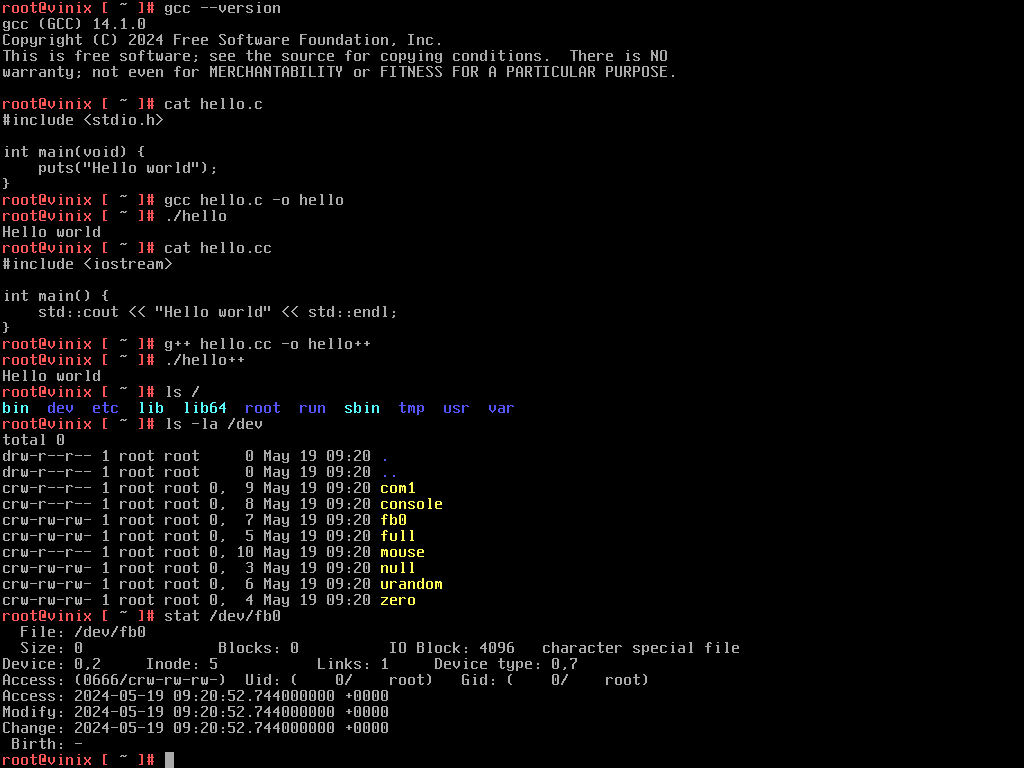
- gcc/g++
- V
- nano
- storage drivers
- ext2
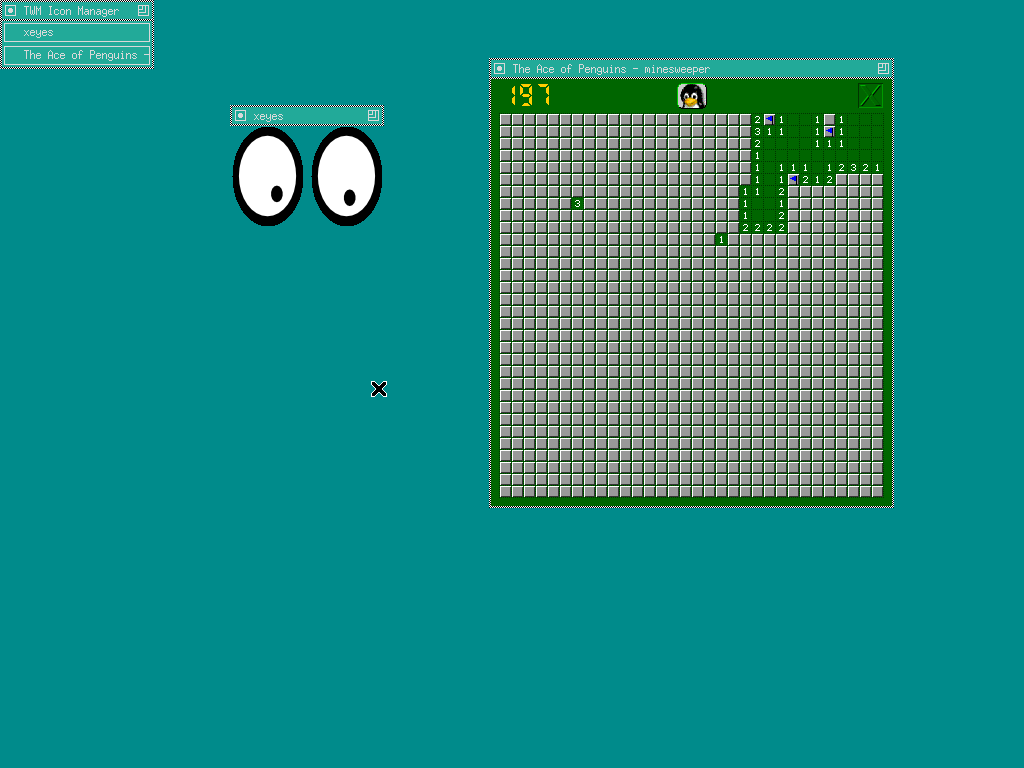
- X.org
- X window manager
- Networking
- Wayland (Hyprland on aarch64)
- Hypervisor (Intel VT-x; see documentation)
- V-UI 2
- Intel HD graphics driver (Linux port)
Build instructions
Distro-agnostic build prerequisites
The following is a distro-agnostic list of packages needed to build Vinix.
Skip to a paragraph for your host distro if there is any.
GNU make, findutils, curl, git, file, xz, rsync, xorriso,
qemu to test it, Python 3, Clang/LLVM/LLD, and a current V compiler need to
be present.
Build prerequisites for Ubuntu, Debian, and derivatives
sudo apt install -y clang llvm lld make findutils curl git file xz-utils rsync xorriso qemu-system-x86 python3Build prerequisites for Arch Linux and derivatives
sudo pacman -S --needed clang llvm lld make findutils curl git file xz rsync xorriso qemu pythonBuild prerequisites for Red Hat Linux and derivatives
sudo yum install -y clang llvm lld make findutils curl git file xz rsync xorriso qemu python3Build prerequisites for Void Linux and derivatives
sudo xbps-install -Suv clang llvm lld make findutils curl git file xz rsync xorriso qemu python3Building the distro
The normal build downloads Alpine's pinned minirootfs, builds the kernel directly with the host compiler, and assembles a UEFI ISO:
make all
# Or build the ARM64 image instead of the default AMD64 image:
make ARCHITECTURE=aarch64 all
This path does not bootstrap binutils, GCC, mlibc, or the userland from source.
Set VINIX_ALPINE_DEVTOOLS=1 to include Alpine's prebuilt C/C++ toolchain in
the guest image:
VINIX_ALPINE_DEVTOOLS=1 make allPort maintainers can still build the historical source-based mlibc distro explicitly:
PKGS_TO_INSTALL='python sqlite' make legacy-distroNative desktop on amd64
The framebuffer-native desktop has an amd64 build and QEMU launcher matching the aarch64 workflow. After checking out ui2, run:
git clone https://github.com/vlang/ui2 third_party/ui2
./run-desktop-amd64.sh
This stages Alpine's prebuilt musl development packages, compiles
vinix-desktop with Clang, and creates vinix-desktop-amd64.iso, whose init
starts the desktop directly. The runner uses KVM when available and otherwise
falls back to QEMU TCG; --no-build, --monitor, and --mem=MB are supported.
The same build works on Apple Silicon and cross-compiles the amd64 executable.
Python 3 on aarch64
The aarch64 image can include Alpine's musl CPython 3.12 runtime and its native standard-library dependencies. Stage it before assembling the userland:
./build-python-aarch64.sh
./build-userland-aarch64.sh
Both aarch64 userland builders automatically merge
build-aarch64-python/staging when it is present. Set
VINIX_PYTHON_STAGING=/path/to/staging to use another tree. The staging script
also installs /root/python3-smoke.py; the ARM64 VM image runs this test during
its boot suite and it can be rerun manually with python3.
Ruby on aarch64
Ruby 3.3, RubyGems, Bundler, Rake, and the native standard-library dependencies can be staged and merged into the same aarch64 image:
./build-ruby-aarch64.sh
./build-userland-aarch64.sh
The userland builders merge build-aarch64-ruby/staging when present. Set
VINIX_RUBY_STAGING=/path/to/staging to override it. The runtime includes
/root/ruby-smoke.rb, which the ARM64 VM boot suite runs automatically and
which can also be invoked manually with ruby.
Go on aarch64
The Go compiler, linker, formatter and standard library can be staged for native development inside Vinix:
./build-go-aarch64.sh
./build-userland-aarch64.sh
Both aarch64 userland builders merge build-aarch64-go/staging when present.
Set VINIX_GO_STAGING=/path/to/staging to use another tree. The ARM64 VM boot
suite compiles /root/go-smoke.go with the native Go compiler, then runs it to
exercise goroutines, filesystem operations, subprocesses, cryptography and TCP
loopback networking. It also builds a cgo program through the native GCC
toolchain when GCC is installed.
OpenJDK on aarch64
The aarch64 image supports the complete OpenJDK 25 JDK and JRE from Alpine Linux 3.24, the latest stable Alpine branch:
./build-java-aarch64.sh
./build-userland-aarch64.sh
Both userland builders merge build-aarch64-java/staging when present. Set
VINIX_JAVA_STAGING=/path/to/staging to override it. The VM boot suite uses
javac and jar, then runs the compiled smoke program with java to exercise
the HotSpot runtime, threads, files, cryptography and loopback sockets.
JAVA_HOME is /usr/lib/jvm/java-25-openjdk.
Codex CLI on aarch64
The aarch64 image can include the official ARM64/musl Codex CLI together with
Alpine's musl builds of its rg and zsh helpers. Stage it before assembling
the userland:
./build-codex-aarch64.sh
./build-userland-aarch64.sh
Both userland builders merge build-aarch64-codex/staging when present. Set
VINIX_CODEX_STAGING=/path/to/staging to use another tree. When Python is also
installed, the VM boot suite runs /root/codex-smoke.py, which drives
codex exec against a local Responses API server without requiring credentials
or Internet access.
Vinix does not yet implement Linux namespaces, so interactive and non-interactive Codex sessions must currently opt out of the upstream sandbox:
codex --dangerously-bypass-approvals-and-sandbox
codex exec --dangerously-bypass-approvals-and-sandbox "your task"
Claude Code CLI on aarch64
The aarch64 image can also include Anthropic's native ARM64/musl Claude Code
CLI. The staging layer supplies the Alpine libgcc, libstdc++, and ripgrep
dependencies required by the musl build:
./build-claude-aarch64.sh
./build-userland-aarch64.sh
Both userland builders merge build-aarch64-claude/staging when present. Set
VINIX_CLAUDE_STAGING=/path/to/staging to use another tree. When Python is
also installed, the VM boot suite runs /root/claude-smoke.py, which drives
claude --print against a local Messages API server without requiring
credentials or Internet access. Start an authenticated session with:
claude
claude --print "your task"
Packages on aarch64
Vinix uses Alpine 3.21's aarch64/musl repositories for optional software. Build the network-tools layer before the userland (the desktop's compact image already requires this layer):
./build-network-tools-aarch64.sh
./build-userland-aarch64.sh
The desktop builder also overlays the current network-tools layer directly,
so rebuilding the desktop refreshes pkg even when its base userland archive
was created before package support was added.
Inside Vinix, use pkg to search, install, remove, and upgrade Alpine packages.
The friendly gtk name installs GTK 3, its two demonstration programs, the
Adwaita icons, and DejaVu fonts:
pkg update
pkg search gtk
pkg install gtk
./gtk-package-smoke.sh
Gnumeric is also installed on demand with its GTK theme and fonts:
pkg install gnumeric
./gnumeric-package-smoke.sh
Sublime Text is available through the same package frontend. This installs its
Alpine gcompat/GTK dependencies and a checksum-verified official ARM64 build,
including an application-menu entry:
pkg install sublime-text
subl
./sublime-package-smoke.sh
pkg disables Alpine maintainer scripts that assume a complete Alpine init
system.
When started with run-aarch64.sh (including through
run-desktop-aarch64.sh), successful package changes are saved in a fixed
archive under boot-image/ and layered over the initramfs on every later
launch. Thus pkg install gtk, shutting down QEMU, and starting it again keeps
GTK installed. The shell store is
boot-image/boot.img.packages.tar; the desktop store is
boot-image/boot-desktop-4096.img.packages.tar. Override its path with
VINIX_QEMU_PACKAGE_STORE, or delete it to reset installed packages.
Ephemeral runs use a private package store that is removed at shutdown unless
the variable explicitly selects a long-lived store.
Boot methods that do not use the QEMU runner retain package changes only in the
running root filesystem. Direct Alpine package names also work, for example
pkg install nano.
Persistent files in aarch64 QEMU
The QEMU runner normally keeps the base system in its initramfs-backed tmpfs.
Pass --persist to attach a separate ext2 disk and mount it at /root:
./run-aarch64.sh --persistThe generic runner creates one fixed boot-image/boot.img.root.ext2 volume
(1 GiB by default). Use --persist=4096 for a 4 GiB new disk, or set
VINIX_QEMU_PERSIST_DISK and VINIX_QEMU_PERSIST_SIZE_MB to choose its path
and initial size. Existing disks are never reformatted. Creating a disk needs
mke2fs from e2fsprogs; on macOS, install it with brew install e2fsprogs.
The system files and package overlay continue to use their existing boot-image
paths; only /root is persistent. As with other writable ext2 experiments,
shut down the VM cleanly and use e2fsck from the host after an interrupted
run.
The desktop launcher enables persistence by default. It caches a QEMU-specific
base without /root, seeds boot-image/desktop-root.ext2 from the desktop
image once, and reuses both that volume and boot-image/boot-desktop-qemu.img.
Use --no-persist for a self-contained RAM-backed image that remains below
FAT32's 4 GiB file limit. --ephemeral creates a private boot disk, seeded
/root volume, and package store for a concurrent test, then removes all three
when QEMU exits. Other newly created boot images under the host temporary
directory are also removed unless VINIX_KEEP_TEMP_BOOT_DISK=1 is set.
tmux is included in the optional native developer-tools overlay. Build that
overlay before the userland to have tmux and its terminal definitions available
from first boot:
./build-developer-tools-aarch64.sh
./build-userland-aarch64.sh
tmux
C++ Minecraft client on aarch64
Vinix can run the native AArch64 Minetest 5.9.1 client, a C++ Minecraft-style voxel sandbox, through its SDL2/X11/OpenGL compatibility stack. The optional layer also bundles Minetest Game, so the default world works without fetching content after boot:
./build-x11-aarch64.sh
./build-minecraft-aarch64.sh
./build-desktop-aarch64.sh
./run-desktop-aarch64.sh --no-desktop
Open Minecraft from the desktop or run minecraft in a terminal. The
launcher creates and reuses $HOME/.minetest/worlds/Vinix World; use
minecraft --menu for Minetest's main menu and minecraft --check for a
display-free runtime check. Software OpenGL and muted audio are the safe
defaults. Set VINIX_MINECRAFT_HARDWARE_GL=1 to experiment with hardware GL.
GTK and Gnumeric are deliberately not included in the base or network-tools
package layer. GTK is downloaded only when it or an application that needs it
is requested. The GTK smoke test first checks that the base image is GTK-free,
installs it, then opens both gtk3-demo and gtk3-widget-factory against the
Vinix Xorg server. Gnumeric is likewise absent until explicitly installed.
macOS compatibility on aarch64
The desktop image includes an experimental all-V Mach-O and Objective-C/AppKit
compatibility runtime. Its Cocoa Calculator test application is compiled
from Objective-C as a normal AArch64 Mach-O bundle, loaded in userspace, and
drawn by the Vinix compositor without shipping Apple frameworks. This is an
initial compatibility slice, not general macOS application support; the exact
supported ABI and reproducible host/Vinix tests are documented in
compat/macos/README.md.
Firefox on aarch64
Firefox ESR can run as a stock Alpine musl application on Vinix's existing
framebuffer-backed Xorg server. Firefox draws its own interface with Gecko/XUL;
GTK 3 is staged as a userspace dependency for Linux window-system integration,
not implemented in the kernel or in vinix-desktop.
Build the X server and stage Firefox before assembling the full userland:
./build-x11-aarch64.sh
./build-firefox-aarch64.sh
./build-userland-aarch64.sh
Boot with at least 8 GiB of RAM, then launch the browser. The first command creates a 2 GiB sparse boot disk when one does not already exist. With no URL, Firefox opens the bundled smoke page; pass a URL to browse normally:
./run-aarch64.sh --mem=8192 --disk=2048
run-firefox
run-firefox https://example.com
After rebuilding the desktop image, its wallpaper and Start menu contain a Firefox launcher. Clicking it opens Firefox in a normal movable Vinix window; the native desktop and taskbar remain visible around its private Xvfb display:
./build-desktop-aarch64.sh
./run-desktop-aarch64.sh --no-build --mem=8192
The X11 session uses a small Vinix-specific input bridge for the native
absolute pointer packets and console keyboard. This keeps Linux evdev and udev
out of the system while giving Firefox normal X11 mouse and keyboard events.
The desktop builder overlays the current bridge and Firefox configuration onto
the full userland too, so an older base image cannot contain startx without
its required input bridge. If the compiled bridge is absent, rebuild X11 first.
build-firefox-aarch64.sh resolves and stages the complete Alpine runtime
dependency closure, including GTK/X11, fonts, TLS certificates, and media
libraries. It defaults to Alpine 3.22's Firefox 140 ESR: newer Alpine builds
currently link Scudo, whose virtual-memory contract Vinix does not yet provide.
Firefox uses the system GTK installation directly, without launcher-local GTK
backend or accessibility overrides. Running run-firefox directly still starts
the browser on the physical Xorg display for command-line debugging.
Set VINIX_FIREFOX_STAGING to merge a different completed staging tree, or
ALPINE_BRANCH/VINIX_FIREFOX_PACKAGE to select another compatible build.
The compact desktop image used by the default M1 deployment merges the Firefox
and X11 staging trees directly, alongside Python, Git and GCC, so its launcher
works without shipping the much larger complete userland image.
On M1 and in a VirGL VM, Firefox automatically enables WebRender over X11 EGL
when a render node and the matching Mesa runtime are present. Xorg imports the
GPU buffers through DRI3 and uses glamor. Other targets keep the software
renderer, as does VINIX_FORCE_SOFTWARE_GL=1. Firefox's Linux namespace and
seccomp sandboxes remain disabled because Vinix does not implement those
kernel facilities yet, so the browser displays its reduced-protection warning.
VirtIO-GPU acceleration with KekVM
The ARM64 QEMU platform has a render-only VirtIO-GPU DRM driver for VirGL. It
uses the MMIO transport, so it does not depend on the still-unimplemented ARM64
PCI ECAM path. The firmware ramfb remains the visible framebuffer while Mesa
submits rendering to /dev/dri/renderD128 and copies completed frames to
/dev/fb0.
Build the shared Asahi/VirGL Mesa runtime in the Debian ARM64 build VM, copy
build-aarch64-asahi/staging back to this checkout, then assemble and boot the
desktop through KekVM's Metal-enabled QEMU:
./build-asahi-aarch64.sh
./build-desktop-aarch64.sh
./run-desktop-aarch64.sh --no-build --virgl
Inside Vinix, the hardware smoke test prints the selected renderer and rejects software rasterizers:
run-gl-triangle-agx --rebuild
run-virgl-smoke
run-firefox
--virgl selects KekVM's .tools/qemu-virgl binary and a Cocoa core-OpenGL
display. Override its location with VINIX_VIRGL_QEMU. The simpler
--virtio-gpu option exposes the unaccelerated MMIO device and is useful for
transport probing, but it does not create a render node. KekVM's compact QEMU
currently omits libslirp, so this launch mode is offline; Firefox can exercise
its bundled local smoke page, while browsing needs a VirGL QEMU build with a
network backend.
Hyprland on aarch64
Vinix can boot Hyprland 0.54.3 on QEMU and Apple Silicon. Aquamarine uses a
Vinix backend that presents rendered GBM buffers through /dev/fb0 and feeds
Hyprland from /dev/pointer plus the raw console keyboard. On M1 it renders
with AGX; QEMU uses Mesa's kms_swrast through Vinix's render-only dumb-buffer
DRM node. This does not pretend the firmware framebuffer is a KMS display.
Build the musl runtime and patched Aquamarine library on an ARM64 Linux or macOS host. If using the Debian ARM64 build VM, copy its staging directory back to the checkout used to assemble the desktop image:
./build-hyprland-aarch64.sh
# copy build-aarch64-hyprland/staging to the macOS checkout when needed
./build-desktop-aarch64.sh
./run-hyprland-aarch64.sh --no-build --grab-keys
run-hyprland-aarch64.sh selects Hyprland for that boot; the ordinary desktop
launcher always starts the native Vinix desktop. In Hyprland, Super+Return
opens Foot, Super+Q closes a window, and Super+M exits to the native
Vinix desktop. The runtime smoke check is available inside the guest as
/root/hyprland-smoke.sh. Press Super+D for a full-screen, dependency-free
dashboard intended for live demonstrations and screenshots.
Apple M1 GPU test image
Vinix has an experimental native AGX path for the base M1 (t8103/G13G). It
uses the Mesa 25.0.5 Asahi Gallium driver for desktop OpenGL and GLES through
EGL, with surfaceless, GBM and X11 platform support. The native desktop uses a
surfaceless GPU presenter, while Xorg/Firefox share GPU buffers through PRIME
and DRI3. Both still copy the completed image to the Limine framebuffer because
Vinix does not yet have a native DCP/KMS scanout driver. The private GPU
firmware structures are currently pinned to Apple firmware ABI 12.3.0; the
driver refuses other firmware ABIs before touching GPU hardware.
Build Mesa in the Debian ARM64 VM (install clang, lld, meson, ninja,
pkg-config, bison, flex, python3-mako, python3-yaml,
libclang-19-dev, libclc-19-dev, libllvmspirvlib-19-dev, and
spirv-tools there):
./build-asahi-aarch64.shCopy build-aarch64-asahi/staging back to the same path in the macOS checkout,
then build the full ARM64 userland and kernel. The userland build needs the
Homebrew LLVM tools (brew install llvm):
./build-userland-aarch64.sh
make -C kernel ARCH=aarch64 CC=clang
The userland builder is host-independent: it extracts Alpine's AArch64
minirootfs and prebuilt build-base packages rather than compiling musl,
BusyBox, or GCC. The old VM entry point remains as a compatibility wrapper:
VINIX_ASAHI_STAGING="$PWD/build-aarch64-asahi/staging" \
    ./build-userland-aarch64-vm.sh
This produces build-support/init-aarch64/initramfs.tar; copy that file and
kernel/bin/vinix back to the macOS checkout before deploying.
To put the accelerated native desktop and Firefox in the M1 image, rebuild the desktop after copying the Asahi staging tree, then select both the GPU and that image at deployment:
./build-desktop-aarch64.sh --compact-initramfs
./deploy-m1-efi.sh --apple-gpu --desktop-initramfs /Volumes/EFI
The compact build publishes both the uncompressed tar used by QEMU and a
deterministic .tar.gz used on Apple hardware. Limine expands the latter
before handing the module to Vinix. This is required because the Asahi EFI
System Partition is only 500 MiB; free space reported for the macOS APFS data
volume is unrelated to ESP capacity.
The installed M1 deployment helper enables the GPU in its default desktop mode, alongside Wi-Fi, so the normal hardware test is simply:
sudo ~/code/kek.shUse sudo ~/code/kek.sh gpu to isolate the driver with the shell test image,
or sudo ~/code/kek.sh desktop-wifi to boot the same desktop with AGX disabled
if the experimental probe resets before reaching userspace.
GPU deployments now run an archive preflight before touching the ESP. It
checks the native AArch64 kernel, Mesa 25.0.5 Asahi loader and Gallium library,
the in-guest test source, and—in desktop mode—the accelerated compositor and
Firefox/X11 closure. Use sudo ~/code/kek.sh gpu-probe only when deliberately
testing the kernel/RTKit probe without a complete Mesa image.
Deploy to an already-mounted M1 EFI system partition with the explicit GPU opt-in, then boot through m1n1 so Vinix receives the patched device tree:
./deploy-m1-efi.sh --apple-gpu /Volumes/EFIAfter the desktop starts, open Terminal and run the hardware-only demo below.
It rebuilds against the libraries in the booted image, rejects software,
validates a rendered pixel, and reserves this pass marker for Mesa's real
Apple M1 renderer (VirGL and fake G17 cannot produce it):
VINIX M1 AGX RENDER TEST: PASSTo run it or collect the renderer output again:
ls -l /dev/dri/renderD128
run-gl-triangle-agx --rebuild
The demo prints the EGL and GL renderer strings, rejects software renderers,
validates a rendered pixel, and reports when the frame reaches /dev/fb0.
The base M1 Air (t8103/G13G, including its 7-core fuse configuration) is the
first hardware target. The M5 Max (t6050/G17C) work remains separate and is
still fail-closed until its firmware command ABI is complete. The
fake G17 backend can already validate encoded
HAL300 3D register streams and drive synthetic workqueue/fence completions on
the host or in a VM, without claiming to emulate G17 firmware.
Apple Studio Display on an M1 Air
Vinix can preserve a Studio Display scanout that the Apple firmware and m1n1/U-Boot chain established before the kernel starts. This is deliberately a single-output framebuffer handoff. Both USB-C ports are monitored, so an inherited output reconnects live. If Vinix booted on the M1 Air panel, a first post-boot connection performs one ANS-ordered warm reboot so firmware can establish the external scanout.
./build-desktop-aarch64.sh
make -C kernel ARCH=aarch64 CC=clang
./deploy-m1-efi.sh --apple-studio-display --desktop-initramfs /Volumes/EFI
The deploy flag keeps the firmware's native mode, selects the largest GOP surface when multiple outputs are present, prevents the internal-panel DCP experiment from resetting the inherited external scanout, and enables the post-boot recovery. Vinix does not yet switch the output in place because it lacks native ATC/external-DCP modesetting. The Studio Display's audio/camera/USB devices are not included. See docs/apple-studio-display.md for the boot procedure, expected log lines, and failure diagnosis.
To test
In Linux, if KVM is available, run with
make run-kvm
In macOS, if hvf is available, run with
make run-hvf
To run without any acceleration, run with
make run
  === Vinix aarch64 booting ===
  vinit → exceptions → term → vmm → timer → gic → sched
  → scheduler spawns kmain_thread
  → polling mode timer fires, scheduler switches context via
  eret
  → kmain_thread: framebuffer, socket, pipe, futex, fs,
  initramfs
  → *** aarch64: Kernel initialisation complete ***