argo9s
A K9s-inspired terminal UI for monitoring Argo CD Applications in real time.
Screenshots
Offline demo (no cluster): argo9s --demo
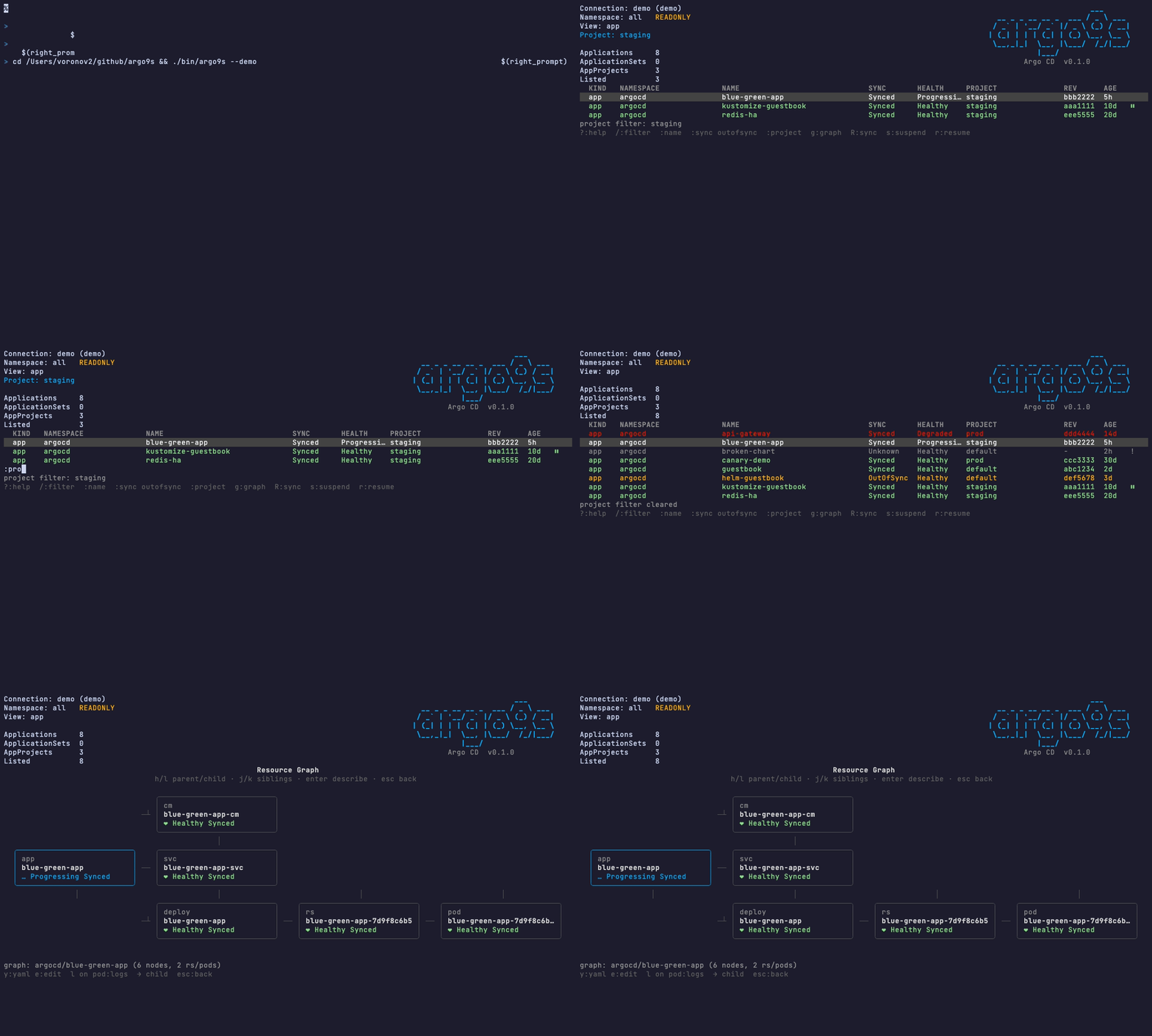
Regenerate assets (needs VHS):
make build
PATH="$(go env GOPATH)/bin:$PATH" vhs docs/screenshots/demo.tape
Features
- Two backends: Kubernetes (kubeconfig / in-cluster) or Argo CD HTTP API (URL + token)
- Named connections in
~/.argo9s/config.yamlwith startup picker (kubernetes,argocd-test,argocd-prod, …) - Real-time watch of Applications (CRD watch or API stream/poll)
- Unified + type views: Applications, ApplicationSets, AppProjects
- K9s-style UX:
j/k,/filter,:commands,?help - Project / name / sync filters
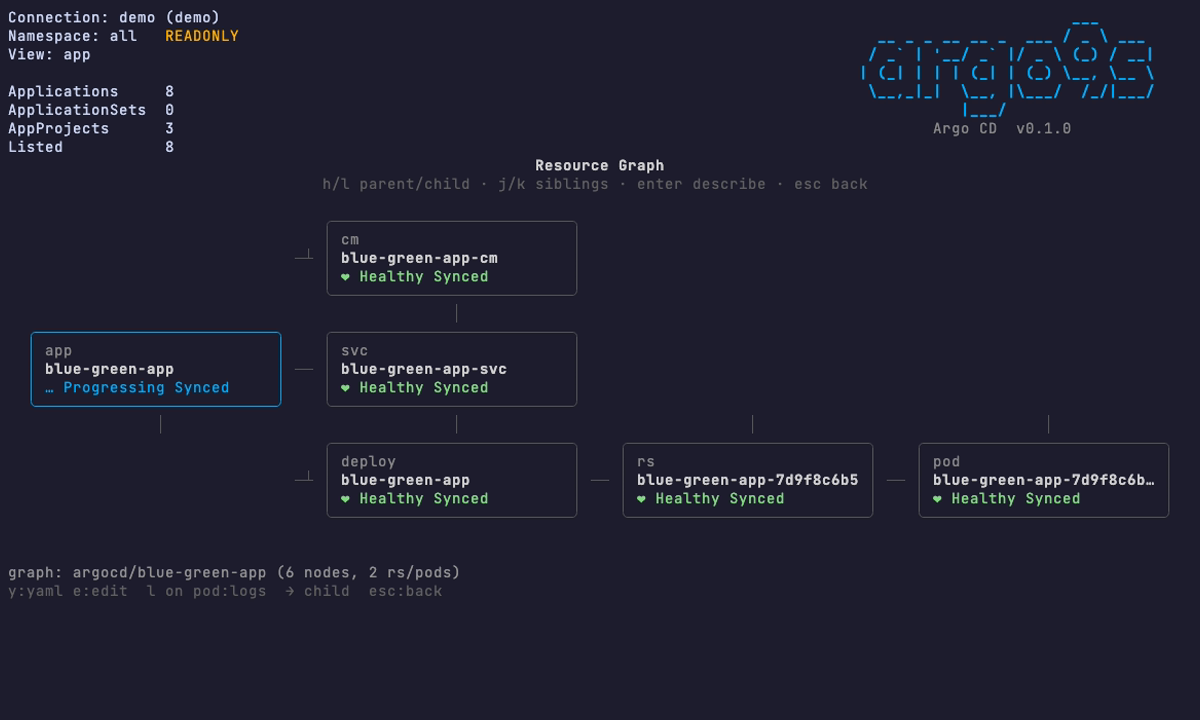
- Graph view (
g): Argo UI–style tree (resource-tree API or live RS/Pods) - Actions (when not read-only): sync, refresh, suspend/resume, delete
- Read-only by default
--demo: offline sample apps for screenshots / VHS recordings--no-color: monochrome TUI (alsoNO_COLOR=1ornoColor: truein config)
Install
Homebrew
brew install vvrnv/tap/argo9sGo
go install github.com/vvrnv/argo9s/cmd/argo9s@latestBinary
Download from the releases page.
Build from source
git clone https://github.com/vvrnv/argo9s.git
cd argo9s
make build
./bin/argo9s
Releases are published automatically on v* tags via GoReleaser (GitHub Release + Homebrew formula in vvrnv/homebrew-tap).
Connections
1) CLI (one-shot Argo CD API)
argo9s --server https://argocd.example.com --auth-token "$TOKEN"
argo9s --server https://argocd.example.com --auth-token "$TOKEN" --insecure
# token also from ARGOCD_AUTH_TOKEN
2) Config profiles + picker
argo9s config init          # writes example ~/.argo9s/config.yaml
# edit connections, put tokens in env vars
export ARGOCD_TEST_TOKEN=...
export ARGOCD_PROD_TOKEN=...
argo9s                      # picker: kubernetes / argocd-test / argocd-prod
argo9s --connection argocd-prod
argo9s --pick               # force picker
Example ~/.argo9s/config.yaml:
defaultConnection: kubernetes
connections:
  - name: kubernetes
    type: kubernetes
  - name: argocd-test
    type: argocd
    server: https://argocd.test.example.com
    tokenEnv: ARGOCD_TEST_TOKEN
    readOnly: false
  - name: argocd-prod
    type: argocd
    server: https://argocd.prod.example.com
    tokenEnv: ARGOCD_PROD_TOKEN
    readOnly: true
readOnly on a connection overrides the global readOnly. CLI --readonly still wins when passed explicitly.
3) Kubernetes / in-cluster (original mode)
argo9s --connection kubernetes
argo9s --context my-cluster -n argocd
Navigation
| Key | Action |
|---|---|
j / k | Move |
g | Resource graph (Application) |
l | Pod logs (on Pod); horizontal scroll in log/YAML views |
y | Live YAML of selected graph node |
e | Edit YAML in $EDITOR (not read-only) |
p | Previous container logs (log view) |
enter / d | Describe |
/ | Name filter |
: | Command |
R | Sync application |
f / F | Refresh / hard refresh |
s / r | Suspend (manual) / resume (auto-sync) |
CLI (autosync / sync)
# need writable connection (readOnly: false) or --readonly=false
argo9s --connection argocd-test --readonly=false app autosync on  guestbook
argo9s --connection argocd-test --readonly=false app autosync off guestbook
argo9s --connection argocd-test --readonly=false app resume  guestbook
argo9s --connection argocd-test --readonly=false app suspend guestbook
argo9s --connection argocd-test --readonly=false app sync    guestbook
argo9s --connection argocd-test --readonly=false app refresh guestbook --hard
| ctrl+d | Delete (confirm) |
| ? | Help |
| Q / :q | Quit |
Filters
:name guestbook       # filter by name substring
:n mpi                # short form
:name clear

:project default      # Applications in AppProject "default"
:p staging
:project clear

:sync outofsync       # only OutOfSync (yellow)
:sync synced
:outofsync
:sync clear
/text is a live substring filter across name/namespace/project/status.
Colors: Synced+Healthy = green · OutOfSync = yellow · Progressing = blue · Degraded = red · Unknown = gray
Disable: --no-color, NO_COLOR=1, or argo9s config set noColor true.
Graph view
- Select an Application
- Press
g(or:graph) - Navigate nodes with
j/k,escto go back
Layout matches Argo CD UI (left → right):
app ── cm
    ├─ svc
    └─ deploy ── rs ── pod
Managed resources come from status.resources; ReplicaSets/Pods are loaded live from the cluster via ownerReferences.
Commands
| Command | Description |
|---|---|
:app / :appset / :appproject / :all | Switch resource view |
:project <name> | Filter apps by Argo CD project |
:ns <namespace|all> | Filter list by namespace |
:graph | Open graph for selected Application |
:readonly | Toggle read-only |
:nocolor | Toggle monochrome TUI |
:ctx | List kube contexts |
:q | Quit |
Config
Stored at ~/.argo9s/config.yaml:
argo9s config view
argo9s config set readOnly false
argo9s config set noColor true
argo9s config set namespace argocd
argo9s config set allNamespaces true
How it works
Two backends, same TUI:
- Kubernetes — dynamic client watches Argo CD CRDs (
applications/applicationsets/appprojects). Mutating actions patch the Application CR (refresh annotation,.operation.sync,syncPolicy). - Argo CD HTTP API — list/watch via the server API (token auth); sync/refresh/suspend go through the same API. Preferred for full resource trees across destination clusters.
Acknowledgments
- K9s — UX inspiration
- Argo CD — GitOps engine
- Bubble Tea — TUI framework
License
MIT