
Cameo
A tiny macOS menu bar app that puts a transparent character video on your desktop.
Download for macOS · Character gallery · Make your own · What’s new



English · 简体中文 · 繁體中文 · 日本語 · 한국어 · Español · Français · Deutsch
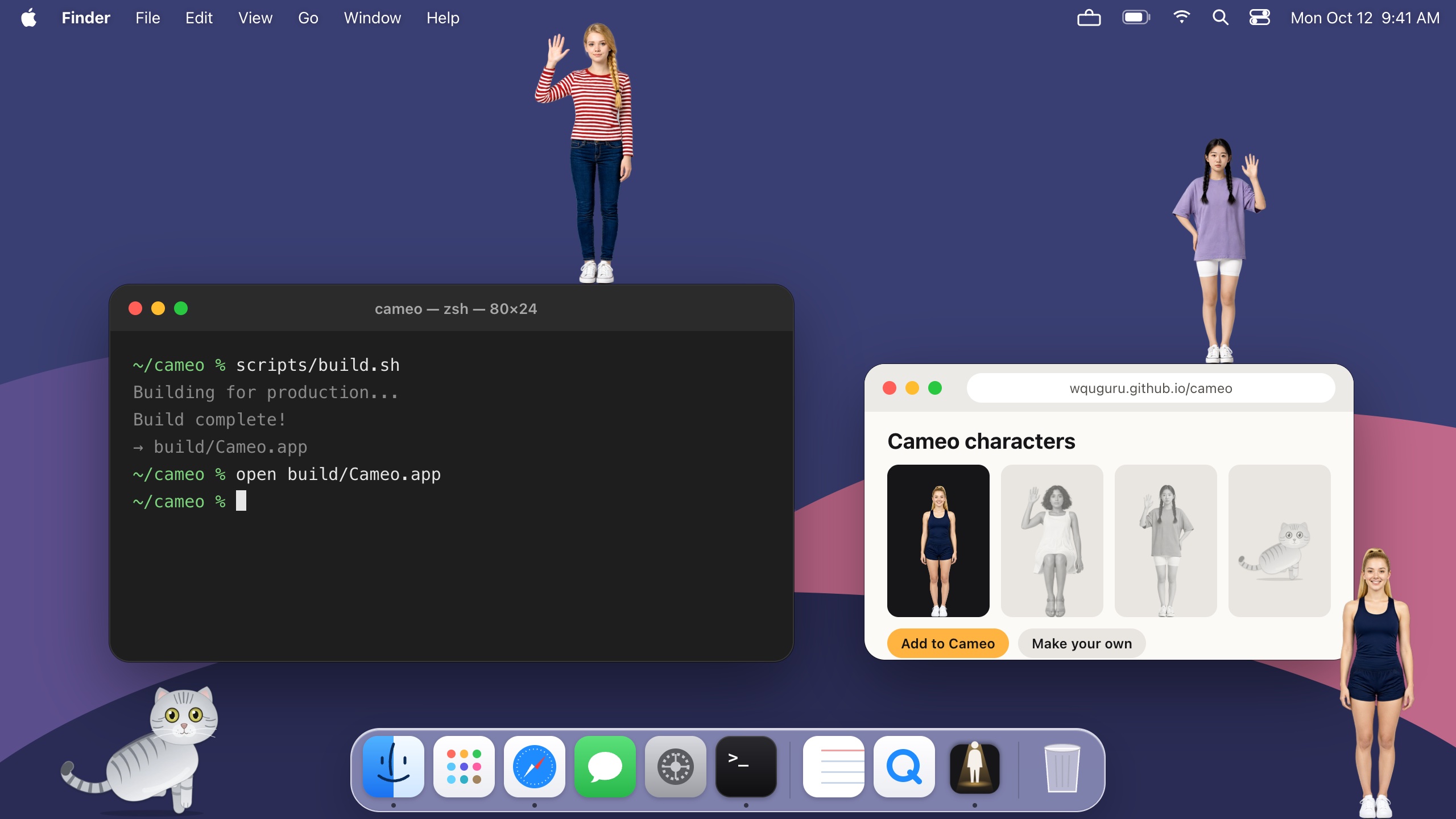
Cameo plays a looping video with an alpha channel as a free-floating figure that stays on top of every window and Space. Drag the figure anywhere; clicks on its transparent pixels pass straight through to whatever is underneath.
Features
- A cat comes built in — Chaofei, a silver tabby British Shorthair drawn in code after the author's own cat, wanders along the bottom of your screen: it walks, sits, lies down and dozes off, stands and rolls. Click it to make it roll, drag it to pick it up, or pin an action from the popover.
- Characters that walk — a character package walks along the bottom of the screen, turns and performs. Drop it on a window and it stands on top, riding along when you move the window. Click it for a random action, or pick one from the popover.
- Up to three at once — ⌘-click characters in the popover or the library to put several on the desktop.
- Truly transparent — only the visible pixels of the figure catch the mouse; everything else is click-through.
- Always on top — floats above all windows on every Space.
- Native formats — HEVC with Alpha and ProRes 4444 (
.mov), decoded by AVFoundation. No FFmpeg, no bundled codecs. - Light on resources — pauses when hidden by a full-screen app or while the screen sleeps, and caps at 30 fps on battery.
- Minimal — a menu bar popover and a plain character library. No settings, no dependencies.
What changed in each release: changelog.
Requirements
- macOS 14 Sonoma or later (Apple silicon or Intel)
- Building from source: Xcode Command Line Tools (
xcode-select --install)
Installation
Download
Download Cameo-<version>-macOS-Universal.dmg from Releases — one installer for Apple silicon and Intel Macs running macOS 14 or later. Open it and drag Cameo into Applications. A .zip of the bare app and checksums.txt (SHA-256) sit next to it.
The app is ad-hoc signed (not notarized). On first launch macOS blocks it: open System Settings › Privacy & Security and click Open Anyway, or run xattr -dr com.apple.quarantine /Applications/Cameo.app.
Updates and languages
Cameo checks for updates daily and updates itself from the popover. It speaks 11 languages and follows your Mac's; pick another under Language in the popover.
Build from source
git clone https://github.com/wquguru/cameo.git
cd cameo
scripts/build.sh          # → build/Cameo.app
open build/Cameo.app
Uninstall
Turn off Open at Login in the popover, quit Cameo and move it to the Trash. Your imported characters and settings stay behind until you delete ~/Library/Application Support/Cameo and run defaults delete io.github.wquguru.cameo.
Usage
- Click the Cameo icon (a figure peeking out of a screen) in the menu bar.
- Add a video with +, by dropping it onto the popover, or via Open With → Cameo in Finder.
- Pick a character and drag the figure wherever you like.
Menu bar too full and the icon hidden behind the notch? Open Cameo again (Spotlight or Launchpad), or right-click the figure, to get the same popover.
While the figure is hidden, Cameo also stays in the Dock: click it for the popover, or drop a video on it to add one.
With more than a handful of characters, open the library to search, rename or remove them. Imported videos are copied to ~/Library/Application Support/Cameo/Characters. Up to three characters can be on the desktop at once: ⌘-click one in the popover or the library to add it (⌘-click again to take it off).
Characters
Gallery
Browse free characters at wquguru.github.io/cameo and click Add to Cameo: the app downloads the character and switches to it (via a cameo://add?url=… link).
Make a character
A character is one looping .mov with alpha (HEVC with Alpha or ProRes 4444). A character that walks is a package instead: a folder of such clips and a manifest.json (spec). The easiest route is to let your coding agent make it with a bundled skill:
| You have | Skill |
|---|---|
| A green-screen clip, or a video with alpha | cameo-from-video |
| Only a description (needs an OpenRouter API key) | cameo-image-loop |
| One character image + an image-to-video tool, for a character that walks, turns, lies down and performs | cameo-video-package |
Paste one of these into your coding agent (Claude Code, Codex, Cursor…):
Install the Cameo skill at https://github.com/wquguru/cameo/tree/main/skills/cameo-from-video, then turn ~/Downloads/dance.mp4 into a Cameo character.Install the Cameo skill at https://github.com/wquguru/cameo/tree/main/skills/cameo-image-loop, then make me a Cameo character: a woman in a yellow sundress, sitting, waving.It installs the skill, checks the result and adds the character to Cameo. To install a skill for all your agents at once, run npx skills add wquguru/cameo --skill <name> instead.
Made one you like? Upload it to the gallery for review.
Development
swift build                        # debug build
scripts/build.sh                   # release app bundle in build/Cameo.app
swift run CameoSample sample.mov   # a test clip with alpha
See AGENTS.md for the project layout, packaging and releases.
Contributing
Issues and pull requests are welcome. Cameo is deliberately small, so please open an issue to discuss new features before adding UI.