VMark
The Plain-Text Workspace Where Humans and AI Collaborate
Free. Local-first. Format-aware.
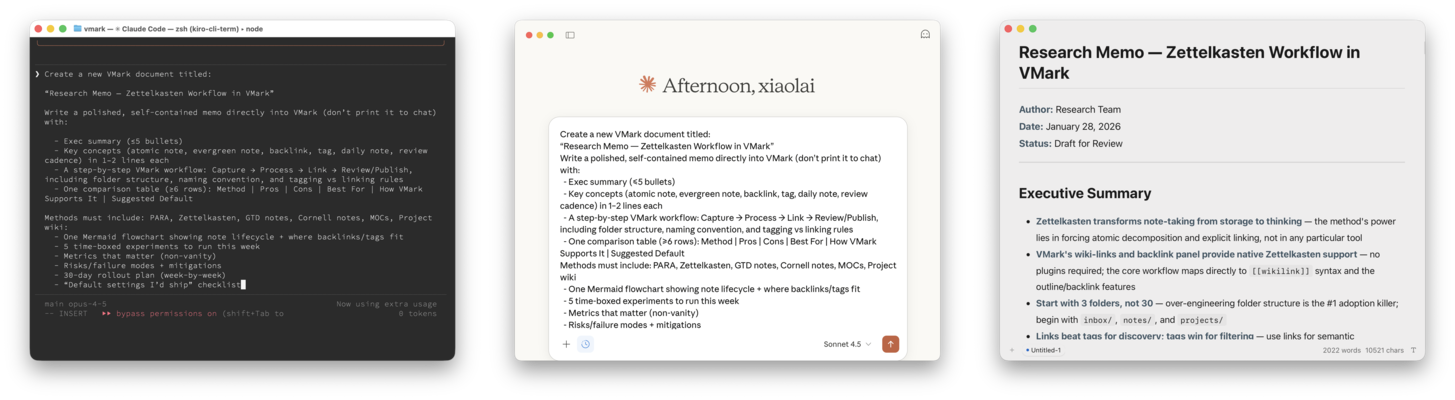
VMark is the plain-text workspace where humans and AI collaborate. Both parties read and write the same artifacts — markdown, YAML, JSON, TOML, Mermaid, SVG, HTML, code — directly, with no translation layer. When the file is a known artifact (GitHub Actions workflow, Cargo.toml, package.json, pyproject.toml), VMark renders the right view, not a generic JSON tree.
Download · Documentation · Formats · Features
Highlights
- Multi-Format — Markdown (WYSIWYG + source), JSON / JSONL, YAML, TOML, Mermaid, SVG, HTML (sandboxed), plain text. Code files (.ts, .py, .rs, .go, .css, …) open as syntax-highlighted viewers; toggle to edit in place or open in your
$EDITOR. - Schema-Aware Previews —
.github/workflows/ci.ymlopens with a workflow-graph view.Cargo.tomlandpackage.jsonandpyproject.tomlopen with a dependency-tree view. Generic JSON / YAML / TOML get a navigable tree. - AI-Native — MCP integration for Claude Desktop, Claude Code, Codex CLI, Gemini CLI. AI Genies for inline writing assistance. Both you and the AI work on the same plain-text files.
- Three Markdown Modes — WYSIWYG (Tiptap/ProseMirror), Source Peek (
F5), Source Mode (F6, CodeMirror 6) - Multi-Cursor —
Mod + Dto select next match,Alt + Clickto add cursors,Mod + Alt + ↑↓for vertical cursors - Tab Escape — Auto-pair brackets/quotes, press Tab to jump past closing characters
- CJK Done Right — 20+ formatting rules for Chinese, Japanese, Korean text
- 10 Languages — English · 简体中文 · 繁體中文 · 日本語 · 한국어 · Deutsch · Español · Français · Italiano · Português (Brasil). Auto-detected on first launch.
- 6 Themes — White, Paper, Mint, Sepia, Night, Solarized
- Local-First — No cloud, no accounts, no analytics. Documents stay on your machine.
- 122 Shortcuts — All customizable in Settings
See the full feature list at vmark.app/guide/features.
Install
macOS (Homebrew):
brew install xiaolai/tap/vmarkManual: Download from the Releases page.
- Apple Silicon:
VMark_x.x.x_aarch64.dmg - Intel:
VMark_x.x.x_x64.dmg
Windows & Linux: Pre-built binaries on the Releases page. macOS is the primary platform; other builds are best-effort.
AI Integration
VMark speaks MCP natively. Settings → Integrations → Install — one click per assistant.
Supported: Claude Desktop, Claude Code, Codex CLI, Gemini CLI.
See the MCP Setup Guide.
Contributing: Issues Only, No PRs
VMark is vibe-coded — written entirely by AI under human supervision. We welcome issues (bug reports, feature requests) but cannot safely merge external PRs.
When you file an issue, AI fixes it with full context of the project's conventions, test suite, and architecture.
- Bug Report · Feature Request
- Read more: Why Issues, Not PRs
Building from Source
Prerequisites: Node.js 20+, pnpm 10+, Rust (stable), Tauri v2 prerequisites
git clone https://github.com/xiaolai/vmark.git
cd vmark
pnpm install
pnpm tauri dev        # Development
pnpm tauri build      # Production
pnpm check:all        # Lint + test + build
Tech Stack: Tauri v2 (Rust), React 19, TypeScript, Zustand v5, Tiptap, CodeMirror 6, Tailwind CSS v4
AI-Assisted Development: The repo ships with full configuration for Claude Code, Codex CLI, and Gemini CLI. See AGENTS.md for conventions and .claude/ for rules, skills, and subagents.
Star History
License
ISC License — free to use, copy, modify, and distribute. See the license page for details.
Questions? Open an issue · Updates? Watch this repo