Connexio
Project-based Terminal Manager — Organize your terminals by project, not by window.




Connexio is built with Tauri v2 and a native Rust backend for fast startup, low memory usage, and cross-platform support.
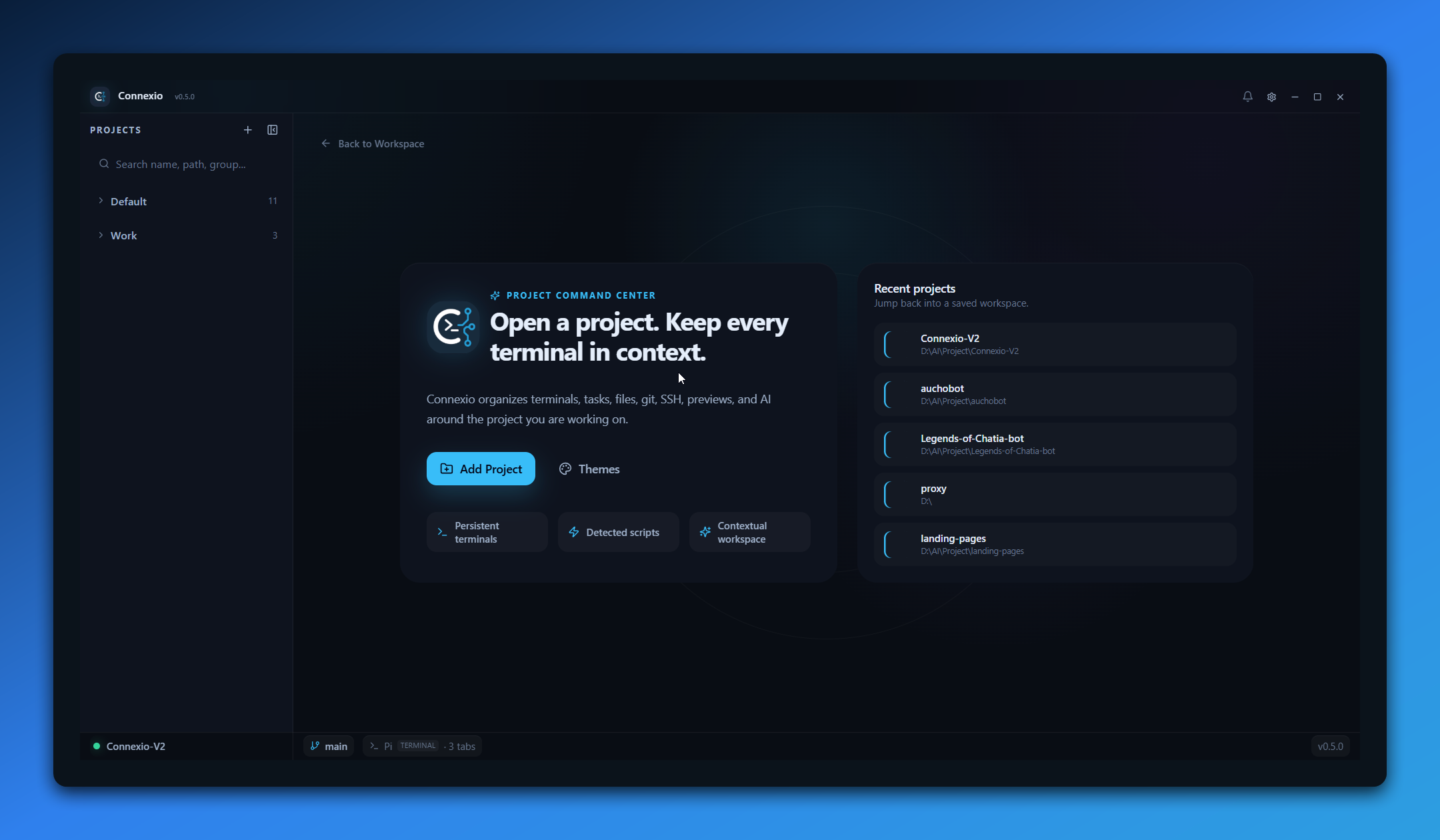
📸 Preview
🎯 Problem
When working on multiple projects, you end up with dozens of terminal windows/tabs with no clear organization. Which terminal belongs to which project? Where was that running server?
✨ Solution
Connexio organizes your terminals by project. Each project gets its own workspace with dedicated terminal tabs, persistent sessions, remote access, and productivity tools built right in.
🚀 Features
Core
- 📁 Project Workspace — Each project has its own workspace with dedicated terminals
- 📑 Multi-tab Terminals — Multiple terminal tabs per project with rename & drag-to-reorder
- 🐚 Shell Picker — Auto-detect available shells (PowerShell, CMD, Git Bash, WSL, Zsh, Fish, etc.)
- 💾 Session Persistence — Tabs, layout, and active project survive app restart
- 🔀 Drag & Drop — Reorder tabs, reorder projects, move projects between groups
- ⚡ WebGL Renderer — Hardware-accelerated terminal rendering (toggleable in settings)
Productivity
- 📋 Task Runner — Auto-detect scripts from
package.json,Makefile,Cargo.toml,pyproject.toml— one-click run - 📌 Pinned Commands — Save favorite commands per project (CRUD, drag reorder)
- ⏱️ Command Timer — Track execution time, notification when long-running commands finish
- 📝 Code Editor — Built-in editor powered by CodeMirror 6 (JS, TS, HTML, CSS, Python, Rust, JSON, Markdown)
- 📂 File Explorer — Full file tree with context menu and inline actions
- 🌐 Web Preview — Live preview panel as a workspace tab
Git Integration
- 🌿 Git Status — Live branch, ahead/behind, modified/staged/untracked counts
- 🔀 Branch Picker — Switch branches from the workspace header
- 💬 Commit Box — Stage and commit directly from the UI
- 📜 Git History — View commit history per project
Connectivity
- 📱 Remote Access — Open a secure mobile workspace with trusted-token login and remote terminal controls
- 🔗 SSH Manager — Save SSH connections per project + global, one-click connect with key or password auth
- 🌐 Tailscale Support — Generate remote URLs using detected Tailscale IPs for private-network access
- 🤖 AI Chat — Side panel with configurable model integration
- 🎮 Discord Rich Presence — Show what you're working on in Discord
- 🔄 Auto-Updater — Check for updates via GitHub Releases, download & install with one click
Customization
- 🎨 Themes — Built-in themes (Dark, Light, Midnight Ocean) with full terminal color support
- ⚙️ Settings — Font size, font family, cursor style, scrollback, copy-on-select, default shell, WebGL toggle
- 🖥️ Custom Titlebar — Clean frameless window with app version display
- 📐 Resizable Panels — Split panes for editor + terminal side-by-side layout
📥 Download
| Platform | Download |
|---|---|
| Windows | Connexio_x64-setup.exe |
| macOS (Apple Silicon) | Connexio_aarch64.dmg |
| Linux | Connexio_amd64.AppImage |
Or go to Releases for all versions including pre-releases.
📦 Tech Stack
| Technology | Purpose |
|---|---|
| Tauri v2 | Cross-platform desktop framework |
| Rust | Native backend (PTY, git, SSH, file system) |
| portable-pty | Native PTY process management |
| React 18 | UI framework |
| TypeScript | Type safety |
| xterm.js | Terminal rendering (with WebGL addon) |
| CodeMirror 6 | Code editor |
| Zustand | State management |
| Tailwind CSS | Styling |
| Vite | Frontend build tool |
| tauri-plugin-store | Persistent storage |
| tauri-plugin-updater | Auto-update via GitHub Releases |
| discord-rich-presence | Discord RPC integration |
🛠️ Development
Prerequisites
- Node.js 18+
- Rust (latest stable via rustup)
- Platform-specific dependencies:
- Windows: WebView2 (usually pre-installed on Windows 10/11), Visual Studio C++ Build Tools
- macOS:
xcode-select --install - Linux:
sudo apt install libwebkit2gtk-4.1-dev build-essential curl wget file libxdo-dev libssl-dev libayatana-appindicator3-dev librsvg2-dev
Setup
git clone https://github.com/yandanp/Connexio.git
cd Connexio
npm install
npm run dev
Scripts
| Command | Description |
|---|---|
npm run dev | Start Tauri dev mode (hot-reload frontend + Rust backend) |
npm run dev:renderer | Start Vite dev server only (frontend) |
npm run build | Build frontend for production |
npm run build:tauri | Build full Tauri app (installer) |
npm run typecheck | Type-check all TypeScript |
Release
# Patch release (e.g. 0.5.0 -> 0.5.1)
npm version patch
git push && git push --tags

# Pre-release (dev builds)
npm version prerelease --preid=dev
git push && git push --tags
Pushing a v* tag triggers GitHub Actions → multi-platform build & GitHub Release.
Tag patterns for release channels:
v1.0.0— Stable releasev1.0.0-dev.1— Dev pre-releasev1.0.0-alpha.1/v1.0.0-beta.1— Alpha/Beta pre-release
📁 Project Structure
Connexio/
├── AGENTS.md                    # Written conventions for AI agents & contributors
├── docs/
│   └── STYLEGUIDE.md            # Canonical design tokens & utility classes
├── config/                      # Tooling & quality gates
│   ├── check-max-lines.mjs      # Max-lines ratchet (frontend + Rust)
│   ├── max-lines-baseline.txt   # Big-file baseline (numbers only go down)
│   ├── check-feature-imports.mjs# Feature boundary checker
│   └── vitest.config.ts         # Test config
├── src/
│   ├── shared/
│   │   └── types.ts             # Pure shared types (frontend ↔ Rust)
│   └── renderer/                # React frontend
│       ├── core/                # Kernel — importable by every feature
│       │   ├── api/             # Typed IPC wrappers per domain (window.connexio)
│       │   ├── api-remote/      # Same API shape for remote (mobile/web) mode
│       │   ├── ui/              # Small primitives (ContextMenu, ConfirmDialog, …)
│       │   ├── hooks/           # use-terminal-resize-v2, useDiscordPresence
│       │   ├── stores/          # Cross-cutting stores: settings, theme, notifications
│       │   └── tauri-shim.ts    # Picks desktop vs remote API at startup
│       ├── features/            # 1 folder = 1 domain; public API via index.ts only
│       │   ├── terminal/        # Terminal, TerminalLayer, ShellPicker, SearchPanel
│       │   ├── workspace/       # Workspace composition, tab bar, split layout, store
│       │   ├── projects/        # Sidebar, AddProjectModal, projects store
│       │   ├── git/             # SourcePanel, DiffViewer, BranchPicker, CommitBox, …
│       │   ├── ssh/             # SSH manager: hosts, identities, known hosts, SFTP
│       │   ├── remote/          # Remote access: login gate, mobile shell, settings
│       │   ├── tasks/           # TaskPanel + pinned commands
│       │   ├── explorer/        # FileExplorer
│       │   ├── editor/          # CodeEditor + RemoteEditorWrapper
│       │   ├── ai/              # AIChatPanel + provider client & store
│       │   ├── settings/        # SettingsModal + settings tabs
│       │   └── notifications/   # NotificationBell, NotificationToast
│       ├── styles/              # globals.css (design token source)
│       └── App.tsx / main.tsx   # Composition root — only place features are joined
├── src-tauri/
│   ├── src/
│   │   ├── main.rs              # Tauri app entry point
│   │   ├── lib.rs               # Plugin registration & command setup
│   │   └── modules/
│   │       ├── pty/             # PTY process management (portable-pty)
│   │       ├── ssh/             # SSH module folder (connection, sftp, trust, secrets, …)
│   │       ├── remote/          # Remote access server folder (http, websocket, wol, …)
│   │       ├── projects.rs      # Project CRUD
│   │       ├── workspace.rs     # Workspace state persistence
│   │       ├── session.rs       # Session persistence
│   │       ├── settings.rs      # App settings + shell detection
│   │       ├── shell.rs         # Shell detection & configuration
│   │       ├── git.rs           # Git status & operations
│   │       ├── tasks.rs         # Task runner (script detection)
│   │       ├── pinned.rs        # Pinned commands
│   │       ├── theme.rs         # Theme management
│   │       ├── explorer.rs      # File system explorer
│   │       ├── clipboard.rs     # Native clipboard handling
│   │       ├── notification.rs  # Desktop notifications
│   │       ├── discord.rs       # Discord Rich Presence
│   │       └── updater.rs       # Auto-updater
│   ├── tauri.conf.json          # Tauri configuration
│   ├── Cargo.toml               # Rust dependencies
│   └── capabilities/            # Tauri permission capabilities
├── assets/                      # App icons
├── .github/workflows/           # CI gates + multi-platform release
├── vite.config.ts               # Vite configuration
├── tailwind.config.js           # Tailwind configuration
└── package.json
🎨 Themes
| Theme | Style |
|---|---|
| Connexio Dark | Default dark theme with blue accents |
| Connexio Light | Clean light theme |
| Midnight Ocean | Deep blue with teal accents |
Themes apply to both the app UI and terminal colors.
🤝 Contributing
Contributions are welcome! Please feel free to submit a Pull Request.
- Fork the repo
- Create your feature branch (
git checkout -b feat/amazing-feature) - Commit your changes (
git commit -m 'feat: add amazing feature') - Push to the branch (
git push origin feat/amazing-feature) - Open a Pull Request
Commit Convention
| Prefix | Usage |
|---|---|
feat: | New feature |
fix: | Bug fix |
refactor: | Code refactoring |
ci: | CI/CD changes |
chore: | Maintenance |
📄 License
MIT © yandanp