yoink
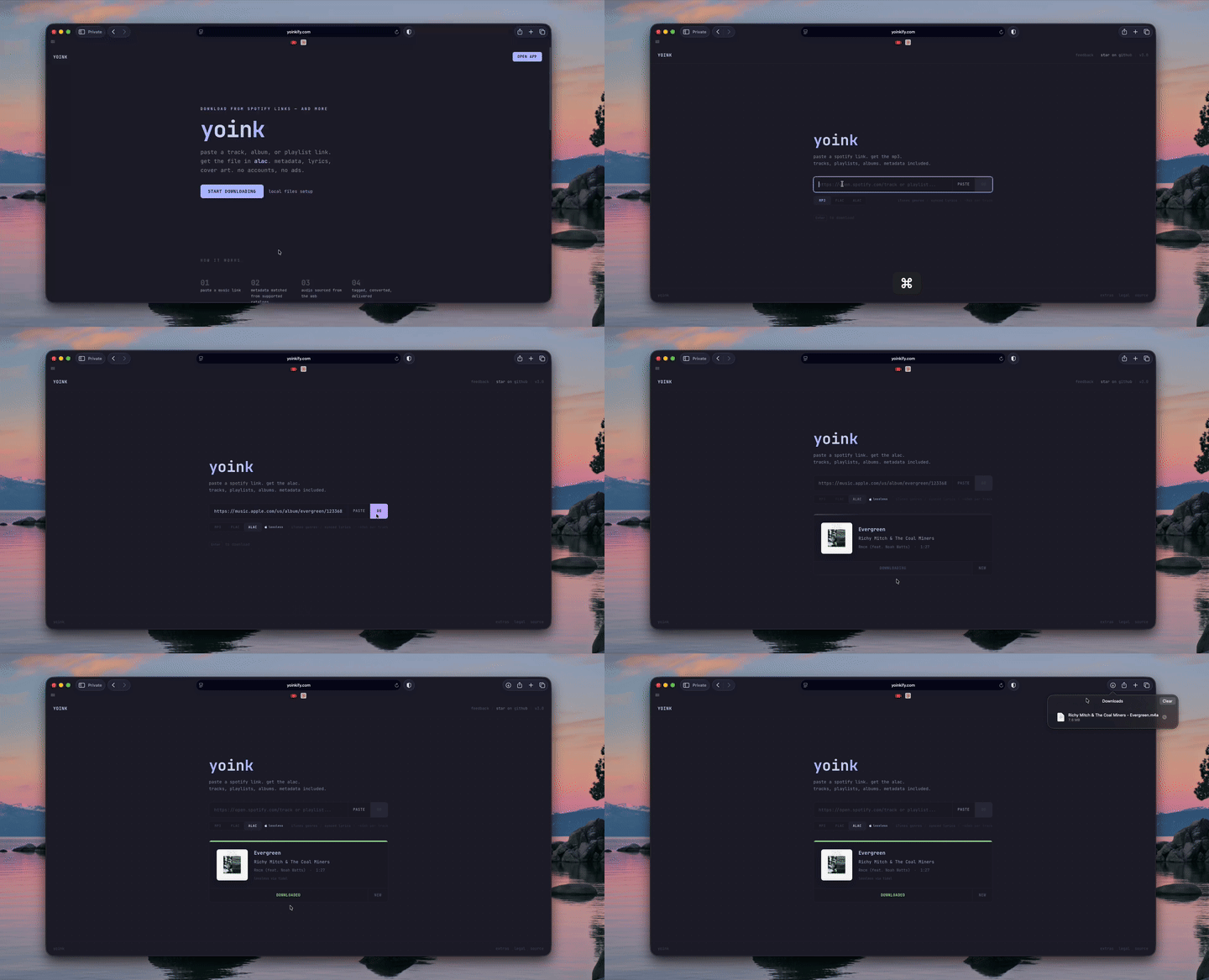
paste a music link. get the file.
live instance notice: the old live instance has been down for a few months because i can no longer afford the hosting costs. the links are staying here for reference, but the hosted site is currently unavailable. you can still self-host yoink using the instructions below.
latest release — v3.1.0
- prebuilt docker images — public amd64 and arm64 images with version tags and a ready-to-run compose file
- better metadata — spotify unfurl resolution, improved caching, and corrected artist, album artist, and compilation tags
- private feedback updates — track reports from the browser where you submitted them, with optional browser details
- mobile and download fixes — fewer false verification failures, more time for browser conversion, clearer errors, and less unwanted input zoom on ios
- privacy and maintenance — clearer data-handling information, seven-day diagnostic log retention, source throttling, and refreshed dependencies and build tooling
this release includes the changes shipped since v3.0.0, including earlier improvements that had not been collected in release notes. see the v3.1.0 release notes and the site's changelog and roadmap for the full history.

feedback is greatly appreciated — i thoroughly read every request. leave feedback
features
- tracks, playlists, albums, artists — paste a link, download everything
- lossless — flac, alac, or 320kbps mp3
- full metadata — id3v2/vorbis tags, album art, synced lyrics, genre, track numbers, explicit flags
- apple music catalog matching — ISRC codes, album artist, and itunes catalog ids embedded into m4a files so apple music recognizes your library
- cross-platform links — apple music and youtube links resolved automatically via song.link
- search — type a song name instead of pasting a link
- multi-source audio — waterfall pipeline across deezer, tidal, and youtube with automatic fallback
- metadata fallback chain — spotify, deezer, and itunes as metadata sources with automatic failover
- no accounts — no sign-up, no cookies, no data stored
how it works
- you paste a spotify (or apple music / youtube) link
- yoink pulls metadata from spotify, with fallbacks to deezer and itunes
- audio is sourced from the best available provider (deezer > tidal > youtube)
- the file is tagged with full metadata, album art, and lyrics, then delivered to your browser
nothing is stored on the server after your request completes.
stack
- Next.js 16 (app router, turbopack)
- Tailwind CSS 4
- ffmpeg for conversion and metadata embedding
- Spotify Web API for metadata
- Deezer for lossless audio and metadata fallback
- Tidal for hi-res audio
- Piped for youtube audio
- lrclib + Musixmatch for lyrics
- Song.link for cross-platform link resolution
- iTunes Search API for genre data and catalog matching
self-hosting
docker (recommended)
published releases provide prebuilt images at ghcr.io/yoinkify/yoink for linux amd64 and arm64.
git clone https://github.com/yoinkify/yoink.git
cd yoink
cp .env.example .env
docker compose -f docker-compose.release.yml up -d --pull always
that's it — yoink works out of the box with zero configuration. audio is sourced from youtube via yt-dlp, and metadata comes from public APIs. for lossless audio or better reliability, add your credentials to .env (see below).
yoink will be running on http://localhost:3000.
the command above also upgrades an existing installation to latest. to pin a version, add YOINK_VERSION=<release-tag> to .env, using the exact tag from the releases page, including any v prefix. prereleases are available by their release tag and do not update latest.
to build from source instead, use docker compose up -d --build after cloning and creating .env.
publishing docker releases
publish a github release whose tag includes .github/workflows/release.yml. the workflow builds the tagged source and pushes its image to ghcr using the built-in GITHUB_TOKEN; no additional registry secrets are needed. each stable release updates latest, so publish older maintenance releases with care. drafts do not publish images.
the official yoink container package is public and can be pulled without signing in. for a fork publishing its own package, github creates new container packages as private by default; set the package visibility to public after its first successful publish (registry documentation). check the release workflow and smoke-test results before announcing an image.
local dev
git clone https://github.com/heysonder/yoink.git
cd yoink
corepack enable
pnpm install
cp .env.example .env.local
# fill in your env vars (see below)
pnpm dev
requires ffmpeg installed locally.
env vars
| variable | required | description |
|---|---|---|
SPOTIFY_CLIENT_ID | no | spotify app client id (create one) — falls back to public APIs if not set |
SPOTIFY_CLIENT_SECRET | no | spotify app client secret |
PIPED_API_URL | no | piped instance url — we recommend self-hosting piped as public instances are unreliable |
DEEZER_ARL | no | deezer session cookie — enables lossless audio from deezer |
TIDAL_CLIENT_ID | no | tidal app client id |
TIDAL_CLIENT_SECRET | no | tidal app client secret |
TIDAL_ACCESS_TOKEN | no | tidal access token — enables hi-res audio from tidal |
TIDAL_REFRESH_TOKEN | no | tidal refresh token |
SONGLINK_ENABLED | no | enable cross-platform link resolution (true/false) |
ACOUSTID_API_KEY | no | audio fingerprinting for better source matching |
MUSIXMATCH_TOKEN | no | musixmatch lyrics as fallback when lrclib misses |
LRCLIB_PROXY_URL | no | cloudflare worker proxy for lrclib if direct access is blocked |
no env vars are required — yoink uses public APIs for metadata and youtube for audio, with yt-dlp as a fallback when piped is unavailable. for lossless audio (flac/alac), you'll need a deezer or tidal account to provide the DEEZER_ARL or tidal credentials.
getting lossless audio with deezer (self-hosted only)
if you're self-hosting yoink, you can enable lossless (flac) downloads by providing a deezer ARL token. the web version at yoinkify.com already has this configured — this section is only for self-hosted instances.
deezer offers a 1 month free trial of premium, which now includes hifi (lossless) streaming:
- sign up for a deezer premium trial (no charge for the first month)
- log in to deezer.com in your browser
- open dev tools (F12) → application tab → cookies →
www.deezer.com - find the cookie named
arl— copy its value (it's a 192-character string) - set
DEEZER_ARLin your.envto that value - download everything you want in flac
the ARL token lasts 3-6 months before expiring. you can cancel the trial before it renews if you just need it for a one-time library download.
youtube audio source
yoink uses youtube as a fallback audio source when deezer and tidal aren't configured. it tries piped first, then yt-dlp directly if piped is unavailable. the docker image includes Node and yt-dlp's matching JavaScript challenge-solving scripts, so this fallback needs no extra setup or runtime script downloads. you can optionally self-host piped and set PIPED_API_URL to point to it. youtube may still limit requests from individual IPs, and its audio is lossy rather than lossless.
rate limits
default limits (per IP, in-memory):
- 30 downloads / minute
- 5 playlist downloads / minute (max 200 tracks per playlist)
- 15 searches / minute
- 10 metadata lookups / minute
self-hosted instances have no rate limits by default — adjust in src/lib/ratelimit.ts.
attribution
thanks to ded-2 and their yoink fork for identifying the yt-dlp JavaScript runtime and dependency setup. our implementation builds on that finding with shared runtime configuration and fallback verification.
if you fork or self-host yoink, a "powered by yoink" mention is appreciated but not required.
license
this project uses AGPL-3.0