Friend Maker




中文说明
朋友制作器 是一个面向 macOS / Windows + ESP32-WROOM-32 / ESP-32S 的自动绘制工具。
它会将图片转换成像素网格和手柄动作脚本,再通过 ESP32 模拟 Switch Pro Controller 输入,在游戏画板中自动完成绘制。当前版本主要面向《朋友收集:梦想生活》与 Tomodachi Life 的绘图场景。
这个项目已经历过多轮迭代,当前 README 以最新的 桌面端三页工作流 为准:
刷入固件手柄测试脚本生成 / 恢复绘制
当前最推荐的体验路线仍然是 单色绘制 和 官方色绘制。
自定义多色 已经开放测试入口,但稳定性仍弱于前两条主线,当前仍属于 测试阶段 / 实验能力。
关键词:Friend Maker、朋友制作器、Tomodachi Life、朋友收集:梦想生活、Nintendo Switch auto draw、ESP32 Pro Controller emulator、pixel art drawing automation、Bluetooth Classic HID。
平台支持
- 支持桌面端一键安装启动:
macOS - 支持桌面端一键安装启动:
Windows x64 - 暂不支持:
Windows ARM64 - 暂未正式支持:
Linux
当前版本已经提供:
macOS / Windows x64的桌面端安装包,安装后可直接启动macOS的Start Friend Maker.command一键启动脚本,作为仓库版备用方式Windows的Install Friend Maker.cmd一键安装脚本与手动启动流程,作为仓库版备用方式
参考文档:
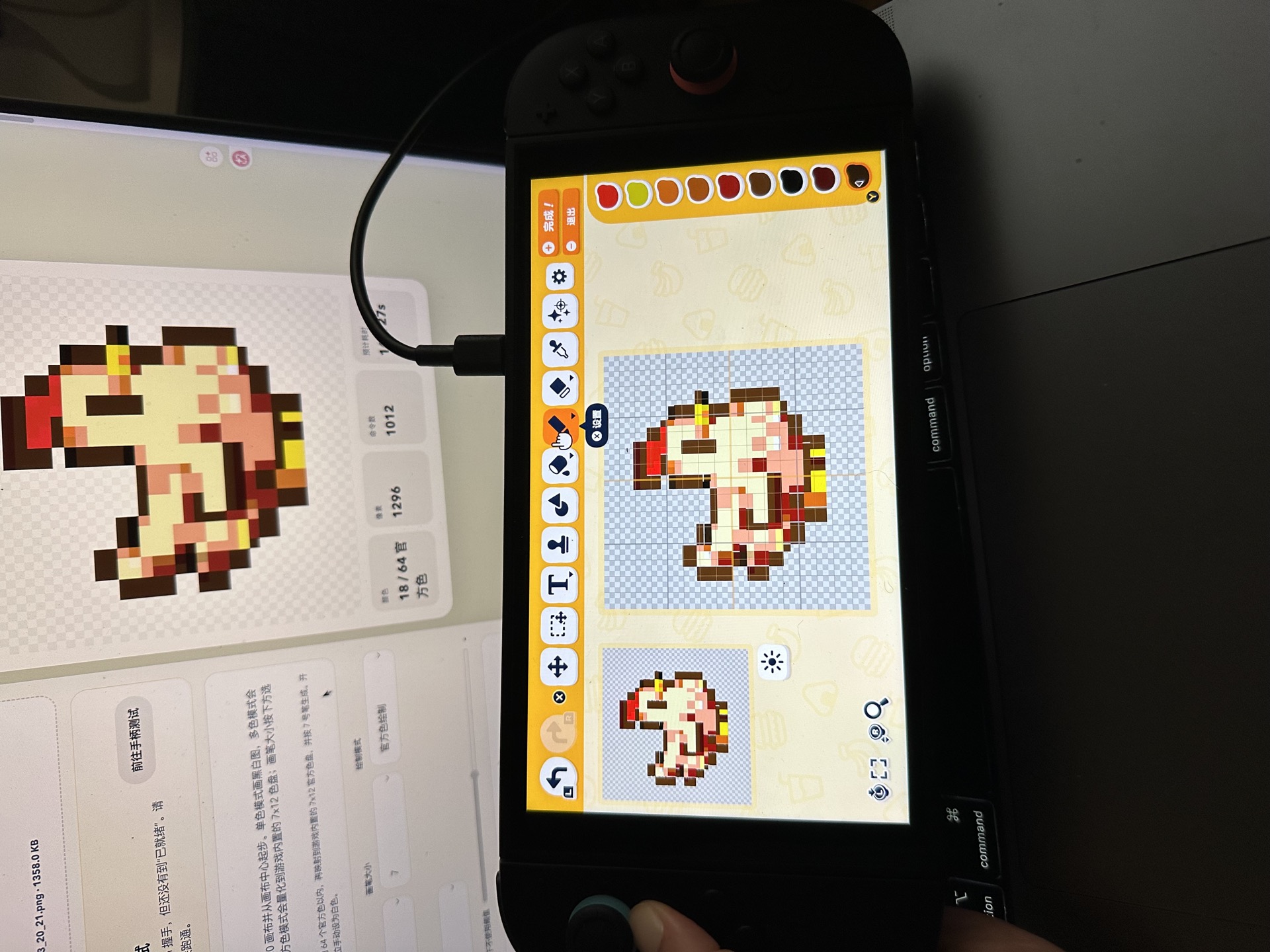
演示
项目功能
- 导入
PNG / JPG / SVG图片,并生成绘制预览 - 支持
1 / 3 / 7 / 13 / 19 / 27六种画笔大小 - 支持
单色绘制、官方色绘制,以及自定义多色(测试中) - 支持
256x256脚本坐标画布工作流 - 支持异形图纸模板裁切与模板预览
- 支持
自动扣背景,适合白底、浅灰底、棋盘格假透明图 - 通过带
SEQ <session> <seq>去重帧的串口协议将绘制脚本逐条发送给 ESP32,并等待ACK - 在界面中完成脚本生成、固件刷写、手柄连接与按钮测试,以及暂停、继续和中断绘制
- 支持本地恢复任务:暂停、中断、异常或应用重启后,仍可从恢复点继续
整体架构
图片输入
  -> 像素化 / 量化 / 路径规划
  -> 指令脚本
  -> 串口 ACK 发送
  -> ESP32-WROOM-32
  -> Bluetooth Classic HID
  -> Nintendo Switch
  -> 游戏内画布绘制
当前主流程
当前最稳定、也是文档默认采用的使用顺序:
刷入固件手柄测试脚本生成
对应的实际动作是:
- 在
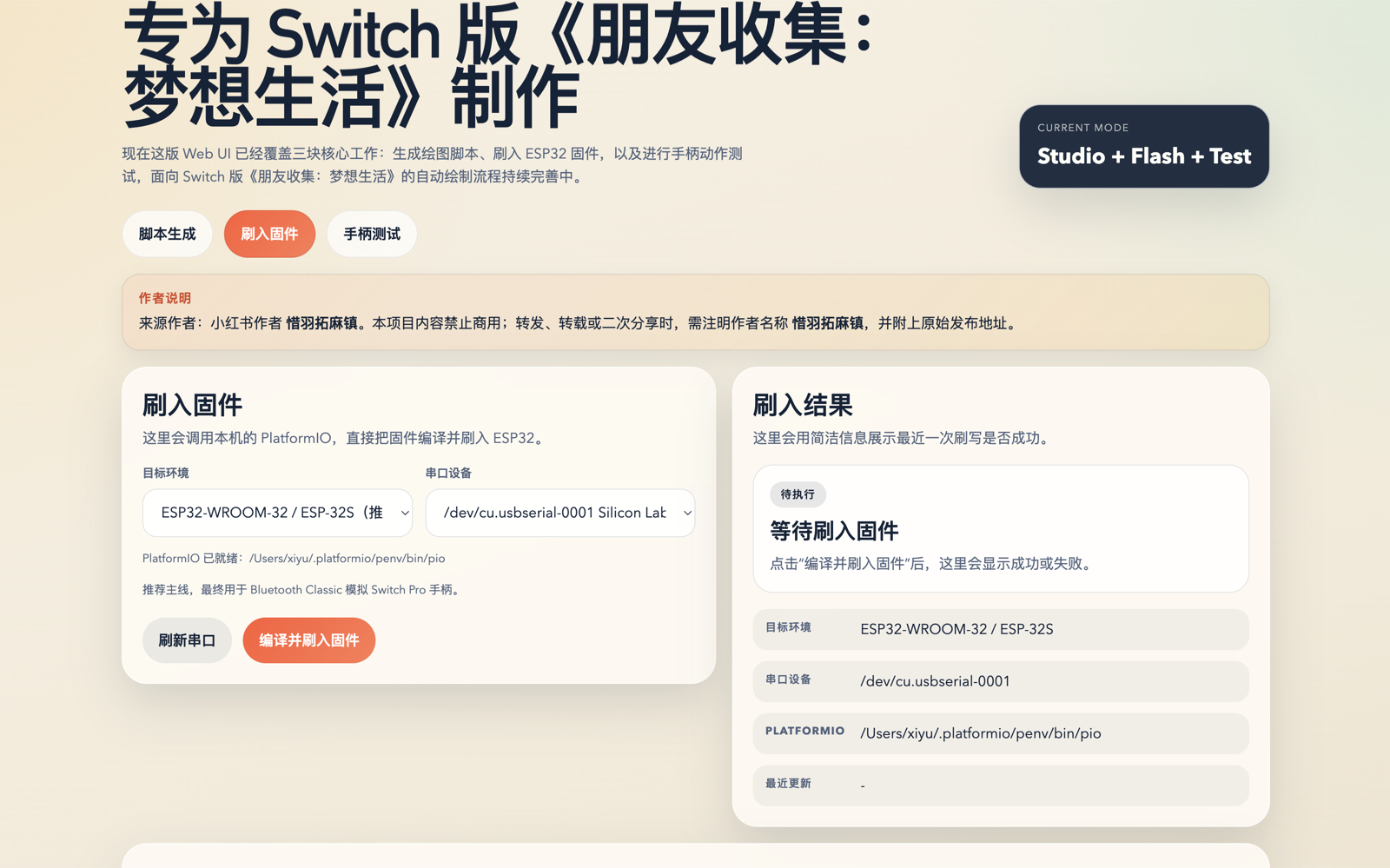
刷入固件页更新推荐固件并确认串口正常 - 在
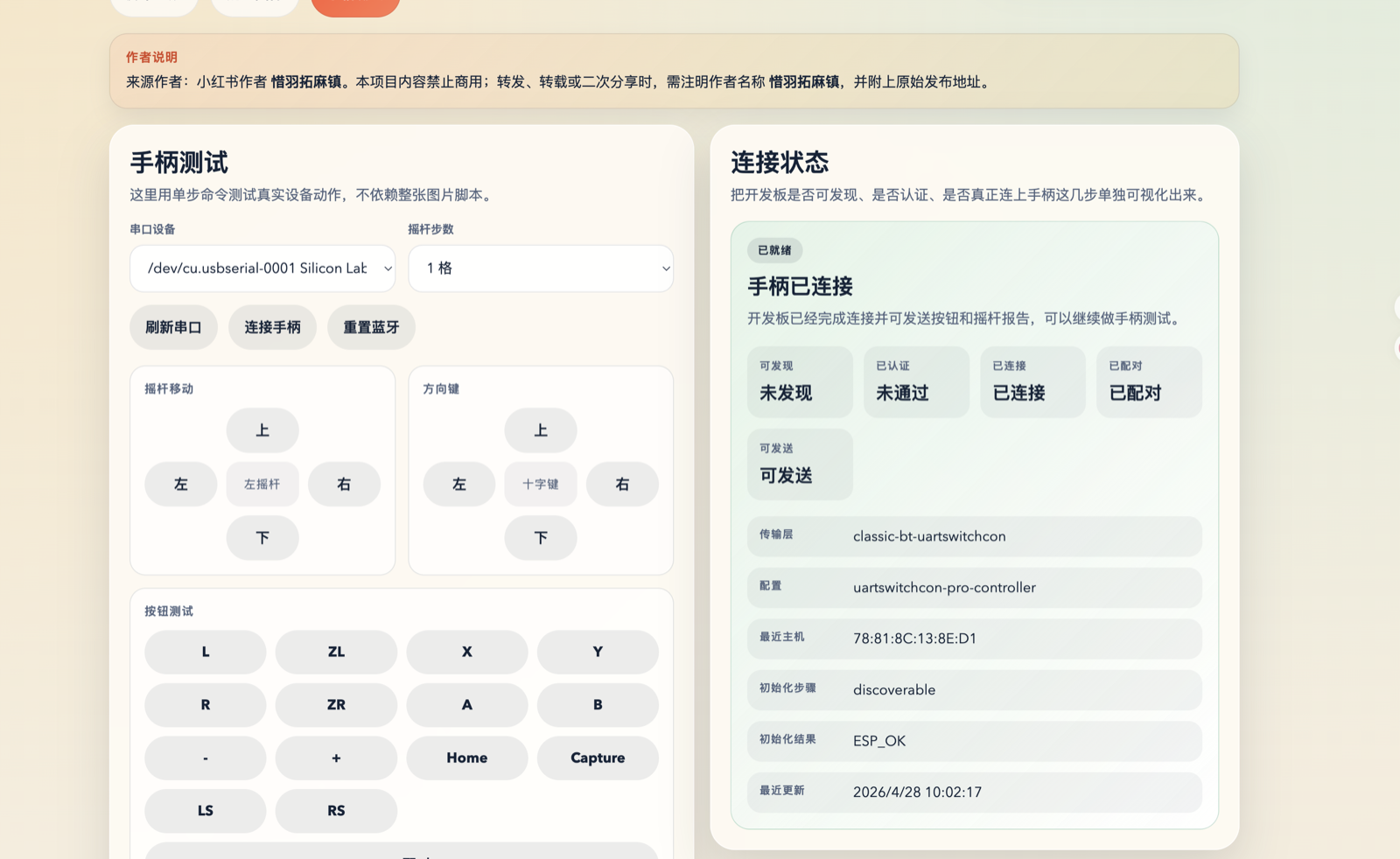
手柄测试页完成蓝牙连接、按钮和方向测试 - 回到
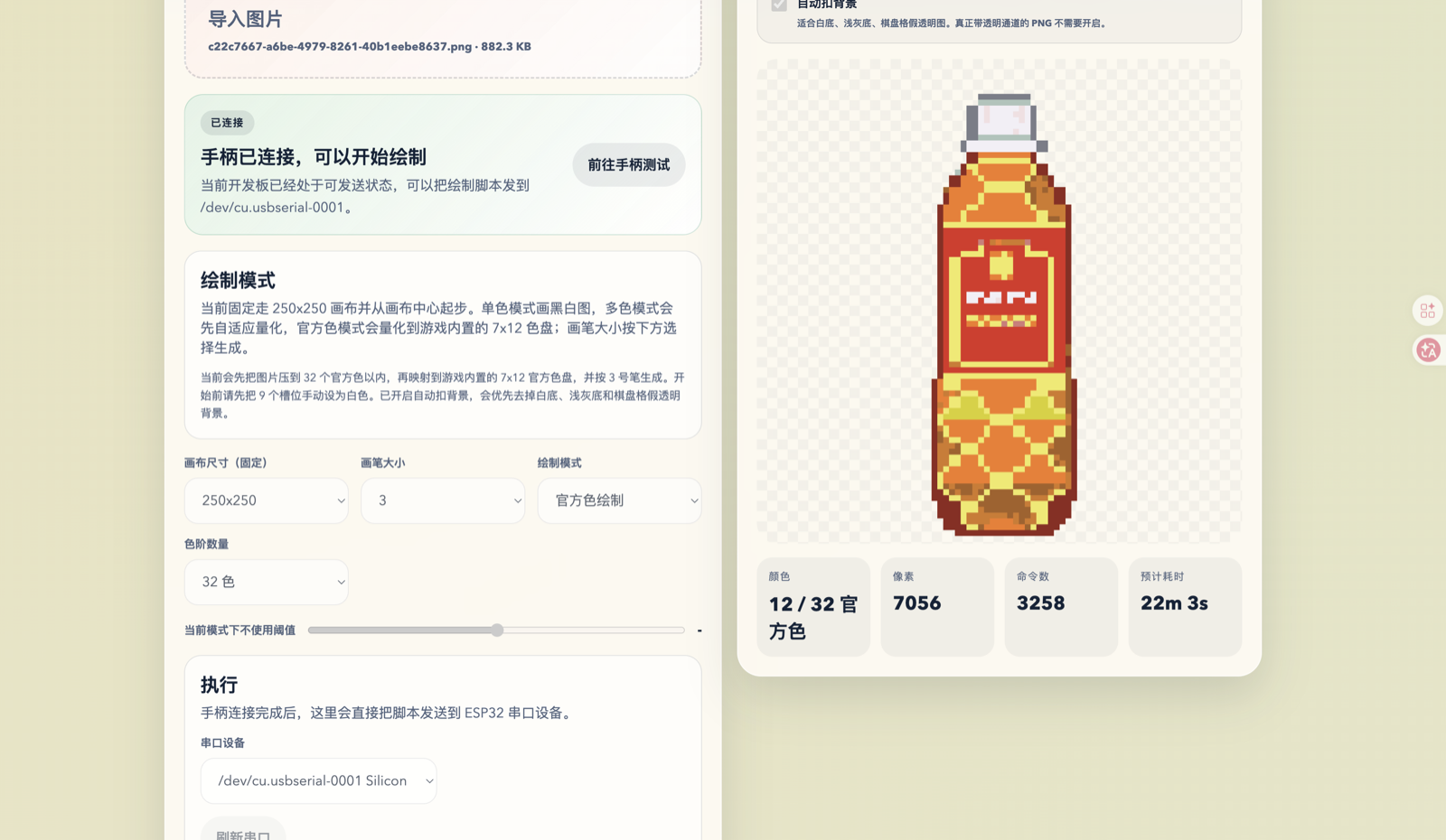
脚本生成页导入图片、检查预览并正式开始绘制
当前版本定位
- 当前主线已经从早期的“手工脚本 + 命令行试验”迭代到“桌面端闭环工作流”
- README 默认描述
桌面端安装包 / 桌面端页面的最新行为 - 与绘图质量和成功率直接相关的能力,会优先以
输入稳定性和恢复能力为准 自定义多色虽然可见、可测试,但暂时不建议作为首次试用路线
绘制模式
单色绘制
- 深色像素会被绘制
- 浅色像素会保留为空白
- 适合黑白图、轮廓图与简单像素素材
官方色绘制
- 会量化到游戏内置的
7 x 12官方色盘 - 当前支持
8 / 16 / 32 / 64 / 84色量化档位 - 当前按游戏原始
9个色盘槽位的默认颜色起步
自定义多色(测试中)
- 会先把图片自动量化成多种颜色,再按批次写入右侧
9个自定义色槽 - 当前更适合颜色数量较少、结构较简单的图片
- 这是仍在继续打磨的实验路线,稳定性与容错性暂时弱于
单色绘制和官方色绘制 - 首次试用时,更推荐先用
单色绘制或官方色绘制验证整体链路
运行要求
硬件
- Mac 或 Windows 电脑
ESP32-WROOM-32 / ESP-32S开发板 常见写法如ESP32 DevKitC或NodeMCU-32S兼容板通常也可以;建议选择带USB串口、可直接刷机的版本,并尽量避开ESP32-C3 / ESP32-S3 / ESP32-C6这类只有BLE或当前不属于本项目主线支持范围的型号- Nintendo Switch
- 可传输数据的 USB 线
软件
- 如果你使用
桌面端安装包,不需要预先手动安装Node.js、npm或PlatformIO,但首次准备PlatformIO需要联网 - 如果你使用
仓库版备用流程,建议准备Node.js 20+、npm 10+、PlatformIO Core 6+
快速开始
桌面端一键安装启动(推荐)
当前推荐优先使用桌面端安装包:
macOS:安装.dmg后直接启动Friend MakerWindows x64:运行安装包.exe后直接启动Friend Maker
首次使用请注意:
- 如果
刷入固件页提示没有PlatformIO,点击准备 PlatformIO - 这一步需要联网;如果应用提示缺少
Python,允许下载仅供Friend Maker使用的本地 Python 运行环境即可 - 初次刷入固件可能需要
5 分钟左右,请耐心等待 - 不要安装在中文目录下
- 如果你是
Windows用户,且串口设备列表为空、检查不到ESP32,在PlatformIO就绪后先尝试安装 CP210x 驱动(优先),仍无效果再尝试安装 CH340/CH341 驱动(备选) Windows ARM64当前不在支持范围内;这类设备市场占有率约1%,我们手头也没有设备可测,欢迎有能力的朋友提交 PR 补充支持
仓库版备用流程
路径说明:
- 将
/path/to/friendmaker替换为你自己的本地项目目录 - 将
<your-serial-port>替换为你自己的串口设备,例如 macOS 上的/dev/cu.usbserial-0001或 Windows 上的COM3 - 如果
pio已经在 shell 的PATH中,可以直接使用pio ... - 如果没有,请使用完整的 PlatformIO 路径
- macOS 路径:
~/.platformio/penv/bin/pio - Windows 路径:
%USERPROFILE%\\.platformio\\penv\\Scripts\\pio.exe
macOS 仓库版一键启动(备用)
你现在可以通过下面两种方式启动应用:
- 双击
Start Friend Maker.command - 或运行下面的命令:
cd /path/to/friendmaker
./Start\ Friend\ Maker.command
这个启动器会:
- 检测
Node.js、npm、Python 3和PlatformIO - 在缺失时尝试自动安装所需软件
- 在需要时自动安装项目依赖
- 启动本地 Web UI
- 自动打开
http://127.0.0.1:4307
补充说明:
- 如果缺少
Homebrew,启动器会询问是否安装 - 第一次安装软件时,终端可能会请求输入系统密码
- 使用过程中请保持终端窗口开启
Windows 仓库版一键安装(备用)
你现在可以通过下面两种方式完成安装:
- 双击
Install Friend Maker.cmd - 或在
CMD/PowerShell中运行:
cd C:\path\to\friendmaker
Install Friend Maker.cmd
这个安装脚本会:
- 检测
Node.js、npm、Python 3和PlatformIO - 在检测到
winget时尝试自动安装缺失的软件 - 自动执行
npm install - 自动执行
npm run check - 如果安装失败,用中文提示当前问题
补充说明:
- 如果系统里没有
winget,请先安装或更新App Installer - 如果自动安装失败,可以直接参考 Windows 安装说明 走原本的手动安装流程
- 这个脚本负责安装,当前 Windows 仍然需要手动运行
npm run ui:dev启动网页
1. 安装依赖
cd /path/to/friendmaker
npm install
2. 检查项目
npm run check
3. 刷入固件
cd /path/to/friendmaker/firmware/esp32
~/.platformio/penv/bin/pio run -e esp32dev_wireless -t upload
Windows 示例:
cd C:\path\to\friendmaker\firmware\esp32
$env:USERPROFILE\.platformio\penv\Scripts\pio.exe run -e esp32dev_wireless -t upload --upload-port COM3
如果刷固件时开发板一直进不去下载模式,可以尝试按住实体板上的 BOOT 键,再重新刷入。
4. 启动网页界面
cd /path/to/friendmaker
npm run ui:dev
打开:
http://127.0.0.1:4307
开始绘制前必须确认
这 3 条是试用时最容易漏掉的前提:
- Switch 中的画笔大小要和网页当前选择一致
- 开始绘制前,画笔和光标必须停在画布中心
- 如果使用官方色绘制,保持游戏默认的
9个色盘槽位颜色即可
补充约束:
- 当前绘图与恢复流程都只支持“重新进入绘图页后,从画布中心继续”这一个起点假设
- 不要把画布理解成可以稳定“撞到左上角再归零”的有边界平面;游戏主画布当前没有可依赖的左上角复位语义
- 如果文档里提到“归左上”或“左上角起点”,那只适用于色盘或颜色编辑页内部的导航建模,不适用于绘图画布光标恢复
自动扣背景
如果素材是下面这些类型:
- 白底 PNG
- 浅灰底 PNG
- 棋盘格“假透明”图片
可以在脚本生成页的预览模块中启用 自动扣背景。
补充说明:
- 真正带透明通道的 PNG 不需要开启
自动扣背景是边缘背景识别,不是 AI 抠图- 对角色、物品与像素素材通常已经够用
网页模块
脚本生成
- 导入图片
- 选择画笔大小
- 选择单色、官方色或自定义多色(测试中)
- 选择模板、缩放和位置,并检查预览
- 生成预览与命令
- 查看官方色盘预览、统计信息与执行状态
- 一键开始绘制
- 暂停、中断或异常后会在本地保留恢复任务;如果应用在暂停期间被关闭,下次启动后该任务也会自动转成可恢复状态
- 可以从恢复点继续,也可以手动放弃已经不需要的恢复记录
- 如果“正在中断绘制”长时间卡住,页面会出现应急按钮,用于强制清除当前卡住状态
刷入固件
- 枚举串口
- 当前主线支持的固件目标环境为:
ESP32-WROOM-32 / ESP-32S与NodeMCU-32S - 调用本机 PlatformIO
- 编译并刷入 ESP32 固件
- Windows 下可在页面内直接安装
CP210x或CH340/CH341串口驱动 - 返回刷写结果与滚动日志
手柄测试
- 连接手柄
- 重置手柄蓝牙
- 如果连接手柄连不上,先点击
重置手柄蓝牙,再点击连接手柄 - 如果还是连不上,可以按一下实体板上的
EN键重启开发板,再重新点击连接手柄 - 如果还是连不上,回到
刷入固件页重新刷一次固件后再试 - 单步测试按钮、方向键与摇杆,并可选择摇杆步数
- 支持
Home、Capture、LS、RS和L+R 配对等单独动作测试 - 查看 HID 连接状态
- 支持手动断开串口
- 发送自定义测试命令并查看滚动日志
仓库结构
apps/desktop/src
  app/               绘制计划生成
  cli/               CLI 参数解析
  config/            默认配置与官方色表
  image/             图片缩放、量化、预览与扣背景
  path/              路径生成与轻量优化
  protocol/          指令对象与序列化
  serial/            串口枚举与 ACK 发送
  web/               本地网页工作台

firmware/esp32
  src/               ESP32 固件与蓝牙控制器实现

profiles/            示例 profile
examples/            演示图片与示例命令
docs/                开发与试用文档
docs/media/          README 展示图片与视频
文档
- docs/user-trial-guide.md:给试用者的启动与使用说明
- docs/development-manual.md:当前开发手册与已知规则
- docs/setup-mac.md
- docs/arrival-checklist.md
- docs/wiring.md
当前限制
- Switch 连接和绘图流程仍然依赖固定场景假设
自定义多色仍在测试阶段,当前整体稳定性明显弱于单色绘制和官方色绘制- 自定义颜色自动调色和长流程容错还不稳定,当前更推荐
官方色绘制 - 第一优先级仍然是输入稳定性,而不是绘制速度
当前状态
当前仓库已经具备可试用的闭环:
网页刷入固件
  -> 测试手柄连接
  -> 导入图片
  -> 像素化 / 量化 / 扣背景
  -> 生成命令脚本
  -> 串口 ACK 发送
  -> ESP32 协议解析
  -> Bluetooth Classic Switch 控制器输出
  -> 游戏内绘制
许可证
本仓库采用 GPL-3.0-or-later 开源协议。
完整协议内容请查看 LICENSE。
当前 firmware/esp32 中的 Switch 蓝牙兼容实现,引入并改写自 UARTSwitchCon 的思路与代码路径,因此当前仓库采用 GPL 以保持许可证一致。
作者与来源
- 来源作者:小红书作者
惜羽拓麻镇 - 如果你公开转发、转载或分享这个项目,建议注明作者名称
惜羽拓麻镇 - 建议同时附上原始发布地址
English
Friend Maker is an automatic drawing toolkit for macOS / Windows + ESP32-WROOM-32 / ESP-32S.
It converts images into pixel grids and controller action scripts, then uses an ESP32 to emulate Switch Pro Controller input and draw automatically on the in-game canvas. The current version is primarily tailored for drawing workflows in Tomodachi Life and 《朋友收集:梦想生活》.
The project has already gone through many iterations, and this README now follows the latest desktop three-page workflow:
Firmware FlashController TestScript Studio / Recovery
The recommended paths are still mono drawing and official palette drawing.
Custom multicolor is now exposed for testing, but it is still less stable than those two main paths and should be treated as an experimental / testing-stage feature.
Keywords: Friend Maker, Tomodachi Life, Nintendo Switch auto draw, ESP32 Pro Controller emulator, pixel art drawing automation, Bluetooth Classic HID.
Compatibility
- Desktop app one-click install and launch supported:
macOS - Desktop app one-click install and launch supported:
Windows x64 - Not supported yet:
Windows ARM64 - Not officially supported yet:
Linux
The current version already provides:
- desktop installers for
macOS / Windows x64, with direct app launch after install - the
Start Friend Maker.commandlauncher for the repo-based macOS fallback flow - the
Install Friend Maker.cmdinstaller and manual startup flow for the repo-based Windows fallback path
Reference documents:
Showcase
What It Does
- Import
PNG / JPG / SVGimages and generate drawing previews - Support six brush sizes:
1 / 3 / 7 / 13 / 19 / 27 - Support
mono drawing,official palette drawing, andcustom multicolor (testing) - Use a
256x256script-coordinate canvas workflow - Support irregular drawing templates and template-aware preview cropping
- Support
automatic background removalfor white, light gray, and fake transparency checkerboard backgrounds - Send drawing commands to the ESP32 over a
SEQ <session> <seq>deduplicating serial protocol and wait forACK - Handle script generation, firmware flashing, controller connection and button testing, plus pause, resume, and stop actions from the shared app interface
- Preserve local recovery jobs so paused, interrupted, failed, or restarted sessions can still be resumed from a recovery point
Architecture
Image input
  -> Pixelization / Quantization / Path planning
  -> Command script
  -> Serial ACK sender
  -> ESP32-WROOM-32
  -> Bluetooth Classic HID
  -> Nintendo Switch
  -> In-game canvas drawing
Current Workflow
The most stable workflow, and the one used by the documentation by default, is:
Flash firmwareTest controllerGenerate script
The practical actions are:
- Update the recommended firmware in the
Firmware Flashpage and confirm the serial port works - Complete Bluetooth connection, button tests, and direction tests in the
Controller Testpage - Return to the
Script Studiopage, import an image, review the preview, and start drawing
Current Product Focus
- The main path has evolved from early command-line experiments into a desktop-app-centered closed loop
- This README describes the latest packaged desktop app and page flow by default
- Features that affect success rate are prioritized around
input stabilityandrecovery Custom multicoloris available for testing, but it is still not the recommended first-run path
Drawing Modes
Mono Drawing
- Dark pixels are drawn
- Light pixels are left blank
- Suitable for black-and-white images, outline art, and simple pixel assets
Official Palette Drawing
- Quantizes colors into the built-in
7 x 12official palette - Currently supports
8 / 16 / 32 / 64 / 84quantization levels - Starts from the game's default colors for the
9palette slots
Custom Multicolor (Testing)
- Automatically quantizes the image into multiple colors, then writes them into the right-side
9custom palette slots in batches - Currently works best on images with fewer colors and simpler structure
- This path is still experimental, and its stability and tolerance are weaker than
mono drawingandofficial palette drawing - For a first successful run,
mono drawingorofficial palette drawingis still the safer recommendation
Requirements
Hardware
- A Mac or Windows computer
- An
ESP32-WROOM-32 / ESP-32Sdevelopment board Common labels such asESP32 DevKitCorNodeMCU-32Scompatible boards are usually fine; prefer versions with a built-inUSBserial interface that can be flashed directly, and avoidESP32-C3 / ESP32-S3 / ESP32-C6variants because they are BLE-only or not part of the current main supported path for this project - Nintendo Switch
- A USB cable that supports data transfer
Software
- If you use the packaged desktop app, you do not need to preinstall
Node.js,npm, orPlatformIO, but the firstPlatformIOsetup requires network access - If you use the repo-based fallback flow, prepare
Node.js 20+,npm 10+, andPlatformIO Core 6+
Quick Start
Desktop app one-click install and launch (recommended)
The preferred path is now the packaged desktop app:
macOS: install the.dmg, then launchFriend MakerWindows x64: run the installer.exe, then launchFriend Maker
First-use notes:
- if the
Firmware Flashpage saysPlatformIOis missing, clickPrepare PlatformIO - this step needs network access; if the app says
Pythonis missing, allow it to download an app-local Python runtime for Friend Maker - the first firmware flash may take around
5 minutes, so please wait patiently - do not install under a non-English path
- if you are on
Windowsand no serial port appears for theESP32, preparePlatformIOfirst, then tryInstall CP210x DriverbeforeInstall CH340/CH341 Driver Windows ARM64is not in the current support scope; its market share is only about1%, we do not have hardware to validate it, and PRs are welcome if you want to add support
Repo-based fallback flow
Path notes:
- Replace
/path/to/friendmakerwith your own local project directory - Replace
<your-serial-port>with your own serial device, such as/dev/cu.usbserial-0001on macOS orCOM3on Windows - If
piois already in your shellPATH, you can usepio ...directly - Otherwise, use the full PlatformIO path
- macOS path:
~/.platformio/penv/bin/pio - Windows path:
%USERPROFILE%\\.platformio\\penv\\Scripts\\pio.exe
Repo-based one-click launch on macOS
You can now start the app in either of these ways:
- double-click
Start Friend Maker.command - or run:
cd /path/to/friendmaker
./Start\ Friend\ Maker.command
This launcher will:
- detect
Node.js,npm,Python 3, andPlatformIO - try to install missing software automatically
- install project dependencies automatically when needed
- start the local web UI
- open
http://127.0.0.1:4307automatically
Notes:
- if
Homebrewis missing, the launcher will ask whether it should be installed - the Terminal may ask for your password during first-time software installation
- keep the Terminal window open while using the app
Repo-based one-click install on Windows
You can now install the project in either of these ways:
- double-click
Install Friend Maker.cmd - or run in
CMD/PowerShell:
cd C:\path\to\friendmaker
Install Friend Maker.cmd
This installer will:
- detect
Node.js,npm,Python 3, andPlatformIO - try to install missing software automatically when
wingetis available - run
npm install - run
npm run check - show Chinese error messages if installation fails
Notes:
- if
wingetis missing, install or updateApp Installerfirst - if the automatic install fails, switch to the original manual flow in Windows Setup Guide
- this script handles installation only; on Windows you still start the web UI manually with
npm run ui:dev
1. Install dependencies
cd /path/to/friendmaker
npm install
2. Type check
npm run check
3. Flash firmware
cd /path/to/friendmaker/firmware/esp32
~/.platformio/penv/bin/pio run -e esp32dev_wireless -t upload
Windows example:
cd C:\path\to\friendmaker\firmware\esp32
$env:USERPROFILE\.platformio\penv\Scripts\pio.exe run -e esp32dev_wireless -t upload --upload-port COM3
4. Start the web UI
cd /path/to/friendmaker
npm run ui:dev
Open:
http://127.0.0.1:4307
Before Drawing
These are the three most commonly missed prerequisites:
- The brush size in Switch must match the current selection in the web UI
- Before drawing starts, the brush and cursor must be positioned at the canvas center
- If you use official palette drawing, keep the game's default colors for the
9palette slots
Additional constraint:
- The current drawing and recovery flow supports only one restart assumption: after re-entering the drawing page, resume from the canvas center
- Do not model the drawing canvas as a bounded plane that can reliably reset by pushing into the top-left corner; the in-game canvas does not currently expose a dependable top-left reset semantic
- If any document mentions "top-left reset" or a "top-left starting point", that applies only to palette or color-editor navigation models, not to drawing-cursor recovery on the canvas
Automatic Background Removal
If your source image is one of the following:
- a white-background PNG
- a light-gray-background PNG
- a checkerboard fake-transparency image
you can enable automatic background removal in the preview module of the script generation page.
Notes:
- Real transparent PNG files do not need this option
Automatic background removaluses edge-background detection, not AI cutout- It is usually sufficient for characters, props, and pixel-art materials
Web UI Pages
Script Studio
- Import images
- Choose brush size
- Choose mono drawing, official palette drawing, or custom multicolor (testing)
- Choose template, scale, and position, then review the preview
- Generate previews and command scripts
- Review official palette previews, statistics, and execution status
- Start drawing with one click
- Preserve local recovery jobs after pause, stop, or failure; if the app closes while paused, the next launch will still surface that job as recoverable
- Resume from a saved recovery point, or discard recovery records you no longer need
- If the stop flow stays stuck for too long, the page exposes an emergency action to forcibly clear the stuck execution state
Firmware Flash
- Enumerate serial ports
- The current main supported firmware targets are
ESP32-WROOM-32 / ESP-32SandNodeMCU-32S - Call the local PlatformIO installation
- Build and flash the ESP32 firmware
- Install
CP210xorCH340/CH341serial drivers directly from the page on Windows - Return flash results and scrollable logs
Controller Test
- Connect the controller
- Reset Controller Bluetooth
- If the controller does not connect, click
Reset Controller Bluetoothfirst and thenConnect the controller - If it still does not connect, reflash the firmware and try again
- Test buttons, D-pad, and stick movement step by step, with selectable stick step sizes
- Test standalone actions such as
Home,Capture,LS,RS, andL+Rpairing - Inspect HID connection status
- Disconnect the serial session manually when needed
- Send custom test commands and review scrollable logs
Repository Layout
apps/desktop/src
  app/               Draw plan generation
  cli/               CLI argument parsing
  config/            Default config and official palette tables
  image/             Image resizing, quantization, preview, and background removal
  path/              Path generation and lightweight optimization
  protocol/          Command objects and serialization
  serial/            Serial enumeration and ACK sending
  web/               Local web workspace

firmware/esp32
  src/               ESP32 firmware and Bluetooth controller implementation

profiles/            Example profiles
examples/            Demo images and sample commands
docs/                Development and trial documents
docs/media/          README images and videos
Documentation
- docs/user-trial-guide.md: startup and usage guide for trial users
- docs/development-manual.md: current development manual and known rules
- docs/setup-mac.md
- docs/arrival-checklist.md
- docs/wiring.md
Current Limitations
- The Switch connection and drawing workflow still depend on fixed scenario assumptions
Custom multicoloris still in the testing stage, and its overall stability is clearly weaker thanmono drawingandofficial palette drawing- Automatic custom-color tuning and long-run fault tolerance are not stable yet, so
official palette drawingis still the recommended color path - The highest priority is still input stability, not drawing speed
Development Status
The repository already provides a usable end-to-end loop:
Flash firmware in the web UI
  -> test controller connection
  -> import image
  -> pixelization / quantization / background removal
  -> generate command script
  -> serial ACK sender
  -> ESP32 protocol parser
  -> Bluetooth Classic Switch controller output
  -> in-game drawing
License
This repository is licensed under GPL-3.0-or-later.
See LICENSE for the full license text.
The Switch Bluetooth compatibility implementation under firmware/esp32 borrows from and adapts ideas and code paths from UARTSwitchCon, so this repository follows GPL to keep the license compatible.
Attribution
- Original author source: Xiaohongshu creator
惜羽拓麻镇 - If you publicly repost, mirror, or share this project, it is recommended that you credit
惜羽拓麻镇 - It is also recommended that you include the original publication link