


ccgui is an open-source desktop client for AI coding. In plain words: it takes command-line AI coding tools like Claude Code, Codex CLI, and OpenCode, and wraps them in a friendly graphical interface.
No more staring at a black terminal. Open ccgui, pick a project, and chat with AI to write code, fix bugs, and commit to Git. Which files the AI touched, which commands it ran, how much it cost — everything is visible at a glance.
The app is built with Tauri 2 + React 19 + TypeScript + Rust. All your data stays on your own machine, and it runs on macOS, Windows, and Linux.
This project originated from CodexMonitor and has grown into a full-featured multi-engine AI coding client.
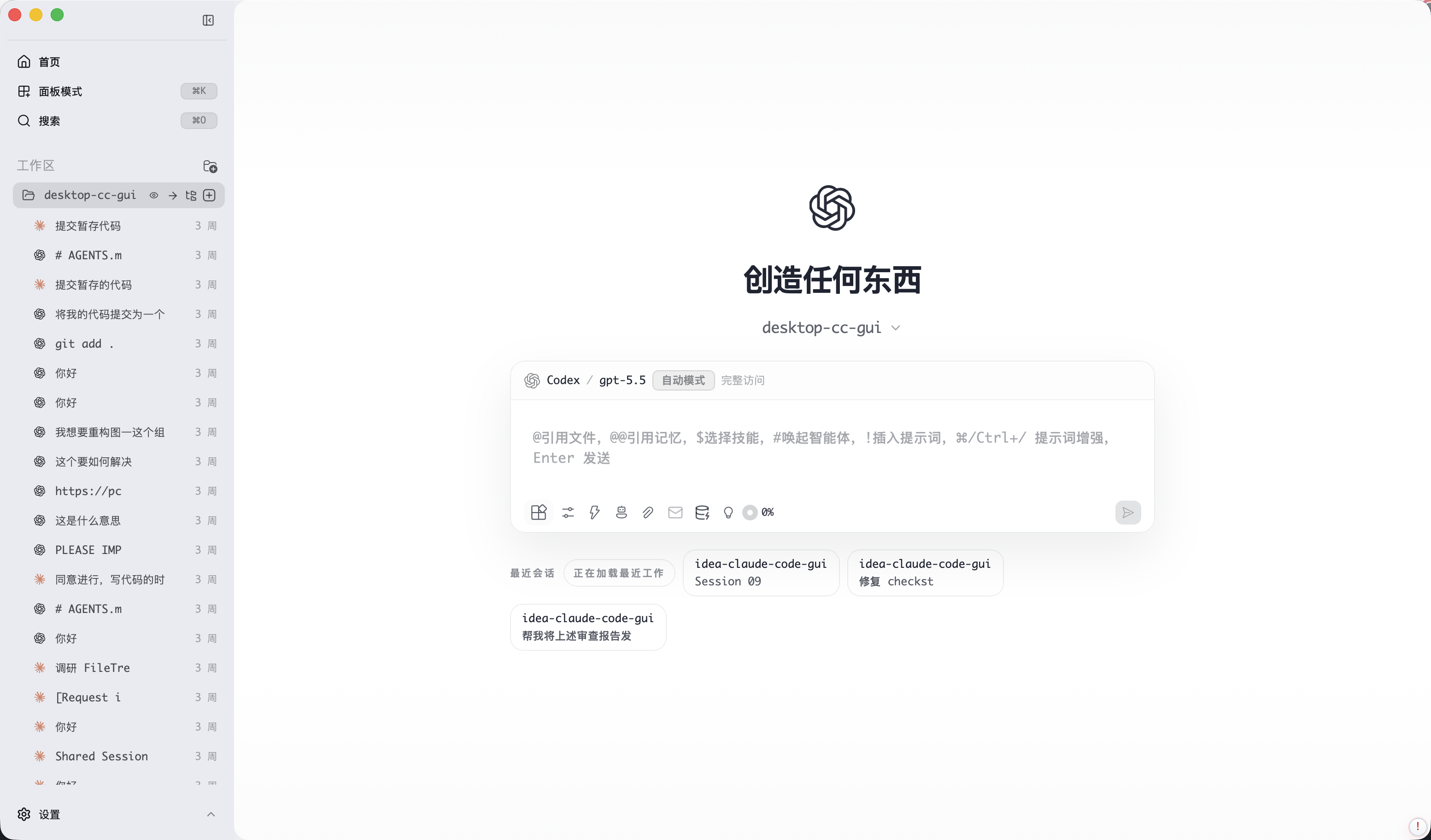
What can ccgui do?
One client, multiple AI engines
- Supports Claude Code, Codex CLI, and OpenCode — switch anytime, or mix them within the same project.
- Works with any channel: official APIs, regional relays, aggregators, and third-party providers. Each engine can keep multiple provider profiles.
- Sessions survive restarts: close the app and your conversation history is still there. Resume broken sessions and see how much context each one is using.
A chat box designed for coding
- The input box supports
@file references, slash commands, pasted images, and attachments. - Everything the AI does is transparent: file edits, shell commands, and reads all show up as live cards.
- Said something wrong? Messages support rewind and fork — jump back to any earlier point and try again.
- Too lazy to type? Use voice dictation. Bad at prompts? The built-in prompt enhancer polishes them for you.
- Queue follow-ups: while the AI is busy, line up your next question.
Not just chat — a full set of dev panels
- File tree: browse, preview, copy, paste, rename, and drag files straight into the conversation.
- Built-in terminal: a real terminal, no need to switch windows.
- Git panel: stage, commit (with AI-generated commit messages), branches, worktrees, diffs, and commit history.
- Global search: files, sessions, past messages, skills, and commands — one search box for everything.
Stay organized when tasks pile up
- Plan panel: the AI's execution plan listed step by step, so you always know where it is.
- Kanban board: drag task cards around to manage your iteration.
- Task Center: every AI run is recorded — retry failures and inspect execution logs anytime.
- Intent Canvas: sketch your plan on a canvas before writing any code.
Project intelligence (the part that makes ccgui different)
- Project Map: the AI scans your project and builds an interactive knowledge graph — file relations, API contracts, and module dependencies at a glance, with incremental updates.
- Project Memory: store key conventions and hard-earned lessons as long-term memory the AI remembers next time.
- Context Ledger: see exactly which context sources went into each answer and how much each one weighs.
- Usage stats: token consumption, cost, and cache hit rates in clear reports, plus a monthly budget cap.
Extensions and personalization
- MCP market, Skills market, Plugin market: one click to install and give the AI new abilities.
- Browser Agent: let the AI read web pages, so you stop copy-pasting docs.
- Themes galore: 15+ built-in themes (VS Code style), custom colors, window transparency, and adjustable fonts.
- Bilingual UI (English / Chinese) and fully customizable keyboard shortcuts.
- macOS / Windows / Linux, with in-app auto-update.
For what changed in each release, see CHANGELOG.md.
Download
Grab the installer for your platform from the Releases page:
| Platform | Installer |
|---|---|
| macOS (Apple Silicon) | aarch64.dmg |
| macOS (Intel) | x64.dmg |
| Windows | .exe / .msi |
| Linux | .AppImage |
After installing, configure your AI engine in Settings (e.g. a Claude Code API key or local CLI), add a project folder, and you're good to go.
Getting it running (setup guide)
Want to build it yourself or contribute? Three steps.
Step 1: Prepare your environment
You need these three things:
| Tool | Version | What for |
|---|---|---|
| Node.js | 20 or newer | Runs the frontend |
| Rust | stable (install via rustup) | Compiles the backend |
| CMake | any recent version | Builds some dependencies |
Each OS needs a bit of extra prep (these are Tauri framework requirements — see the official Tauri prerequisites):
- macOS: install Xcode command line tools:
xcode-select --install; get CMake viabrew install cmake. - Windows: install Microsoft C++ Build Tools and WebView2 (Windows 11 ships with WebView2).
- Linux: install
webkit2gtkand friends — just copy the commands from the Tauri docs.
Step 2: Install dependencies
git clone https://github.com/zhukunpenglinyutong/desktop-cc-gui.git
cd desktop-cc-gui
npm install
Note: you must use npm. pnpm and yarn are blocked by a script (so everyone gets identical dependency versions).
Step 3: Start it
# macOS / Linux
npm run tauri:dev

# Windows
npm run tauri:dev:win
A few tips:
- The first launch compiles the entire Rust backend and can take a few minutes — go grab a coffee. Later launches use incremental builds and are fast.
- An environment self-check (doctor) runs before startup. If it fails, run
npm run doctorby itself — it tells you what's missing and how to install it. - The frontend runs on port
1420. Don't worry if the port is taken; the script cleans it up automatically. - Only touching the UI, not Rust?
npm run devruns the frontend alone in a browser (backend-dependent features won't work there).
Building installers
npm run build:mac-arm64      # macOS Apple Silicon
npm run build:mac-x64        # macOS Intel
npm run build:mac-universal  # macOS Universal
npm run build:win-x64        # Windows x64
npm run build:linux-x64      # Linux x64
npm run build:linux-arm64    # Linux arm64
How to work on the code (development guide)
Tech stack at a glance
| Part | Technology |
|---|---|
| UI | React 19 + TypeScript + Tailwind CSS 4 |
| Build | Vite 7 |
| Desktop shell | Tauri 2 (Rust backend) |
| Tests | Vitest (frontend) + cargo test (Rust) |
Directory layout
desktop-cc-gui/
├── src/                    # Frontend code
│   ├── features/           # ★ Feature modules (50+), one folder per feature — where most work happens
│   │   ├── composer/       #    Input box
│   │   ├── messages/       #    Message stream
│   │   ├── git/            #    Git panel
│   │   ├── project-map/    #    Project knowledge map
│   │   └── ...             #    Each folder is a self-contained feature
│   ├── components/         # Shared UI components used across features
│   ├── services/           # Business logic; tauri.ts is the frontend↔Rust bridge
│   ├── i18n/               # English / Chinese UI strings
│   ├── styles/             # Global styles
│   └── lib/ utils/         # Utility functions
├── src-tauri/              # Rust backend
│   └── src/                # Organized by module: engine / codex / git / terminal / files ...
├── scripts/                # Build, check, and diagnostic scripts
└── docs/                   # Architecture docs, performance baselines
The typical workflow for changing a feature
- UI-only change: find the matching module under
src/features/and edit there. New components live inside that feature's own folder. - Needs backend support: add a
#[tauri::command]in the matchingsrc-tauri/src/module, then add a wrapper insrc/services/tauri.ts, and the frontend can call it. - Changed any UI text: add both English and Chinese strings in
src/i18n/— hardcoded UI text is not allowed.
Everyday commands
| Command | What it does |
|---|---|
npm run tauri:dev | Start the full app (dev mode) |
npm run dev | Frontend only (browser debugging) |
npm run lint | Code style check |
npm run typecheck | TypeScript type check |
npm run test | Run unit tests |
npm run test:watch | Watch mode (test while you code) |
npm run test:integration | Full run including heavy integration tests |
Writing tests
- Test files sit next to the source, named
xxx.test.ts/xxx.test.tsx. - The framework is Vitest — it works almost exactly like Jest.
- Heavy integration tests are named
xxx.integration.test.tsx; they're skipped by default and run withnpm run test:integration. - Rust tests go in their modules as usual and run with
cargo test.
Coding rules
Not many rules, but each exists for a reason. Run through them before submitting:
- Run the big three before committing:
npm run lint && npm run typecheck && npm run test— all green before you push. CI runs them too; passing locally saves round trips. - UI text must go through i18n: every user-visible string comes from
src/i18n/, in both English and Chinese. No hardcoding. - Keep components close to home: new components start inside their own feature folder; promote to
src/components/only once they're genuinely reused across features. - Prefix CSS classes by feature: e.g. the Git history panel uses
git-history-*class names, so styles from different features don't fight each other. - Keep files under 3000 lines: a script (
npm run check:large-files) enforces this — split files that grow too big. - TypeScript strict mode: don't paper over things with
any; write real types. - Rust file writes go through the shared helper: use the atomic write in
storage.rsinstead of rawwrite, so a crash mid-write can't corrupt user data. - Search before adding a Tauri command:
command_registrymay already have what you need — don't reinvent it. - Never commit secrets: API keys and tokens must never appear in code or commit history.
Writing commit messages
Format: type(scope): what you did (the Conventional Commits convention). The description can be in English or Chinese — just keep the format right.
| type | When to use |
|---|---|
feat | New feature |
fix | Bug fix |
refactor | Refactoring (no behavior change) |
docs | Documentation |
test | Adding/updating tests |
chore | Housekeeping (version bumps, deps, scripts) |
perf / style / ci | Performance / formatting / CI |
Real examples:
feat(composer): support pasting images as attachments
fix(git): 修复 diff 面板滚动位置丢失
docs(readme): update setup guide
No emoji in commit messages, and no AI-generated signatures.
Submitting your code (contribution flow)
- Fork the repo and clone it locally.
- Branch off
main, named likefeat/xxxorfix/xxx. - Make your changes and get the big three green locally (
lint/typecheck/test). - Open a PR against this repo's
mainbranch. Title in commit format; in the description, explain what changed, why, and how you verified it. - CI automatically runs lint, type checks, tests, and builds. Medium/high-risk findings from the PR review must be fixed before merging.
Not sure where to start? Browse the Issues and pick one that interests you. Found a bug or have an idea? Open an issue and let's talk.
Want to dig deeper into the project's internals?
AGENTS.md— the entry point for repository rules (required reading if you develop this project with AI assistance)..trellis/spec/— detailed frontend and backend implementation specs.openspec/— proposals and specs for behavior changes.docs/architecture/— architecture governance docs.
License
Friendship Link
Thanks for the support and feedback from the friends at LINUX DO.
Contributors
Thanks to all the contributors who help make ccgui better.