Project website · 项目网页 · Documentation · Download v0.3.5



Alcedo Studio is a free and open-source RAW editor and photo library.
Import your photos to browse, rate, and search them within a single project, then develop RAW files in an end-to-end 32-bit floating-point GPU pipeline that handles large medium-format files without lag. The album structure and every photo's complete edit history stay inside one project file, making backups and moving libraries as simple as copying a standard file.
Supports Windows 10/11 (x64 with CUDA/OpenCL) and Macs with Apple Silicon (Metal).
Demo Video (two short videos)
Editor
https://github.com/user-attachments/assets/d70cd10d-2045-42f3-a67d-97ab3ef9874b
Library
https://github.com/user-attachments/assets/ae0d9773-220e-4901-90f6-1989f58b0462
Key Features
-
Scene-Referred Node-Based Color Pipeline
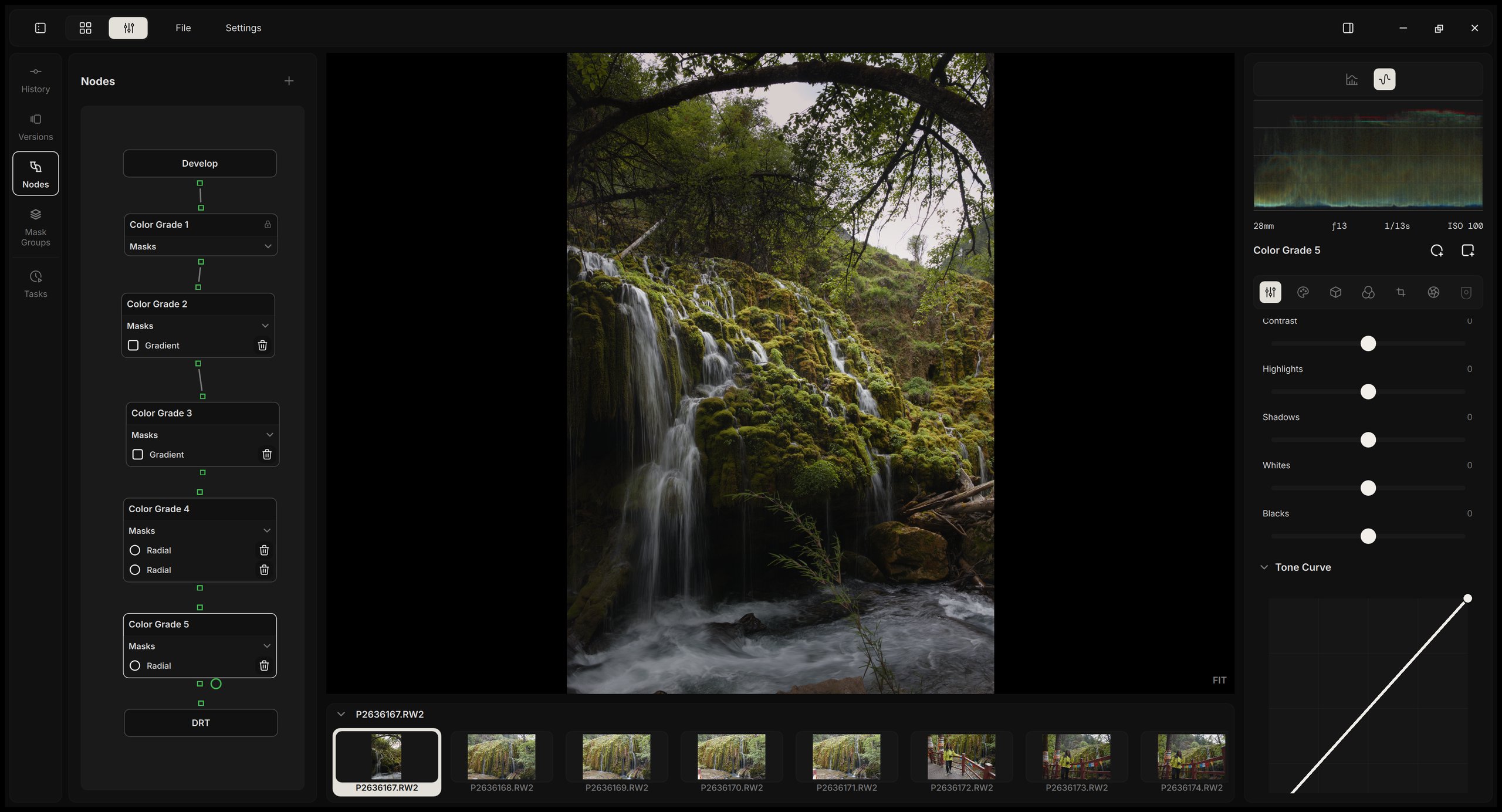
Operates entirely in a 32-bit floating-point scene-linear space. Edits are structured as an intuitive node graph: aDevelopnode handles RAW decoding and color space transforms, followed by arbitraryColor Gradenodes with dedicated masks. The final picture is formed by the built-in ACES 2.0 or OpenDRT output transform, or by the spectral Film Print simulation. -
DAG-Based GPU Pipeline
Edits are evaluated as a directed acyclic graph (DAG) in full 32-bit floating-point precision on native CUDA/OpenCL (Windows) and Metal (macOS). Each node and mask caches its output, so moving a slider only recalculates what comes after it rather than reprocessing the entire image. The preview updates in real time while dragging and settles to full quality on release. Zooming in only computes the visible region at 1:1 detail, eliminating the need to wait for offline proxies. -
Stylize Toolbox: Spectral Film Simulation, Film LUTs, and Grain
Film Print simulates 30 color negative films and 5 color reversal films spectrally: the scene light exposes the film layers, the layers develop into dyes, and the negative is printed on photographic paper or cinema print stock, or scanned and inverted for SDR or HDR output. Reversal films are viewed on a light table. Grain follows the 16mm, 35mm, or 70mm film format and the granularity data of each stock. Also includes 113 film LUTs and supports custom 3D CUBE LUTs in any color space. -
AI Masks
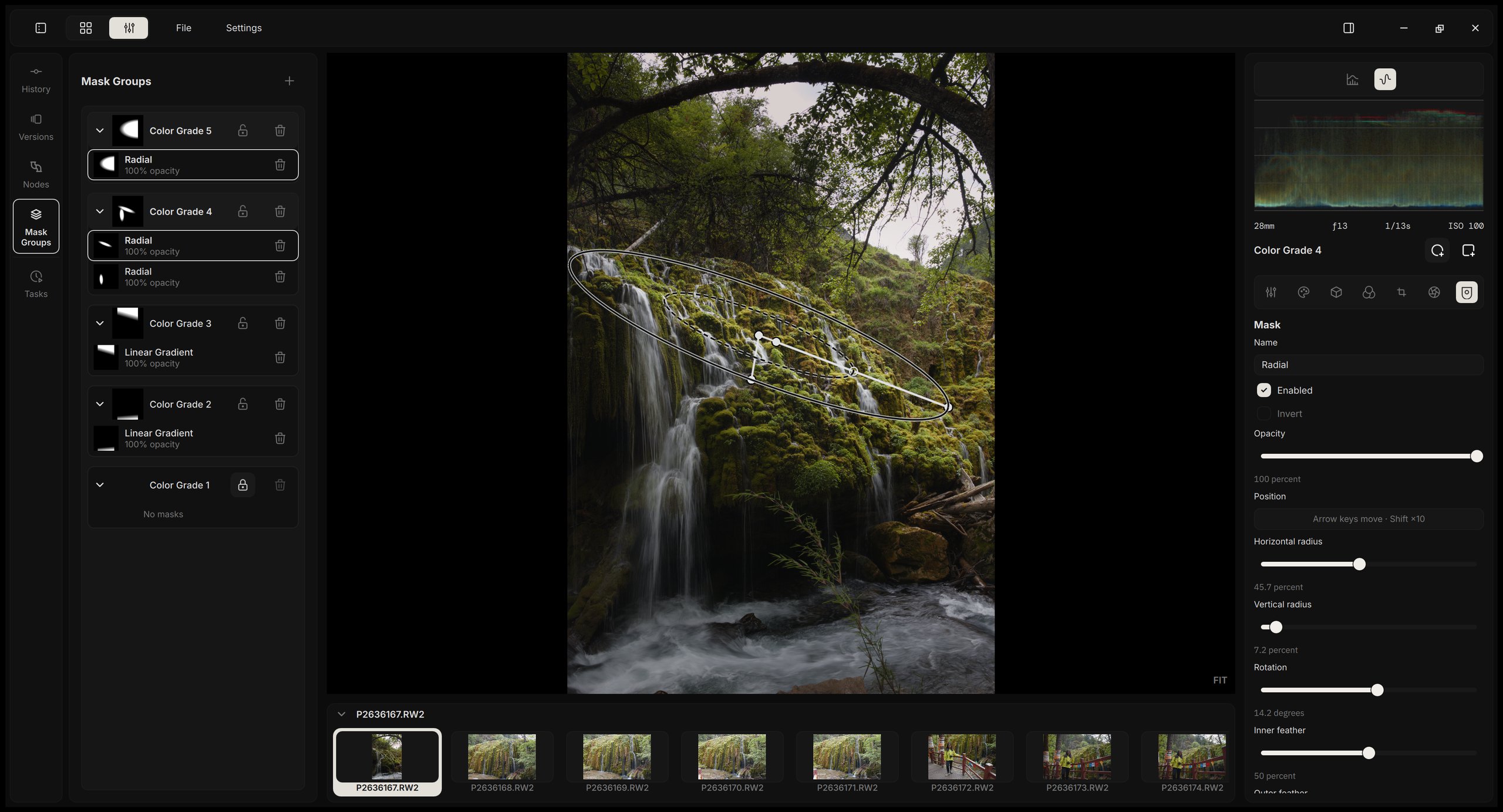
Select the subject, background, sky, or people with one click, or select any object with points, a drawn path, or a box. Add and subtract selections, adjust Feather and Expand, and restrict any mask by luminance and hue ranges. The models run on your device; saved masks stay in the project and render without running the models again. -
Local Asset Management (DuckDB & Local CLIP)
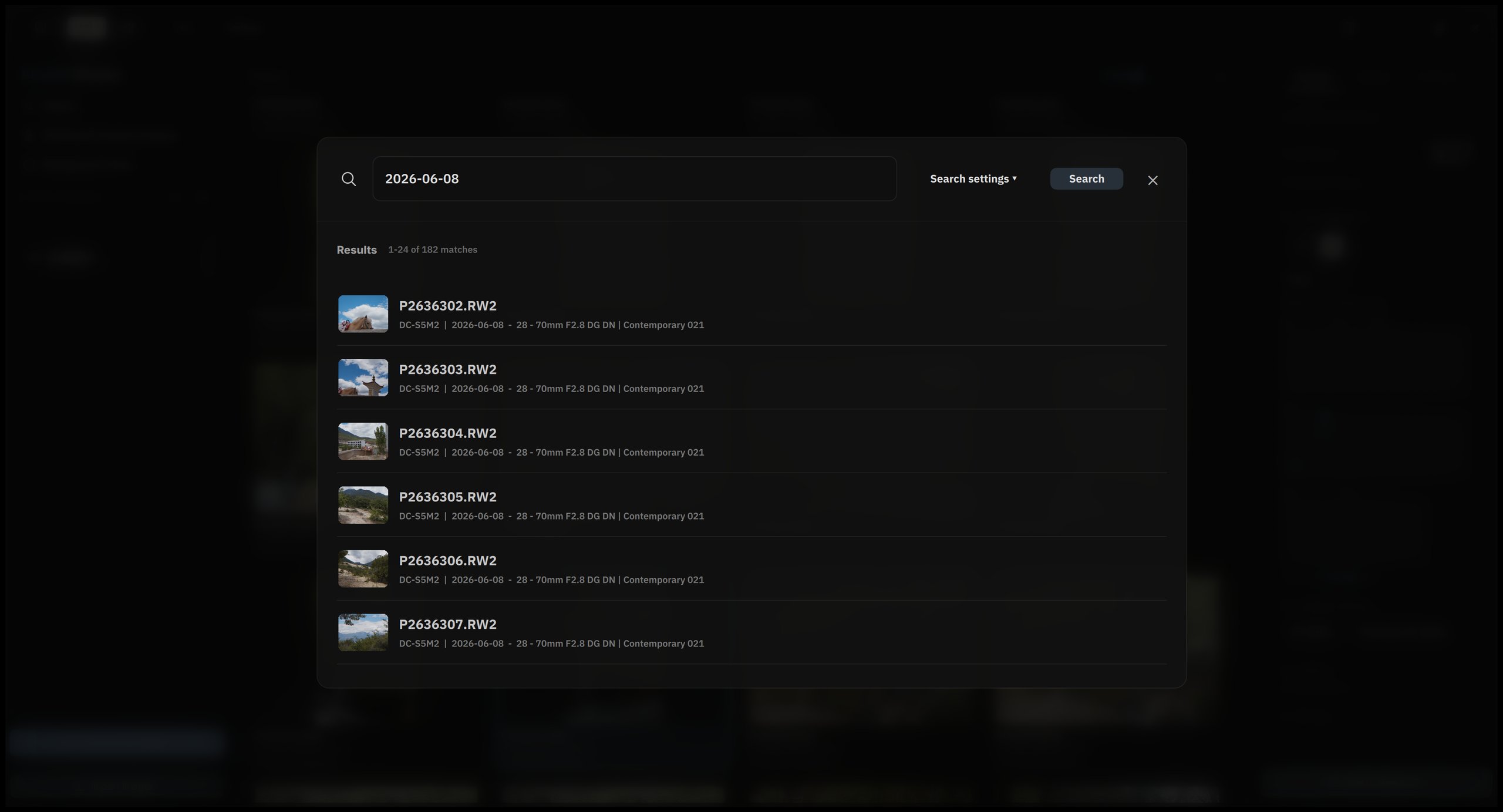
Catalogs are backed by an embedded DuckDB engine for sub-millisecond filtering across massive libraries. An on-device multilingual CLIP model tags photos upon import for natural language search without cloud dependencies. Nested collections, star ratings, and edit marks organize the library. -
Branching Version History (Git-like DAG)
Every adjustment is recorded in a non-linear version tree. Branch new variations from any step, undo changes permanently, or copy partial/complete Looks across images. -
Full CLI & Agent Collaboration
Every UI action—from culling and slider adjustments to branching history—maps 1:1 toalcedo-cli. Paired with alcedo-skills, agents like Claude Code or Codex can run batch jobs headlessly or collaborate directly in the live window via a "preview → evaluate → adjust" loop.
A Closer Look
RAW Decode
Alcedo reads RAW files from Canon, Nikon, Sony, Fujifilm, Panasonic, OM System, Leica, Hasselblad, Phase One (including the 150 MP IQ4), Pentax, Sigma, and DNGs from phones and drones; see the lists of supported formats and supported cameras. Through the project's LibRaw fork, it also opens Nikon High Efficiency NEFs from the Z 8, Z 9, Z 6 III, and Z 50 II.
It offers two demosaicing methods. RCD is the default for Bayer sensors, and the Neural Engine, a compact neural network distilled from DemosaicNet that runs on the GPU, is the default for Fujifilm X-Trans and works with Bayer files as well. Alcedo also supports highlight reconstruction based on an improved inpaint-opposed method from darktable and RawTherapee, lens correction with Lensfun profiles and Lanczos-3 resampling, and the color profiles embedded in DNG files.
Scene-Referred Color Pipeline
Alcedo keeps the full range of the RAW file through the whole edit and forms the picture for your display only at the last step:
flowchart LR
    A[RAW file] --> B[Decode and demosaic]
    B --> C[Scene-referred linear image]
    C --> D[Grading in ACEScc]
    D --> E[Display rendering transform:<br/>ACES 2.0, OpenDRT, or Film Print]
    E --> F[SDR, wide-gamut, or HDR display]
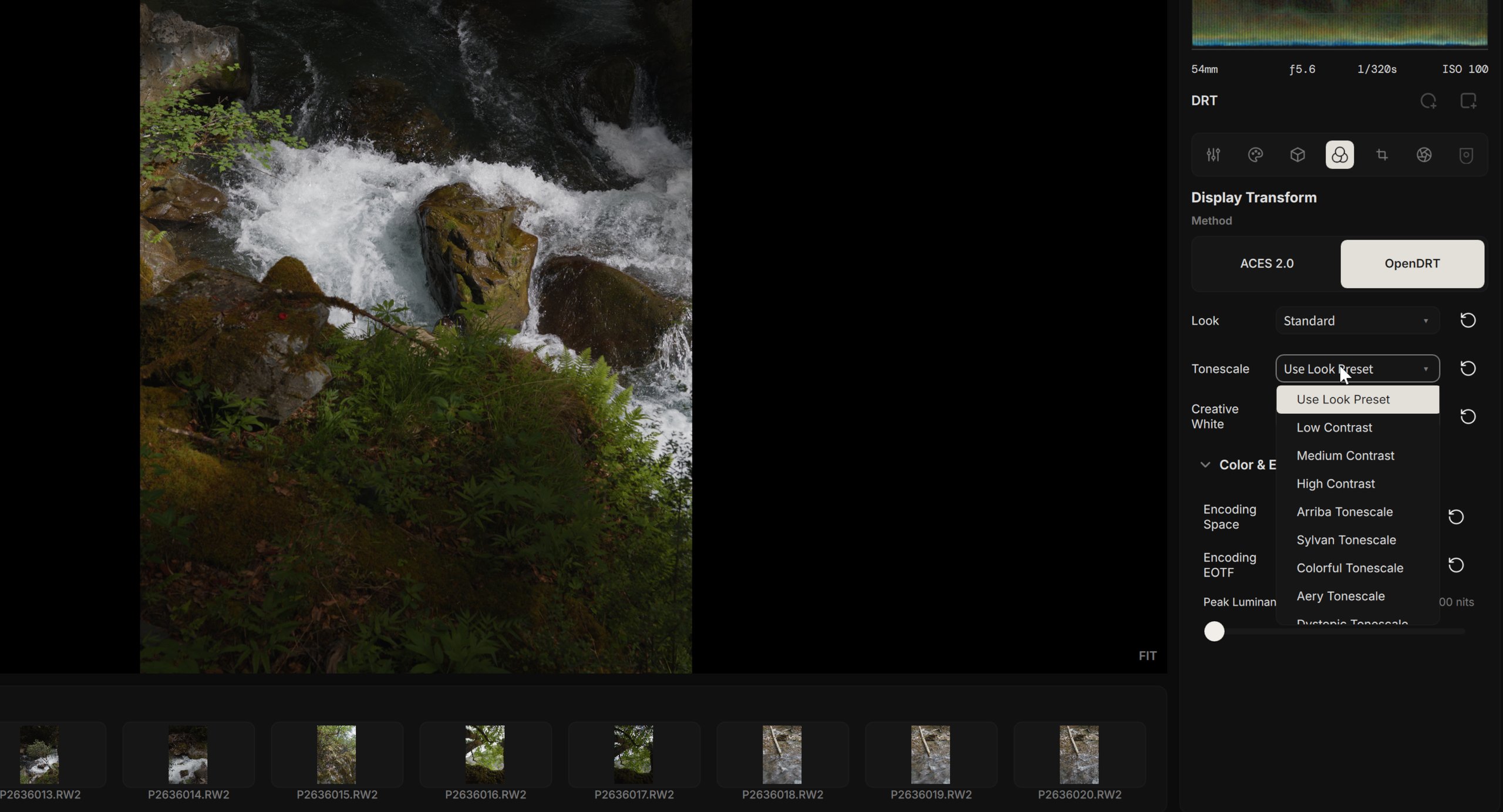
For the display rendering transform, you can choose the ACES 2.0 output transform, OpenDRT, or Film Print. With ACES 2.0 and OpenDRT, you set the target color space, transfer function, and peak luminance. On a Mac with an HDR display, the editor previews the HDR result directly.
Film Print is a spectral film simulation. It treats the graded scene-linear image as the light that reaches the film: it reconstructs a spectrum for each pixel, exposes each emulsion layer through its spectral sensitivity, spreads the light inside the emulsion and adds halation, and develops the layers along their characteristic curves with interlayer inhibition. The developed film then goes to one of three outputs:
flowchart LR
    A[Scene-referred linear image] --> B[Spectral reconstruction]
    B --> C[Film layer exposure]
    C --> D[Light spread and halation]
    D --> E[Development with<br/>interlayer inhibition]
    E --> F[Negative density]
    F --> G[Print on paper or<br/>cinema print stock]
    F --> H[Negative Scan]
    E --> I[Reversal film<br/>on a light table]
    G --> J[Rec. 709 SDR]
    I --> J
H --> K[OpenDRT: SDR or HDR]- Print: combine any of the 30 negative films with a photographic paper or a cinema print stock, including Cine Look (Kodak Vision 2383).
- Negative Scan: a virtual scanner reads and inverts the negative, and OpenDRT forms the SDR or HDR picture. Adjust scan exposure, contrast, cyan, magenta, yellow, and black. Neutral auto color keeps the balance of the full frame while you zoom and pan.
- Reversal: view the 5 color reversal films on a light table.
Scene Light defaults to As Shot and follows the temperature and tint of the RAW white balance. The film format (16mm, 35mm, or 70mm) sets the grain size relative to the frame, and smaller formats also enlarge light spread and halation. Grain forms in the film layers before printing or scanning, with the granularity data of the selected stock. The stock browser filters films by process and brand and shows a color swatch of each stock. Film Print runs on CUDA, OpenCL, and Metal, and the film data is included in the installer. For the physics, the data sources, and the GPU implementation, see the Film Print explainer (in Chinese).
Node-Based Grading
Each photo's edit is a node graph. The Develop node turns the RAW into a scene-referred image, any number of Color Grade nodes follow in sequence, and the Display Transform node forms the final picture. Every Color Grade node carries its own adjustments and its own masks, so a grade can apply to the whole frame or only to the region you choose.
flowchart LR
    D[Develop] --> G1[Color Grade: Base]
    G1 --> G2[Color Grade: Sky<br/>with gradient mask]
    G2 --> G3[Color Grade: Subject<br/>with radial mask]
    G3 --> T[Display Transform]
Each node provides standard tone and color controls, tone curves, Lift/Gamma/Gain and Offset color wheels, selective color, and detail tools. Shadows and highlights are handled by local tone mapping. Alcedo also includes CUBE LUTs built from the spectral response of real film, as well as physically modeled film grain and halation. Grain strength ranges from 0 to 200%, and its scale stays consistent as you zoom.
AI Masks and Range Masks
A Color Grade node can use gradient, radial, and AI Masks. AI Masks select the subject, background, sky, or people, or any object you mark with points, a drawn path, or a box. You can add and subtract selections, include or exclude individual people, and adjust Feather and Expand; a red overlay shows the selection. The tool keeps its own Undo and Redo, and Confirm saves the result as one history step. Saved AI Masks stay in the project and render without running the models again.
Any mask can be restricted by a Luminance/Hue Range, with two-handle bars, numeric fields, softness, and a saturation threshold. Show selection displays the resulting coverage.
The AI Mask models run on your device. Download them in Settings > AI Models, where each model card shows its license, size, and download progress.
LUTs in Any Color Space
Alongside the built-in film LUT pack, you can use your own 3D CUBE LUTs: drop them into the folder suggested by the LUT browser, and they appear under the "User" category. You can set the expected input encoding and resulting output encoding for each LUT. Scene encodings include ACES, ARRI LogC3 and LogC4, Fujifilm F-Log, Panasonic V-Log, Nikon N-Log, Apple Log, and DaVinci Intermediate; display encodings include sRGB, BT.1886, PQ, and HLG. When a LUT outputs a display encoding, Alcedo applies an ACES 2.0 inverse output transform to bring the result back into the scene space, allowing the LUT to integrate into the scene-referred pipeline like any other adjustment. Alcedo remembers encoding pairs per LUT and carries them when copying adjustments. The LUT browser supports filtering by category, source, brand, and print stock.
Versions and Edit History
Each photo can store multiple named versions, or branch into a new version from any step in history. Adjustments are recorded in a Git-like history inside the project file, making every step reversible. You can copy an entire Look, or select specific adjustments, across photos. For architecture details, see the edit history design notes.
Library and Search
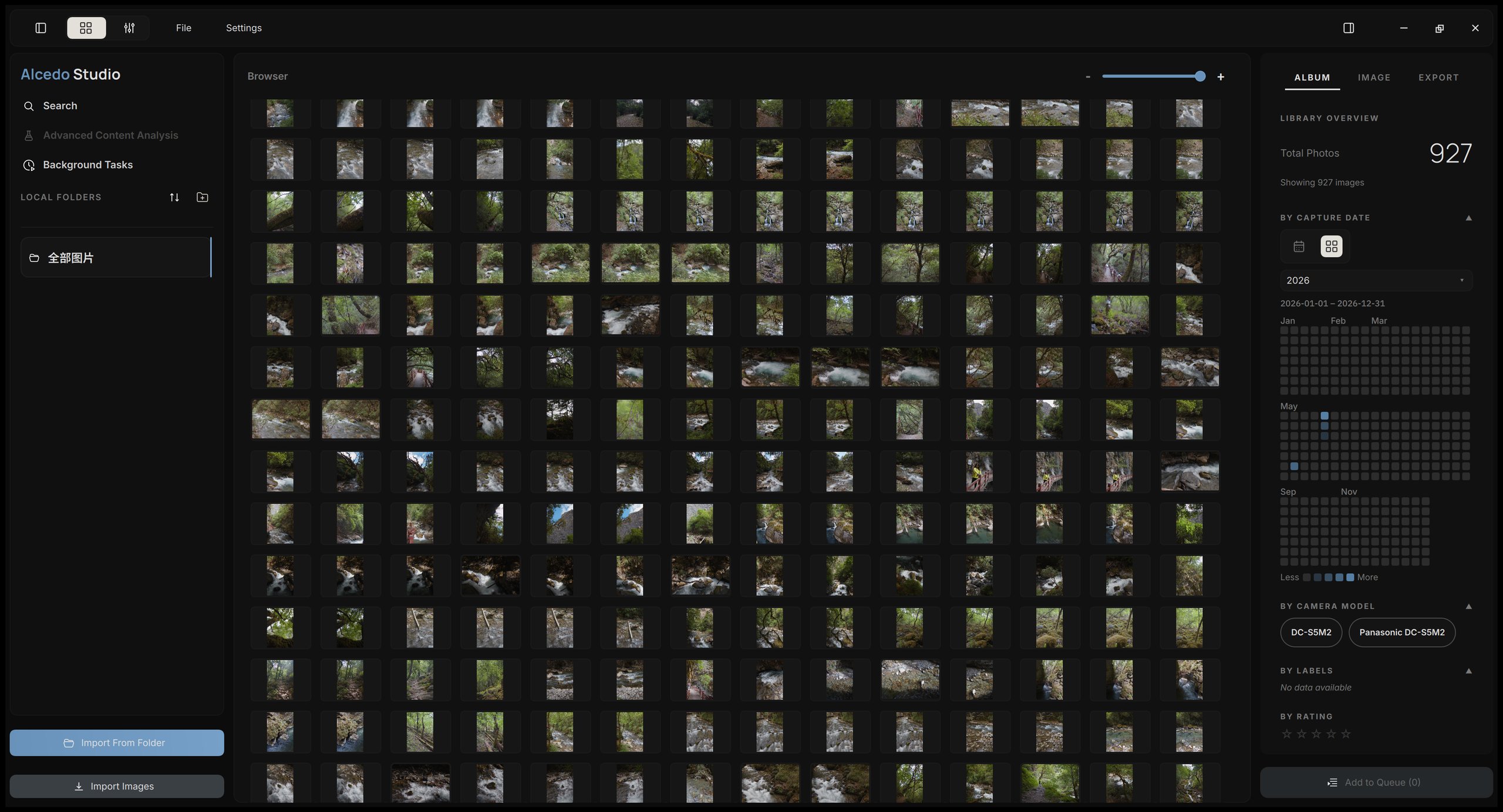
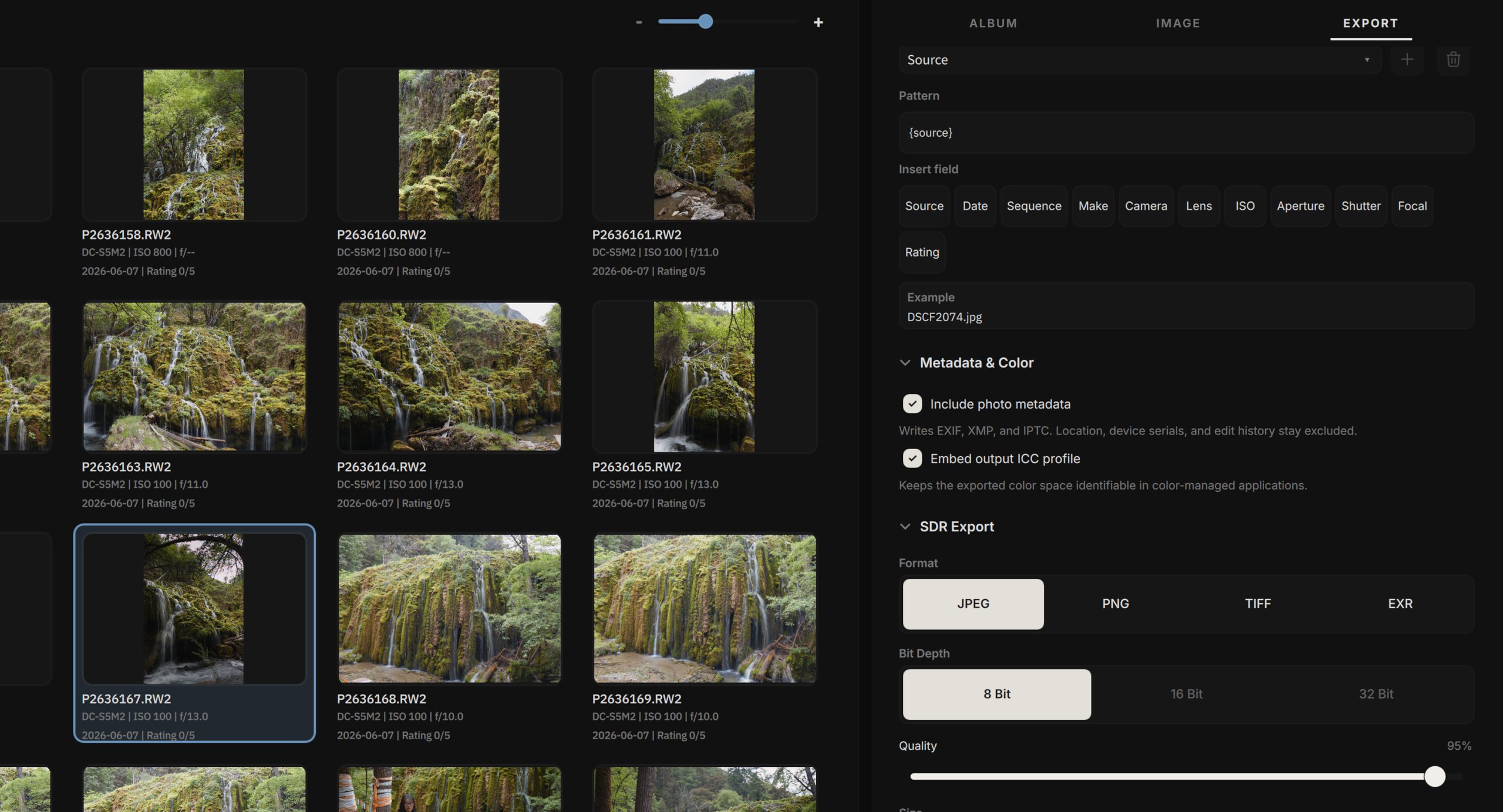
The library is stored in a DuckDB database, keeping browsing, filtering, and search responsive as your collection expands. The album inspector groups photos by date, camera, lens, tag, and rating; selecting any group filters the catalog instantly. Nested collections form a compact tree with inline create and rename, drag to move, and photo counts. Photo cards show edit marks and star ratings, and larger cards let you rate a photo by clicking a star.
Alcedo supports EXIF queries by camera, lens, date, ISO, focal length, and aperture, and natural-language search via on-device multilingual CLIP models that can also auto-tag on import. Download and activate the CLIP models in Settings > AI Models. The search palette puts recent searches, commands, filters, and photo previews in one window, and Enter applies the search to the Library.
Export
Alcedo exports to JPEG, PNG, TIFF, OpenEXR, and Ultra HDR JPEG, supporting 8, 16, or 32 bits where applicable. Sizing can be defined by long edge, exact dimensions, or print size, with embedded ICC profiles and flexible filename patterns. Built-in presets (Standard, Web, Social Media, Email, Maximum Quality JPEG, 16-bit TIFF, and EXR Archive) configure all settings except destination, and custom presets can be saved. Metadata export options let you choose whether to retain EXIF, ICC profiles, and GPS coordinates. Camera/lens serial numbers and edit history are never written to exported files.
AI Agents and alcedo-cli
alcedo-cli is installed alongside the application (inside the app bundle on macOS). Agents, shell scripts, or terminal users can perform any UI action through the CLI:
- Projects and Library: Create, open, and save projects; import folders; list, rate, select, and delete photos; inspect metadata and thumbnails; query via search rules including natural-language queries.
- Editing: Open photos, inspect and set any adjustment, update multiple fields atomically, manipulate nodes and LUTs, list Film Print stocks, undo/redo, and read edit histories.
- Versions: Create, branch, switch, rename, and delete versions; copy and paste adjustments across photos.
- Output: Render previews for inspection, export using identical settings to the UI panel, and monitor background tasks until completion.
Agents operate in two modes. Headless sessions run in the background for batch workflows. Alternatively, an agent can take control of your active window: editing controls are locked during its operations while viewport panning, zooming, and scopes remain active. Agent sessions are pinned to the task island and background tasks dialog, listing executed commands; clicking Stop immediately returns control. Agent edits are badged in the history with rationales for easy review and rollback.
alcedo-cli session start --headless --project <project>.alcd
alcedo-cli call search.query '{"text": "sunset over the ocean"}'
alcedo-cli schema          # Parameter and result definitions per command
alcedo-cli session stop
Paired with the alcedo skill in alcedo-skills, an agent establishes a "render preview → inspect frame → refine adjustments" loop, adapting edits dynamically to the image rather than applying static numbers. Install by telling your agent "Install the skill zidage/alcedo-skills", or in Claude Code via /plugin marketplace add zidage/alcedo-skills and /plugin install alcedo@alcedo-skills. New capabilities are added as lightweight Python scripts rather than compiled plugins. For example, contact_sheet.py generates contact sheets across hundreds of images in a single batch call for automated culling and rating, while analyze_preview.py measures tones, color casts, and horizon tilt, writing results directly back into the project. The complete command reference is available in the same repository.
Screenshots
 |  |
 |  |
 |  |
System Requirements
- Windows: 10 or 11, x64. Compute capability 6.0+ NVIDIA GPU for CUDA; OpenCL for other GPUs.
- macOS: 13.3 or later, Apple Silicon (M1 or newer), using Metal.
- Minimum 8 GB RAM; 16 GB or more recommended for large libraries.
Documentation
User guides and developer notes are available on the documentation site. For building from source, see docs/build_from_source.md. Release notes are located in docs/changelog/. To control Alcedo Studio from scripts, terminals, or AI agents, refer to the alcedo-cli documentation.
Acknowledgments
Alcedo Studio builds upon the work of many open-source projects and authors:
- Film simulation LUTs from JanLohse/spectral_film_lut and andreavolpato/spektrafilm.
- The Film Print spectral simulation is inspired by andreavolpato/spektrafilm and DhaliwalX/fotufilm-engine. Its film data uses the digitized datasheets of spectral_film_lut and the Astia 100F profile of fotufilm (CC BY-SA 4.0).
- AI Masks use SAM 2.1 (Hiera tiny) for point, path, and box selection, and S3OD (s3od-synth weights, with a DINOv3 image encoder) for Subject matting.
- Camera color matrices from rawtoaces-data.
- Neural demosaicing model distilled from mgharbi/demosaicnet (Gharbi et al., 2016).
- Inpaint-opposed highlight reconstruction adapted from darktable and RawTherapee.
- RCD demosaicing adapted from LuisSR/RCD-Demosaicing.
- OpenDRT ported from Jed Smith's open-display-transform.
- ACES 2.0 output transforms implemented according to aces-aswf/aces-core.
- Film grain based on Realistic Film Grain Rendering (IPOL 2017).
- RAW decoding uses LibRaw, lens correction uses Lensfun, metadata uses Exiv2, image IO uses OpenImageIO and OpenCV, color management uses OpenColorIO, catalog database uses DuckDB, and UI uses Qt and QuickQanava.
For a complete list of third-party components and their licenses, see THIRD_PARTY_NOTICE.txt and third_party_licenses/.
ACES is a trademark of the Academy of Motion Picture Arts and Sciences (A.M.P.A.S.). Alcedo Studio is an independent project and is not affiliated with, certified, or endorsed by A.M.P.A.S., Academy Software Foundation, Jed Smith, or any other upstream authors mentioned above. These names are used solely to identify the respective technologies. Film stock names such as Kodak and Fujifilm are trademarks of their owners and identify the films that Film Print simulates.
License
Alcedo Studio is licensed under the GNU General Public License v3.0 (GPL-3.0-only). See LICENSE and NOTICE.