
Harbor SDK
Publish-ready TypeScript and Python packages for building with Harbor.
Promise-first TypeScript clients, sync and async Python clients, generated protocol types, runtime execution results, plugin and registry contracts, platform adapters, and a local Harbor-compatible development server with a built-in browser frontend.





Prefer the hosted control plane with workspace-scoped credentials, team sharing, and the full Harbor dashboard? Use tryharbor.ai.
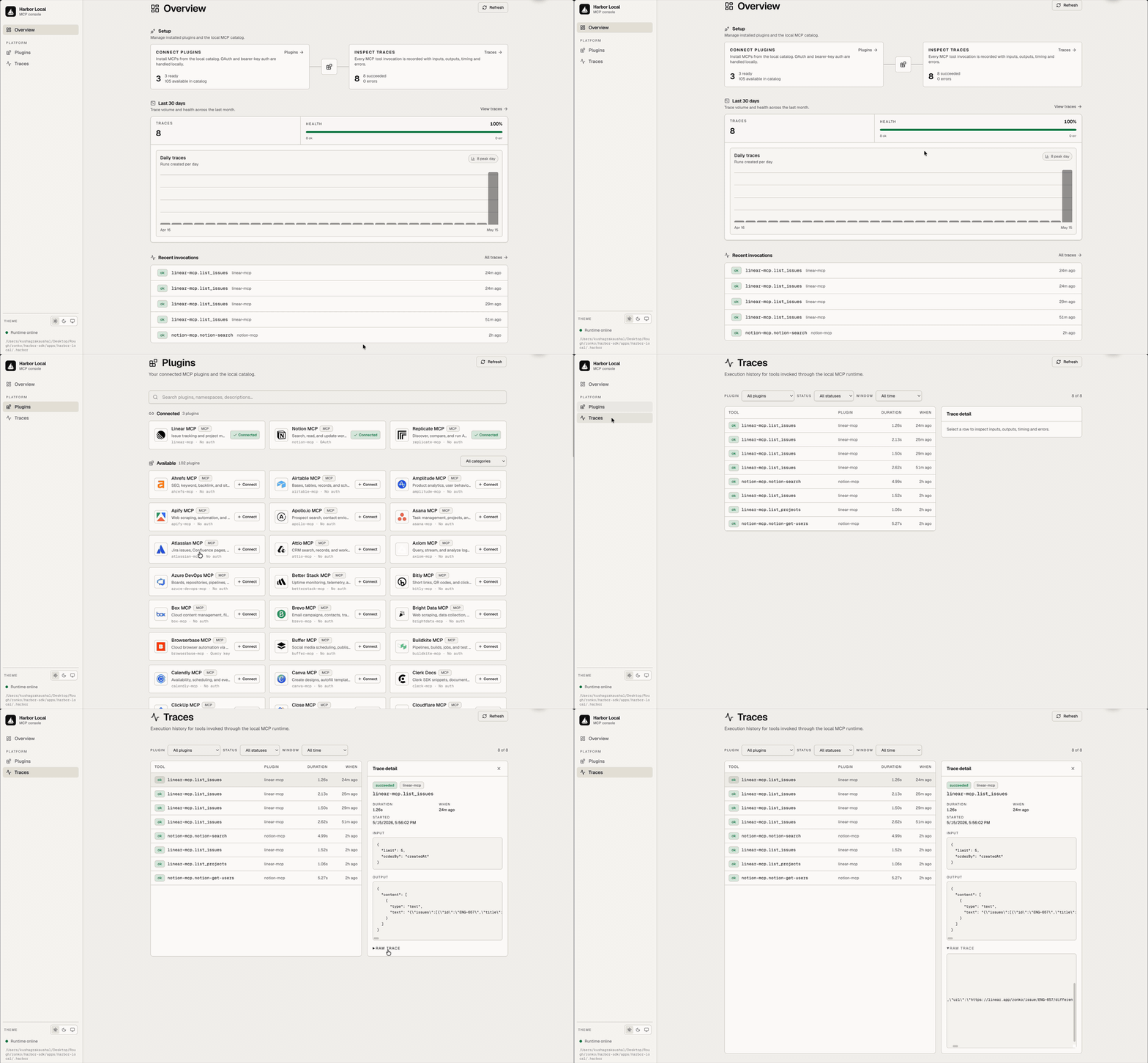
Table of Contents
- Why Harbor SDK
- Public Packages
- Key Features
- Architecture at a Glance
- Quickstart
- Use the Client
- Use the Python Client
- Local Platform Frontend
- Examples
- Project Layout
- Development
- Security Model
- Publishing
- Roadmap
- License
Why Harbor SDK
Most agent and tool integrations end up in one of two weak shapes:
- Hardcoded provider clients inside the app or agent, with little auditability.
- A hosted platform dependency before the developer has proved the workflow.
Harbor SDK keeps the public package surface small while still exposing the real building blocks:
- app code can use a normal Promise client through
@hrbr/client, - system code can import stable Harbor namespaces through
@hrbr/sdk, - local development can run a Harbor-compatible server and frontend without the hosted dashboard,
- runtime results preserve raw JSON and expose language-friendly content blocks for text, JSON, and explicit skill bundles.
This repo is the publish-shaped package repo. Source generation still happens in the Harbor monorepo; this repository stores the npm artifacts and runnable examples in the shape external developers consume.
Public Packages
| Package | Purpose |
|---|---|
@hrbr/client | Promise-first Harbor API client for application, browser, integration, CLI, and server authors. Includes @hrbr/client/effect for Effect-native hosts. |
@hrbr/sdk | Composite system SDK facade for Harbor runtime, platform, inspect, plugin, protocol, registry, Orbit, and control-plane contracts. |
harbor-sdk | Python client SDK from packages/python, with sync and async clients over the same generated Harbor protocol. |
The intended public TypeScript surface is two package identities. The Python
surface is one distribution package named harbor-sdk with import package
harbor_sdk. In the current pre-release lane, all three packages are
distributed as GitHub release artifacts rather than npm or PyPI registry
publishes. Leaf runtime/protocol/platform packages stay behind @hrbr/sdk
unless there is a concrete reason to expose a new public product.
Key Features
| Capability | What you get |
|---|---|
| Promise-first client | createHarborClient() returns ordinary Promises for app and integration code. |
| Effect variant | @hrbr/client/effect exposes the same client surface as Effect values and a layer. |
| Python client | HarborClient and AsyncHarborClient expose sync/async Python calls with typed runtime content blocks. |
| Generated protocol client | harbor.api and @hrbr/client/generated/harbor expose generated Harbor API resources and types. |
| Explicit auth modes | Workspace API keys, bearer tokens, token providers, OAuth authorize URL helpers, and device-login helpers. |
| Runtime results | runtime.execute preserves raw result and typed content blocks, including explicit skill bundles. |
| System namespaces | @hrbr/sdk exports Agents, Core, Inspect, Orbit, Platform, Plugins, Protocol, Registry, and Runtime. |
| Focused subpaths | Narrow imports such as @hrbr/sdk/inspect, @hrbr/sdk/core/trigger, @hrbr/sdk/registry, and @hrbr/sdk/platform/local. |
| Local server | @hrbr/sdk/platform/local can initialize a local project, serve Harbor-compatible routes, record runs, and host a small frontend. |
| Packaged artifacts | Package directories contain dist, declaration files, modern exports, and release metadata. |
Architecture at a Glance
┌────────────────────────────────────────────────────────────────────┐
│                    Application / agent / integration                │
│       browser app, server job, CLI, desktop app, or test harness     │
└─────────────────────┬───────────────────────────┬──────────────────┘
                      │                           │
                      ▼                           ▼
          ┌──────────────────────┐     ┌──────────────────────────┐
          │     @hrbr/client     │     │        @hrbr/sdk          │
          │ Promise API client   │     │ Composite system facade   │
          │ Effect subpath       │     │ Core/Runtime/Platform/... │
          └──────────┬───────────┘     └───────────┬──────────────┘
                     │                             │
                     ▼                             ▼
       Hosted Harbor API                 Local platform / contracts
       https://api.tryharbor.ai          @hrbr/sdk/platform/local
                     │                             │
                     ▼                             ▼
           workspaces, runs,         local project store, run records,
           plugins, sources,         local frontend, runtime host hook
           triggers, workflows
Quickstart
Prerequisites: Bun 1.3+ and Node 22+.
git clone https://github.com/zonko-ai/harbor-sdk.git
cd harbor-sdk
bun install
bun run typecheck
bun run smoke
bun run python:sdk:test
Run the local frontend example:
bun run --filter local-platform-example serve
Open the printed http://127.0.0.1:<port> URL. The example uses
local-token as its bearer token when the frontend asks for auth.
Install the current release artifacts directly from GitHub:
npm install https://github.com/zonko-ai/harbor-sdk/releases/download/v0.1.1/hrbr-client-0.1.1.tgz
npm install https://github.com/zonko-ai/harbor-sdk/releases/download/v0.1.1/hrbr-sdk-0.1.1.tgz
python -m pip install https://github.com/zonko-ai/harbor-sdk/releases/download/v0.1.1/harbor_sdk-0.1.1-py3-none-any.whl
Use the Client
import { createHarborClient } from '@hrbr/client'

const harbor = createHarborClient({
  baseUrl: 'https://api.tryharbor.ai',
  workspaceId: process.env.HARBOR_WORKSPACE_ID!,
  auth: { kind: 'api_key', key: process.env.HARBOR_API_KEY! },
})

const exec = await harbor.runtime.execute({
  code: 'return "hello from Harbor"',
})

console.log(exec.result)
console.log(exec.content?.[0])
For browser and app-owned OAuth flows, keep token storage in the application and pass a provider into the client:
const harbor = createHarborClient({
  baseUrl: 'https://api.tryharbor.ai',
  auth: {
    kind: 'bearer',
    tokenProvider: async () => await getCurrentAccessToken(),
  },
})

const workspaces = await harbor.workspaces.list({ limit: 25 })
Use @hrbr/client/effect when the host application wants Effect-native calls
instead of Promises.
Use the Python Client
from harbor_sdk import HarborClient

client = HarborClient(
    api_key="hrbr_...",
    workspace_id="workspace_...",
)

run = client.runtime.execute(code='return "hello from Harbor"')

print(run.result)
for block in run.content or []:
    if block.type == "text":
        print(block.text)
    elif block.type == "json":
        print(block.json_)
    elif block.type == "skill_bundle":
        print(block.skill.slug)
Async hosts use the same shape:
from harbor_sdk import AsyncHarborClient

client = AsyncHarborClient(
    api_key="hrbr_...",
    workspace_id="workspace_...",
)

run = await client.runtime.execute(code='return "hello from Harbor"')
api_key defaults to HARBOR_API_KEY, workspace_id defaults to
HARBOR_WORKSPACE_ID, and base_url defaults to https://api.tryharbor.ai.
The generated protocol layer is exposed as harbor_sdk_generated; application
code should prefer the public harbor_sdk facade.
Local Platform Frontend
@hrbr/sdk/platform/local is the SDK-local infrastructure surface. It is not
the full hosted Harbor dashboard, but it is enough to exercise a local
Harbor-compatible server and frontend.
import { createHarborClient } from '@hrbr/client'
import { Effect } from 'effect'
import { initLocalProject, startLocalHarborServer } from '@hrbr/sdk/platform/local'

const project = initLocalProject({
  workspaceId: 'workspace_local',
  workspaceName: 'Local SDK Workspace',
  authToken: 'local-token',
})

const server = await startLocalHarborServer({
  project,
  authToken: 'local-token',
  runtimeHost: (invocation) =>
    Effect.succeed({
      mode: invocation.request.mode,
      result: { ok: true, scopeId: invocation.context.scopeId },
      logs: [],
      warnings: [],
      timings: {},
    }),
})

const harbor = createHarborClient({
  baseUrl: server.url,
  workspaceId: 'workspace_local',
  auth: { kind: 'bearer', token: 'local-token' },
})

await harbor.runtime.execute({ code: 'return { ok: true }' })
The server exposes the SDK-local frontend at /, the frontend script at
/local/frontend.js, health at /healthz, and Harbor-compatible JSON
routes for the local workspace/run flow used by the examples.
Examples
| Example | What it shows |
|---|---|
examples/browser-client | Browser/app integration with caller-owned bearer token state. |
examples/client-promise | Promise runtime execution and content blocks for text plus explicit skill bundles. |
examples/python-client | Offline Python client call showing text, JSON, and skill-bundle content blocks. |
examples/sdk-system | Root namespace imports, the inspect namespace, and focused subpaths from @hrbr/sdk. |
examples/local-platform | Local project, local server, SDK client call, and built-in frontend. |
Run all examples through the smoke command:
bun run smoke
Project Layout
harbor-sdk/
├── docs/assets/              # logo and demo media used by this README
├── examples/
│   ├── browser-client/
│   ├── client-promise/
│   ├── python-client/
│   ├── local-platform/
│   └── sdk-system/
├── packages/
│   ├── client/               # generated @hrbr/client package
│   ├── python/               # Python harbor-sdk package
│   └── sdk/                  # generated @hrbr/sdk package
├── LICENSE
├── package.json
└── README.md
Development
bun install
bun run typecheck
bun run smoke
bun run pack:dry-run
bun run python:sdk:test
The package directories are generated artifacts. For broad source changes, refresh them from the Harbor monorepo publish pipeline, then re-run the checks above in this repository.
Security Model
@hrbr/clientdoes not own browser cookies, OAuth refresh storage, or app sessions. The host application owns credentials and passes a token or provider.- Workspace API-key clients require an explicit
workspaceIdbefore runtime and workspace-scoped helper calls. - Skill bundles are never inferred from arbitrary returned objects. User code must return the explicit Harbor execute-result envelope for SDKs to expose a loadable skill bundle.
- The local platform server is for single-user development and test harnesses.
Keep it on loopback and configure
authTokenwhen exposing the frontend. - The hosted Harbor dashboard, WorkOS/AuthKit configuration, shared credential vault, and team governance live in the Harbor product, not in this package repository.
Release Artifacts
The current release flow builds GitHub release artifacts from the package directories after generated artifacts have been refreshed and verified:
bun run python:sdk:pack
npm pack ./packages/client --pack-destination tmp/release-artifacts
npm pack ./packages/sdk --pack-destination tmp/release-artifacts
cp tmp/python-dist/harbor_sdk-*.whl tmp/release-artifacts/
Upload the three files in tmp/release-artifacts to the matching GitHub
release tag. Do not publish to npm or PyPI unless the registry release lane has
explicitly been opened.
Roadmap
- Open the npm registry release lane for
@hrbr/clientand@hrbr/sdk. - Open the PyPI registry release lane for
harbor-sdk. - Add more framework examples for browser, server, CLI, and worker hosts.
- Keep local platform frontend examples aligned with the hosted Harbor API contract.
- Add release automation that proves pack/install smokes before publish.
License
Released under the MIT License.
Built by Zonko Team