The AI Telco Engineer
The AI Telco Engineer (AITE) is an agentic framework that deploys a swarm of parallel large language model (LLM) workers to autonomously design and optimize wireless communications algorithms for user-defined tasks, such as the design of a channel estimator or a link adaptation algorithm. Each worker is powered by an LLM and operates within an isolated, containerized environment. Workers have access to a toolkit that includes file editing capabilities, Sionna documentation, and a task-specific evaluation tool that provides feedback on algorithmic performance.
AITE implements an idea-driven, multi-objective optimization loop. An orchestrator LLM proposes N distinct algorithmic approaches (ideas) for the task. A population of M workers is distributed across those ideas, with each worker implementing and improving one assigned approach in its own isolated workspace. Each solution is evaluated on two objectives: a task-specific metric and a complexity measure (e.g. floating-point operations (FLOPs), parameter count, or inference time). After every worker run, multi-objective hyperparameter tuning (via Optuna) produces a set of Pareto-optimal configurations per workspace. The global 2-D Pareto front across all workspaces then drives idea generation for subsequent generations, with the aim of pushing the front outward.
This repository accompanies the paper "Autonomous Discovery of Wireless Communications Algorithms" and includes the two example tasks studied there: an equalizer for an orthogonal time–frequency space (OTFS) system, and a receiver for an orthogonal frequency-division multiplexing (OFDM) system that uses a custom constellation and operates without pilots.
Setup
Workers run inside Docker containers, so a working Docker installation is required, together with the NVIDIA Container Toolkit for GPU-accelerated tasks. AITE falls back to CPU when no NVIDIA runtime is available. Install the Python dependencies with:
pip install -r requirements.txtBuilt-in tasks
A task is a self-contained folder providing everything AITE needs to tackle a given problem. AITE ships with the two example tasks below under tasks/. Custom tasks can also be created for other wireless communications problems.
| Task | Metric | Direction | Complexity | Description |
|---|---|---|---|---|
pilotless | Normalized Validation Error (NVE) | Lower is better | Per-call runtime | Pilotless OFDM receiver |
otfs_detector | Normalized Validation Error (NVE) | Lower is better | Per-call runtime | OTFS equalizer |
Each task folder contains a notebook that reproduces the results reported in the paper, OTFS.ipynb for the OTFS equalizer and Pilotless.ipynb for the pilotless receiver. For the pilotless task, pre-trained weights for the neural receiver baseline are available here.
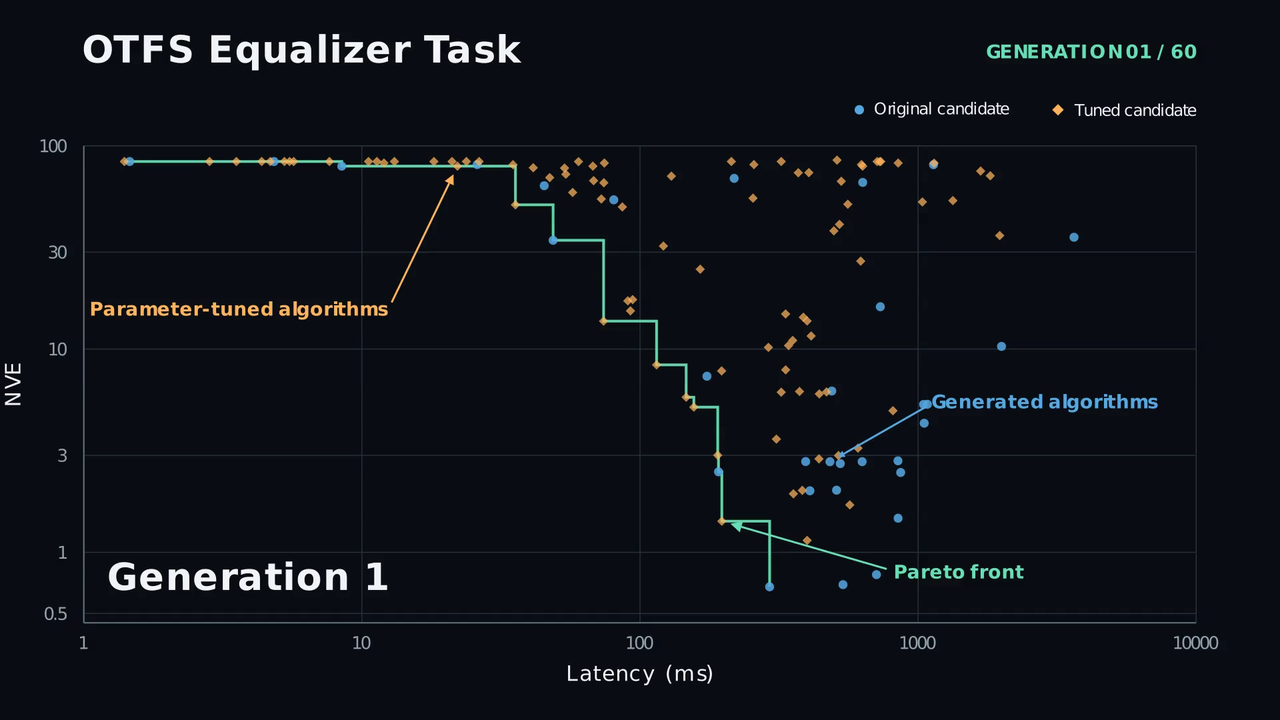
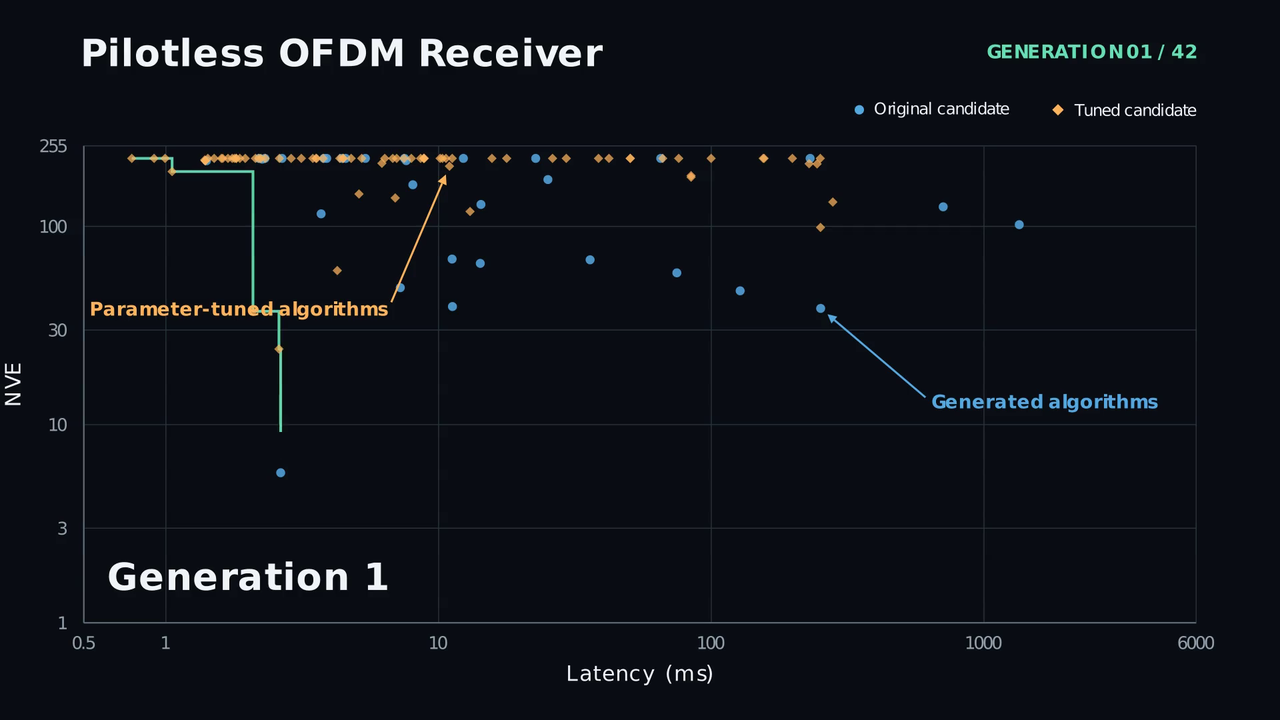
Click on a preview below to watch a video showing of the Pareto front's evolution.
Running these tasks first requires installing their dependencies:
pip install -r requirements-tasks.txtThe built-in tasks cannot be launched out of the box. Each task's config.json must first be completed with the model name and API base URL of the models to use. These values depend on how the models are accessed (e.g. a remote endpoint or a local deployment).
The fields to complete in each task's config.json are:
- Orchestrator LLM:
modelandbase_urlundermanager_llm. We used GPT-5.5 with "high" reasoning effort. - Workers LLM:
modelandbase_urlunderagent_llm. We used GPT-5.5 with "medium" reasoning effort.
Enabling the Sionna documentation search tool requires setting the embedding and reranker endpoints. The first time the tool runs, it indexes the Sionna tutorials and API documentation, which also relies on an LLM for summarization. The corresponding fields are:
- Embedding model:
embedding_modelandembedding_base_urlundertools_config.sionna_doc_config. We used nomic-embed-text-v1.5. - Reranker model:
reranker_modelandreranker_base_urlundertools_config.sionna_doc_config. We used ms-marco-MiniLM-L6-v2. - Summarization LLM:
modelandbase_urlundertools_config.sionna_doc_config.summarize_llm. We used GPT-5.5 with "low" reasoning effort.
Launching tasks
If accessing the configured LLMs requires an API key, set it as an environment variable:
export MODEL_API_KEY=<your-api-key>To start a task, use:
python launch.py <task_folder>For example, to launch the built-in tasks:
# OTFS Equalizer Design
python launch.py tasks/otfs_detector

# Pilotless Receiver
python launch.py tasks/pilotless
Leaderboard
The leaderboard is the live record of the search: it lists all algorithms produced by the workers, their evaluation outcome (success or failure), the task metric, and the complexity measure. A web viewer displays a 2-D scatter plot of all solutions (metric vs complexity) with the Pareto front overlaid.
While a task is running (or after it has run), the leaderboard can be viewed in the web UI. From the repository root, run:
./scripts/leaderboard/serve.py --workspace path/to/workspacesThen open http://localhost:8000 in your browser.
Use ./scripts/leaderboard/serve.py --help for more options (e.g. --port).
Stopping and resuming
Pressing Ctrl+C stops the workers gracefully. The leaderboard is saved after each candidate completes, so progress is preserved. Re-running AITE on the same task and on the same workspace resumes the optimization process.
Creating a new task
A new task is a subfolder under tasks/ containing the following:
- Required:
config.json— task configurationprompt.md— natural-language task descriptioneval_tool.py— defines theEvalToolclasseval/eval.py— evaluation script that computes the metric and complexitydocker/— folder containing the Dockerfile for the worker container
- Optional:
- Other files in
eval/(datasets, helper modules, baselines) to be copied into the workspace tool_factory.py— for extra tools (e.g. Sionna documentation search)
- Other files in
1. Create the task folder
mkdir -p tasks/my_task/eval
mkdir -p tasks/my_task/docker
2. Create the Docker container
A Dockerfile in tasks/my_task/docker/ (e.g. tasks/my_task/docker/dockerfile_agent_container) declares the dependencies for the task. The framework builds the image automatically the first time it is needed, using workspace.container.dockerfile_path from config.json.
This image is used to run workers in isolated workspaces. Workers can install additional packages via PyPI inside the container.
The image tag must match workspace.container.docker_image in config.json. Setting workspace.container.dockerfile_path to null instead selects a pre-built image or a public one such as python:3.12-slim.
3. Create required files
config.json — Task configuration. Copying an existing task's file and adapting it is the recommended starting point. Example:
{
    "agent_llm": {
        "model": "<model-name>",
        "base_url": "<api-base-url>",
        "temperature": 0.7,
        "top_p": 0.95
    },
    "manager_llm": {
        "model": "<model-name>",
        "base_url": "<api-base-url>",
        "temperature": 0.0,
        "top_p": 0.95
    },
    "workspace": {
        "container": {
            "docker_image": "agent_my_task",
            "dockerfile_path": "docker/dockerfile_agent_container",
            "memory_limit": "16g",
            "pids_limit": 2048,
            "use_gpu": true
        }
    },
    "tools_config": {
        "eval_timeout": 120
    },
    "num_workers": 10,
    "num_gpus": 1,
    "higher_is_better": false,
    "population_size": 20,
    "num_ideas": 5,
    "num_generations": 5,
    "timeout": 900,
    "task_submit_delay": 30.0,
    "prompt_path": "prompt.md",
    "enable_prompt_refinement": false,
    "result_processing_concurrency": -1
}| Parameter | Description |
|---|---|
agent_llm.model | LLM model used by the workers |
agent_llm.base_url | OpenAI-compatible API (application programming interface) base URL for the worker LLM. Should include /v1/ but not /chat/completions. |
agent_llm.temperature | Sampling temperature for the workers |
agent_llm.top_p | Nucleus sampling top-p for the workers |
agent_llm.model_kwargs | Optional extra model kwargs (e.g. {"reasoning_effort": "high"}) |
manager_llm.model | LLM model used by the orchestrator (ideas and summaries) |
manager_llm.base_url | OpenAI-compatible API base URL for the orchestrator LLM. Should include /v1/ but not /chat/completions. |
manager_llm.temperature | Sampling temperature for the orchestrator |
manager_llm.top_p | Nucleus sampling top-p for the orchestrator |
manager_llm.model_kwargs | Optional extra model kwargs for the orchestrator |
workspace.base_path | Directory for worker workspaces, relative to the task folder (default: "workspaces") |
workspace.container.docker_image | Docker image name for worker containers |
workspace.container.dockerfile_path | Path to the Dockerfile, relative to the task folder. The framework builds the image automatically if it isn't already present. Set to null to use a pre-built or public image (e.g. python:3.12-slim). |
workspace.container.memory_limit | Memory limit per container (default: "16g") |
workspace.container.pids_limit | Max processes per container (default: 2048) |
workspace.container.use_gpu | Enable graphics processing unit (GPU) access in containers (default: true); falls back to CPU if NVIDIA runtime is unavailable |
workspace.container.workspace_mount_point | Path inside the container where the workspace is mounted (default: "/workspace") |
tools_config | Configuration passed to ToolFactory and EvalTool |
tools_config.eval_timeout | Timeout in seconds for each evaluation run (default: 120) |
num_workers | Number of parallel workers |
num_gpus | Number of GPUs available to the run (default: 1) |
higher_is_better | If true, higher metric values are better |
population_size | Total number of candidates per generation |
num_ideas | Number of distinct algorithmic approaches per generation |
num_generations | Number of optimization generations |
timeout | Timeout in seconds per worker |
task_submit_delay | Delay between task submissions |
num_off_front_candidates | In addition to Pareto-front entries, sample this many off-front candidates (one per cluster not on the front) when generating ideas. Set to 0 to disable (default: 10). |
off_front_temperature | Softmax temperature for off-front sampling, normalised by the pool's metric spread (default: 0.5) |
prompt_path | Path to the prompt file, relative to the task folder |
enable_prompt_refinement | If true, the orchestrator analyses worker journals after each generation and refines the worker prompt template (default: false) |
result_processing_concurrency | Number of worker results to summarize & analyze concurrently; -1 means fully parallel |
prompt.md — A natural-language description of the problem to solve.
eval_tool.py — Defines how candidate algorithms are evaluated. It must define an EvalTool class that subclasses EvalToolBase, which determines what constitutes the metric and complexity used to score a candidate algorithm. A subclass implements a small set of required methods and may override a few others. The base class provides supporting machinery that ties everything together, as documented separately below.
The two-file workflow: draft.py and solution.py
Inside every workspace, a worker follows a two-file convention that the evaluation tool is built around:
draft.py— the worker's scratch file. The worker writes and edits it iteratively and invokes the evaluation tool on it throughout the run.solution.py— the best-performing code found so far. The framework automatically copiesdraft.py→solution.pywhenever an evaluation beats the previous best metric (using thehigher_is_betterflag). This preserves progress even if the worker is interrupted, andsolution.pyis the worker's final output: it is what the framework re-evaluates after the worker finishes and what the post-process hyperparameter tuner operates on.
The worker creates draft.py, and the framework manages solution.py. The evaluation tool is responsible only for defining how a given file implementing a candidate algorithm is evaluated.
Default evaluation flow: eval.py versus EvalTool
By default, the evaluation logic and the machinery that runs it are kept separate:
eval/eval.pyholds the evaluation logic. It loads the candidate file (e.g.draft.py), runs the task's simulation or benchmark, computes the metric and complexity, and prints the result to stdout in the standard output format. This is the script a task author normally writes to define how a candidate is scored.EvalToolonly prepares the workspace and runs that script.setup_workspace()copieseval.py(along with any datasets, baselines, or helper modules) into the workspace, the default_execute()runspython eval.py <filename>inside the container, andcleanup_workspace()removes the harness afterwards.
For most tasks, writing eval/eval.py and a thin EvalTool that stages it is therefore all that is required. This behaviour is not fixed, however: overriding _execute() (see Optional overrides) replaces the default python eval.py <filename> invocation with any custom command or in-process evaluation logic, in which case eval/eval.py can be adapted or omitted entirely.
Required methods to implement
_create_tools(self) -> list[BaseTool]— Builds and returns the LangChain tools exposed to the worker (typically a singleevaluate_*tool that callsself.run_evaluation(self.default_source_file), where the inheriteddefault_source_fileis"draft.py"). The base class invokes it once from__init__and stores the result, which the worker later retrieves via the inheritedget_tools().setup_workspace(self) -> None— Copies the evaluation harness (scripts, datasets, baselines) into the workspace so the evaluation command can run inside the container. Invoked automatically byrun_evaluation()before each evaluation.cleanup_workspace(self) -> None— Removes the harness files written bysetup_workspace(). Invoked automatically byrun_evaluation()after each evaluation.__init__(self, eval_timeout: int, **kwargs)— Forwardseval_timeoutand any framework-injected keyword arguments (in particularhigher_is_better) tosuper().__init__(...). The base class relies onhigher_is_betterto track the best metric for auto-savingsolution.py.
Optional overrides
_execute(self, filename: str) -> str— Runs the evaluation command inside the container and returns the raw result string. The default implementation runspython eval.py <filename>. Overriding is only necessary when a different command or a non-standard execution path is required. It is called byrun_evaluation(), which already wraps it withsetup_workspace()/cleanup_workspace(), so the harness is not managed here.set_workspace(self, workspace) -> None— A hook called once, immediately after the workspace (and its container) is created and before the worker's first turn. The base implementation stores the workspace reference and resets the auto-save best-metric tracker. It can be overridden for any one-time, workspace-creation setup the task requires, for example seeding the workspace with permanent assets the worker is meant to load (pre-trained weights, datasets, reference files). Anything done here persists for the whole worker run and is not undone bycleanup_workspace(). An override should callsuper().set_workspace(workspace)first so the base-class bookkeeping still runs.
Output format
_execute(), and therefore run_evaluation(), must return a string in this format:
- First line:
SUCCESS, <metric>, <complexity>or bareFAILURE,<metric>is the task-specific numeric value (e.g.3.3687,12.5).<complexity>is a numeric complexity measure (always lower-is-better, e.g. FLOPs, parameter count, inference time).- Both values are mandatory on success. A bare
FAILURE,is used when there is no meaningful metric (e.g. a crash).
- Remaining lines (optional): Details and logs for the worker (error messages, statistics). The framework uses only the first line when recording the result.
Example first lines: SUCCESS, 3.3687, 1024.0, FAILURE,
Registering the worker-facing tool
Within _create_tools(), a local function (with a docstring) is wrapped using tool(...), and its name and description are set explicitly. The description is the primary documentation the worker sees, and should explain what the tool does, which file the worker must create, and the expected function signature.
See the bundled tasks under tasks/*/eval/eval.py for concrete examples of the companion evaluation script described in Default evaluation flow.
Example implementation:
from pathlib import Path
from tool_lib.base import EvalToolBase
from langchain_core.tools import tool, BaseTool

# Files copied into the workspace at evaluation time. eval.py is run by the
# default _execute() implementation as `python eval.py <filename>`.
_EVAL_SCRIPT_PATH = Path(__file__).parent / "eval/eval.py"
_ASSET_PATH = Path(__file__).parent / "eval/asset.pkl"  # optional, see below


class EvalTool(EvalToolBase):
    _TOOL_DESCRIPTION = (
        "Evaluate the algorithm. "
        "Expects draft.py defining my_function(x). ..."
    )

    def __init__(self, eval_timeout: int, **kwargs):
        # The framework also passes `higher_is_better=...`; forward it via **kwargs.
        super().__init__(eval_timeout, **kwargs)

    def set_workspace(self, workspace) -> None:
        # Optional: one-time workspace-creation setup. Runs once, before the
        # worker's first turn, and is not undone by cleanup_workspace().
        # Use it for permanent task assets, warm-ups, etc.
        super().set_workspace(workspace)
        with open(_ASSET_PATH, "rb") as f:
            workspace._write_file_binary("asset.pkl", f.read())

    def setup_workspace(self) -> None:
        with open(_EVAL_SCRIPT_PATH, "r") as f:
            self._workspace._write_file("eval.py", f.read())

    def cleanup_workspace(self) -> None:
        self._workspace._delete("eval.py")

    def _create_tools(self) -> list[BaseTool]:
        def _evaluate() -> str:
            """Evaluate the task."""
            return self.run_evaluation(self.default_source_file)

        evaluate = tool(_evaluate)
        evaluate.name = "evaluate_my_task"
        evaluate.description = self._TOOL_DESCRIPTION
        return [evaluate]
tool_factory.py (optional) — Provides additional tools (e.g. Sionna documentation search).
The class must define a TOOL_TYPES class attribute listing the ToolProvider types it uses. Before spawning workers, the framework calls each type's build(tools_config) classmethod once in the orchestrator process. A ToolProvider subclass that needs expensive one-time setup (e.g. building a vector-store index on disk) can override it. The default build() does nothing.
get_tools() is the only required method on ToolProvider. set_workspace(workspace) is an optional convention used by the framework: when a factory implements it, the framework calls it once at workspace creation, allowing the call to be forwarded to any sub-providers that need a workspace reference.
The following is a minimal, dummy example provided only to illustrate the structure of a ToolFactory. It exposes a single trivial tool that rounds a number to a configurable precision. See tasks/*/tool_factory.py for realistic implementations.
from tool_lib.base import ToolProvider, EvalToolBase
from config import ToolsConfig
from langchain_core.tools import tool, BaseTool


class ToolFactory(ToolProvider):
    """Bundles the extra (non-evaluation) tools exposed to each worker."""

    # ToolProvider sub-types that need a one-time build() before workers are
    # spawned (e.g. SionnaDoc, which builds a vector-store index). Left empty
    # here because this factory constructs its tools directly.
    TOOL_TYPES = []

    def __init__(self, tools_config: ToolsConfig, *,
                 eval_tool: EvalToolBase, higher_is_better: bool):
        # tools_config carries this task's `tools_config` section from config.json.
        # eval_tool and higher_is_better are injected by the framework (used, for
        # example, by the post-process HyperparameterTuner). A simple factory that
        # only exposes its own tools can ignore them.
        self._decimals = tools_config.get("round_decimals", 4)
        self._workspace = None
        self._tools = self._create_tools()

    def _create_tools(self) -> list[BaseTool]:
        # A dummy tool that rounds a number to the configured precision.
        def _round_number(value: float) -> str:
            """Round a number to the task's configured number of decimals."""
            return str(round(value, self._decimals))

        round_number = tool(_round_number)
        round_number.name = "round_number"
        # This description is the documentation the worker LLM sees for the tool.
        round_number.description = (
            "Round a floating-point number to the task's configured precision. "
            "Argument: value (float). Returns the rounded number as a string."
        )
        return [round_number]

    # --- ToolProvider interface ---

    def get_tools(self) -> list[BaseTool]:
        return self._tools

    # Optional: called once when the workspace is created. Store the reference
    # if any tool needs to read/write files.
    def set_workspace(self, workspace) -> None:
        self._workspace = workspace
4. Run the task
Launch the task by pointing launch.py at its folder. The framework automatically builds the Docker image the first time it is needed.
python launch.py tasks/my_taskTool-specific configuration
Configure these only if the task uses the corresponding tools via tool_factory.py.
Sionna documentation
The SionnaDoc tool indexes Sionna documentation for semantic search, i.e. retrieval-augmented generation (RAG). It requires an embedding model and, optionally, a cross-encoder reranker. Indexing is performed once and cached to disk.
Configure the tool through tools_config.sionna_doc_config in config.json:
{
    "tools_config": {
        "sionna_doc_config": {
            "cache_dir_path": "api_doc_cache",
            "embedding_model": "<embedding-model-name>",
            "embedding_base_url": "<embedding-server-url>",
            "reranker_model": "<reranker-model-name>",
            "reranker_base_url": "<reranker-server-url>",
            "retrieve_k": 12,
            "rerank_top_n": 4
        }
    }
}| Parameter | Description |
|---|---|
cache_dir_path | Directory for the FAISS index cache |
embedding_model | Embedding model name (served via any OpenAI-compatible endpoint) |
embedding_base_url | Base URL of the embedding server (e.g. TEI, Ollama /v1, vLLM) |
reranker_model | Cross-encoder model for reranking (optional; leave empty to skip) |
reranker_base_url | Base URL of the reranker server |
retrieve_k | Number of documents to retrieve before reranking |
rerank_top_n | Number of documents to return after reranking |
The embedding and reranker endpoints must speak the OpenAI-compatible protocol (/v1/embeddings and /v1/rerank). These can be served with TEI, Ollama, vLLM, or any compatible server.
How to Cite
@article{aitaoudia2026autonomous,
  title   = {Autonomous Discovery of Wireless Communications Algorithms},
  author  = {{Aït Aoudia}, Fayçal and Hoydis, Jakob and Cammerer, Sebastian and Marti, Gian and Nimier-David, Merlin and Roussel, Nicolas and Keller, Alexander},
  journal = {arXiv preprint arXiv:2607.17762},
  year    = {2026},
  url     = {https://arxiv.org/abs/2607.17762}
}