GS-SDF: LiDAR-Augmented Gaussian Splatting and Neural SDF for Geometrically Consistent Rendering and Reconstruction
⭐ News
- 2026/02/03: Update Custom FAST-LIVO2 Datasets for better adaption to general collection settings.
- 2025/08/09: Support colmap-format Multi-camera datasets.
1. Introduction
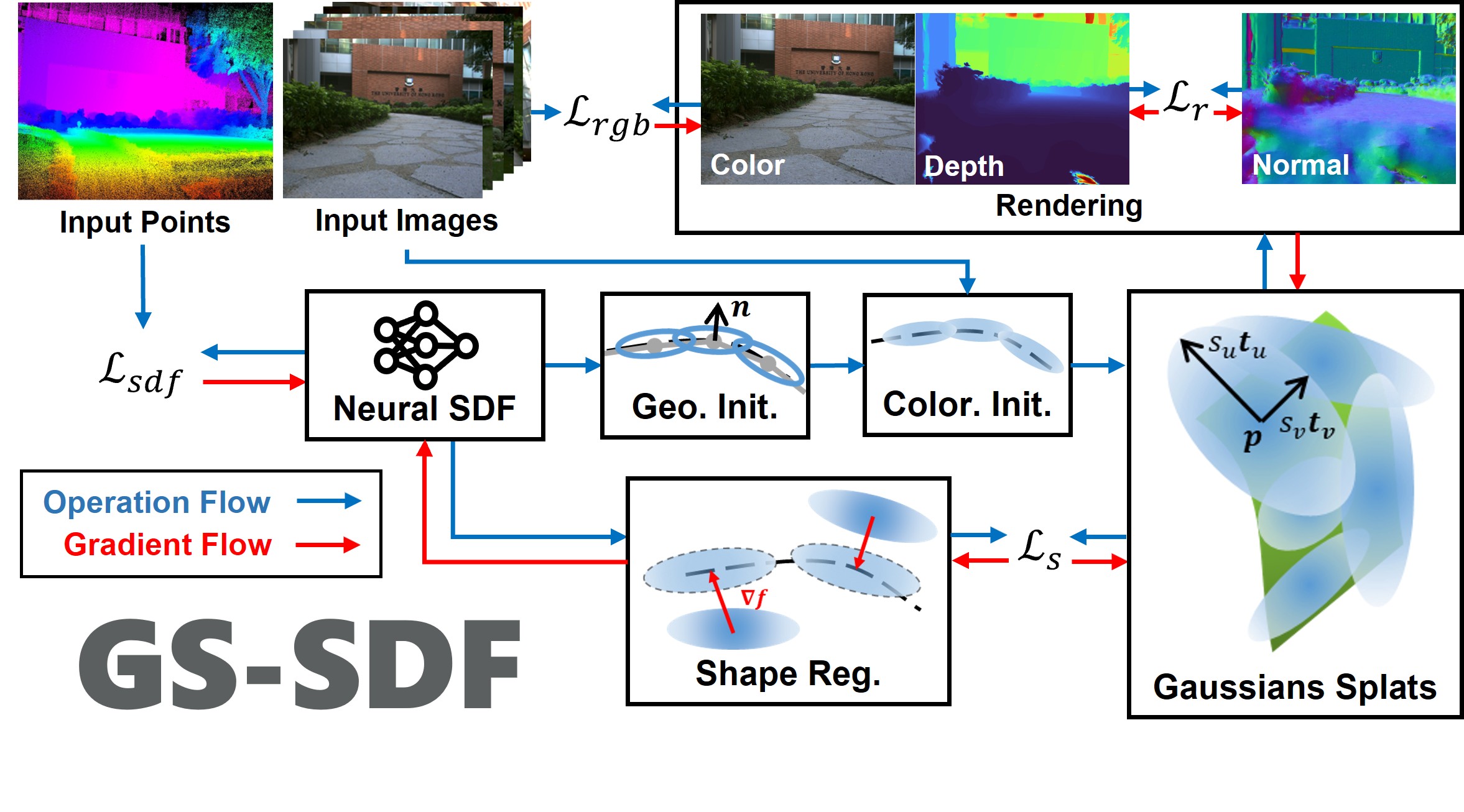 A unified LiDAR-visual system achieving geometrically consistent photorealistic rendering and high-granularity surface reconstruction.
We propose a unified LiDAR-visual system that synergizes Gaussian splatting with a neural signed distance field. The accurate LiDAR point clouds enable a trained neural signed distance field to offer a manifold geometry field. This motivates us to offer an SDF-based Gaussian initialization for physically grounded primitive placement and a comprehensive geometric regularization for geometrically consistent rendering and reconstruction.
A unified LiDAR-visual system achieving geometrically consistent photorealistic rendering and high-granularity surface reconstruction.
We propose a unified LiDAR-visual system that synergizes Gaussian splatting with a neural signed distance field. The accurate LiDAR point clouds enable a trained neural signed distance field to offer a manifold geometry field. This motivates us to offer an SDF-based Gaussian initialization for physically grounded primitive placement and a comprehensive geometric regularization for geometrically consistent rendering and reconstruction.
Our paper is currently undergoing peer review. The code will be released once the paper is accepted.
Project page | Paper | Video
2. Related paper
FAST-LIVO2: Fast, Direct LiDAR-Inertial-Visual Odometry
If you use GS-SDF for your academic research, please cite the following paper.
@article{liu2025gssdflidaraugmentedgaussiansplatting,
      title={GS-SDF: LiDAR-Augmented Gaussian Splatting and Neural SDF for Geometrically Consistent Rendering and Reconstruction},
      author={Jianheng Liu and Yunfei Wan and Bowen Wang and Chunran Zheng and Jiarong Lin and Fu Zhang},
      journal={arXiv preprint arXiv:2108.10470},
      year={2025},
}
3. Installation
- Tested on Ubuntu 20.04, cuda 11.8
The software not relies on ROS, but under ROS noetic installed, the installation should be easier. And if real-time visualization is needed, ROS is required and refer to the Visualization section.
  pip install open3d==0.18.0
  # Libtorch
  wget https://download.pytorch.org/libtorch/cu118/libtorch-cxx11-abi-shared-with-deps-2.4.1%2Bcu118.zip
  apt install zip
  unzip libtorch-cxx11-abi-shared-with-deps-*.zip
  rm *.zip
  echo "export Torch_DIR=$PWD/libtorch/share/cmake/Torch" >> ~/.bashrc # ~/.zshrc if you use zsh
  source ~/.bashrc # .zshrc if you use zsh

  mkdir -p gs_sdf_ws/src
  cd gs_sdf_ws/src
  apt install git libdw-dev
  git clone https://github.com/hku-mars/GS-SDF.git --recursive
  cd ..
Build with ROS for visualization
catkin_make -j8 -DENABLE_ROS=ON(Alternative) Build without ROS
  # Instead of build with catkin_make, you can also build with cmake
  cd gs_sdf_ws/src/GS-SDF
  mkdir build
  cd build
  cmake ..
  make -j8
4. Data Preparation
- The processed FAST-LIVO2 Datasets and Replica Extrapolation Datasets are available at M2Mapping Datasets
4.1. Replica
- Download the Replica dataset from M2Mapping Datasets and unzip it to
src/GS-SDF/data:wget https://cvg-data.inf.ethz.ch/nice-slam/data/Replica.zip # Replica.zip, cull_replica_mesh.zip, and replica_extra_eval.zip are supposed under gs_sdf_ws unzip -d src/GS-SDF/data Replica.zip unzip -d src/GS-SDF/data/Replica cull_replica_mesh.zip unzip -d src/GS-SDF/data replica_extra_eval.zip - Arrange the data as follows:
├── Replica
│   ├── cull_replica_mesh
│   │   ├── *.ply
│   ├── room2
│   │   ├── eval
│   │   │   └── results
│   │   │   │   └── *.jpg
│   │   │   │   └── *.png
│   │   │   └── traj.txt
│   │   └── results
│   │   │   └── *.jpg
│   │   │   └── *.png
│   │   └── traj.txt
4.2. FAST-LIVO2 Datasets
-
Download either Rosbag or Parsered Data in M2Mapping Datasets.
-
Arrange the data as follows:
- For Rosbag:
├── data │ ├── FAST_LIVO2_Datasets │ ├── campus │ │ │ ├── fast_livo2_campus.bag - For Parsered Data:
├── data
│   ├── FAST_LIVO2_Datasets
│   │   ├── campus
│   │   │   ├── images
│   │   │   ├── depths
│   │   │   ├── color_poses.txt
│   │   │   ├── depth_poses.txt
- For Rosbag:
4.3. Custom FAST-LIVO2 Datasets
- Clone the modified-FAST-LIVO2 repo; install and run FAST-LIVO2 as the official instruction. The overall pipeline as:
# 1. open a terminal to start LIVO
roslaunch fast_livo mapping_avia.launch
# 2. open another terminal to get ready for bag recording
rosbag record /aft_mapped_to_init_lidar /aft_mapped_to_init_cam /origin_img/compressed /cloud_registered_body /tf /tf_static /path -O "fast_livo2_YOUR_DOWNLOADED" -b 4096 -O YOUR_BAG_NAME.bag
# 3. open another terminal to play your downloaded/collected bag
rosbag play YOUR_DOWNLOADED.bag
# 4. convert rosbag into colmap format
python scripts/rosbag_convert/rosbag_to_colmap.py \
  --bag_path data/YOUR_BAG_NAME.bag \--image_topic /origin_img/compressed \
  --image_pose_topic /aft_mapped_to_init_cam \
  --point_topic /cloud_registered_body \
  --point_pose_topic /aft_mapped_to_init_lidar \
  --output_dir data/YOUR_BAG_NAME_colmap \
  --fx [fx] --fy [fy] --cx [cx] --cy [cy] \
  --width [width] --height [height] \
  --k1=[k1] --k2=[k2] --p1=[p1] --p2=[p2]
# 5. run GS-SDF with the converted colmap format data
rosrun neural_mapping neural_mapping_node train src/GS-SDF/config/colmap/colmap_example.yaml data/YOUR_BAG_NAME_colmap
4.4. Multi-camera datasets
- Following Colmap-txt-format to prepare the multi-camera datasets as follows:
You can download the multi-camera demo datasets from M2Mapping Datasets:
├── data │ ├── colmap_dataset │ │ ├── cameras.txt │ │ ├── images.txt │ │ ├── depths.txt │ │ ├── images/ │ │ ├── depths/rosrun neural_mapping neural_mapping_node train src/GS-SDF/config/colmap/shenzhenbei.yaml src/GS-SDF/data/multi_cam_demo_shenzhenbei_202404041751
5. Run
    source devel/setup.bash # or setup.zsh

    # Replica
    ./src/GS-SDF/build/neural_mapping_node train src/GS-SDF/config/replica/replica.yaml src/GS-SDF/data/Replica/room2
    # If ROS is installed, you can also run the following command:
    # rosrun neural_mapping neural_mapping_node train src/GS-SDF/config/replica/replica.yaml src/GS-SDF/data/Replica/room2

    # FAST-LIVO2 (ROS installed & ROS bag)
    ./src/GS-SDF/build/neural_mapping_node train src/GS-SDF/config/fast_livo/campus.yaml src/GS-SDF/data/FAST_LIVO2_RIM_Datasets/campus/fast_livo2_campus.bag
    # If ROS is installed, you can also run the following command:
    # rosrun neural_mapping neural_mapping_node train src/GS-SDF/config/fast_livo/campus.yaml src/GS-SDF/data/FAST_LIVO2_RIM_Datasets/campus/fast_livo2_campus.bag

    # FAST-LIVO2 (Parsered ROS bag format)
    ./src/GS-SDF/build/neural_mapping_node train src/GS-SDF/config/fast_livo/campus.yaml src/GS-SDF/data/FAST_LIVO2_RIM_Datasets/campus/color_poses.txt
    # If ROS is installed, you can also run the following command:
    # rosrun neural_mapping neural_mapping_node train src/GS-SDF/config/fast_livo/campus.yaml src/GS-SDF/data/FAST_LIVO2_RIM_Datasets/campus/color_poses.txt
After running, the training and evaluation results will be saved in the src/GS-SDF/output directory.
For afterward visualization/evaluation, you can use the following command:
    source devel/setup.bash # or setup.zsh
    ./src/GS-SDF/build/neural_mapping_node view src/GS-SDF/output/(your_output_folder)
    # If ROS is installed, you can also run the following command:
    # rosrun neural_mapping neural_mapping_node view src/GS-SDF/output/(your_output_folder)
Input h + Enter to see the help message.
- Use provided scripts to reproduce the results:
    cd src/GS-SDF
    sh scripts/baseline.sh
6. Visualization
-
Tested on Ubuntu 20.04, cuda 11.8, ROS Noetic
-
We use RVIZ for visualization for now. Please install ROS Noetic following the official guide or refer to the Docker 'ROS Installation' section.
-
Re-build the packege:
cd src git clone https://github.com/jianhengLiu/rviz_map_plugin.git git clone https://github.com/jianhengLiu/rviz_fps_plugin.git sudo apt install ros-noetic-mesh-msgs ros-noetic-rviz-animated-view-controller ros-noetic-hdf5-map-io catkin_make -DENABLE_ROS=ON -
Run the following command to visualize the map in real-time:
source devel/setup.bash # or setup.zsh
roslaunch neural_mapping rviz.launch
Click the
FPS Motionbutton to enable FPS control, and you can use theW,A,S,Dkeys to move around the map. Drag the view to activate and control the view with the mouse. -
For post-training visualization, you can use the following command:
./src/GS-SDF/build/neural_mapping_node view src/GS-SDF/output/(your_output_folder)
# If ROS is installed, you can also run the following command:
# rosrun neural_mapping neural_mapping_node view src/GS-SDF/output/(your_output_folder)

roslaunch neural_mapping rviz.launch
7. Docker
- We provide a enroot docker image for testing.
# https://github.com/NVIDIA/enroot
enroot import docker://nvidia/cuda:11.8.0-cudnn8-devel-ubuntu20.04
enroot create --name gs_sdf ~/nvidia+cuda+11.8.0-cudnn8-devel-ubuntu20.04.sqsh
# check if create right
enroot list
enroot start --root --rw gs_sdf
# ctrl + d to return

cd ~
# ROS Installation
apt update
apt install lsb-release
sh -c 'echo "deb http://packages.ros.org/ros/ubuntu $(lsb_release -sc) main" > /etc/apt/sources.list.d/ros-latest.list'
apt install curl # if you haven't already installed curl
curl -s https://raw.githubusercontent.com/ros/rosdistro/master/ros.asc | apt-key add -
apt update
apt install ros-noetic-desktop-full
# Dependencies
apt install ros-noetic-mesh-msgs ros-noetic-rviz-animated-view-controller ros-noetic-hdf5-map-io
echo "source /opt/ros/noetic/setup.bash" >> ~/.bashrc

# Libtorch
wget https://download.pytorch.org/libtorch/cu118/libtorch-cxx11-abi-shared-with-deps-2.4.1%2Bcu118.zip
apt install zip
unzip libtorch-cxx11-abi-shared-with-deps-*.zip
rm *.zip
echo "export Torch_DIR=$PWD/libtorch/share/cmake/Torch" >> ~/.bashrc
source ~/.bashrc

# upgrad cmake
wget https://github.com/Kitware/CMake/releases/download/v3.23.0/cmake-3.23.0-linux-x86_64.sh
bash ./cmake-3.23.0-linux-x86_64.sh --skip-licence --prefix=/usr
# opt1: y; opt2: n

mkdir -p m2mapping_ws/src
cd m2mapping_ws/src
apt install git libdw-dev
git clone https://github.com/hku-mars/GS-SDF.git --recursive
cd ..
catkin_make -DENABLE_ROS=ON # if lacking memory try restricting number of cores: catkin_make -j8

# Image export
enroot export --output gs_sdf.sqsh gs_sdf
8. Acknowledgement
Thanks for the excellent open-source projects that we rely on: gsplat, M2Mapping, nerfacc, tiny-cuda-nn, kaolin-wisp, CuMCubes