IngeTrazo
Pronounced EEN-heh-TRAH-soh — from Spanish inge(niería) "engineering" + trazo "a drawn stroke": the engineer's stroke.
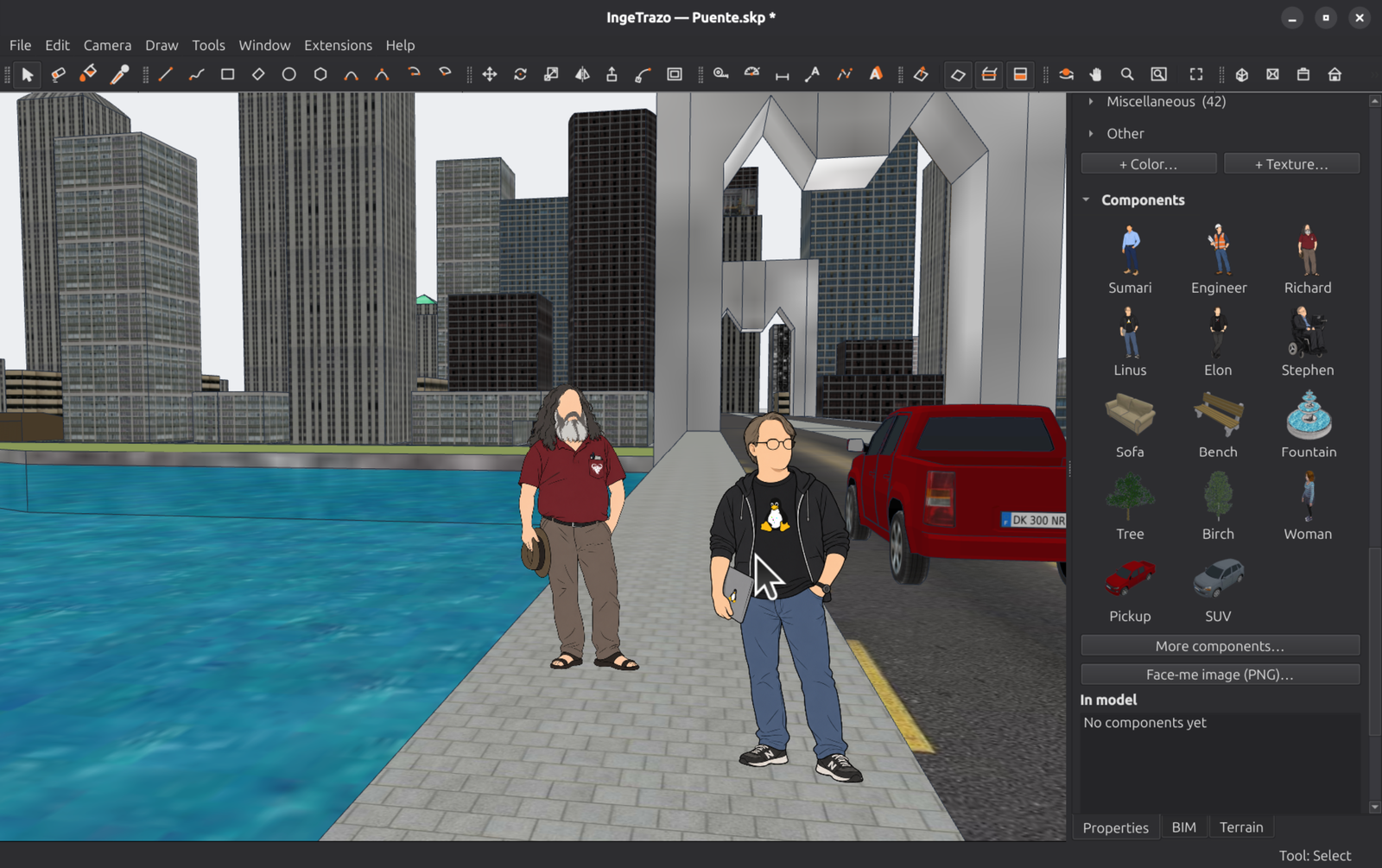
A free 3D modeler for architecture, engineering and 3D design — draw as if by hand, built natively for Linux.




IngeTrazo brings push/pull modeling to Linux — where there is
almost no native CAD for civil engineers and architects, and for anyone who
designs in 3D (furniture, objects, scenes, models). It is freeform at the
core (draw anything, like sketching by hand) with an optional BIM tagging
layer planned on top: mark geometry as IfcWall / IfcSlab / IfcColumn,
export to IFC, and close the loop model → tag → quantity takeoff → budget
with its sister project IngePresupuestos.
The name is the thesis: trazar — to trace, as you would by hand.
Status
Usable — real work gets done in it today. Draw, extrude, edit, paint,
dimension and annotate; open .skp files from 2013 to 2026; tag BIM classes and export IFC quantities; georeference and
import survey data. IngeTrazo is developed by dogfooding on real engineering
projects, backed by ~2,000 automated tests, and its geometry engine refuses
to commit a broken solid (the hermeticity guard) — your quantities stay
honest. It is still a 0.x: the file format and plugin API may evolve between
minor versions, and rough edges exist — please
report them.
Install
Grab the latest release:
- Windows: the
-setup-installer (or the portable.zip). - Linux (x86_64): the Flatpak, from our repository — this is the one
that keeps itself current, because
flatpak updatehas somewhere to look. It lands in your applications menu with.igz/.skpassociated.
flatpak remote-add --user --if-not-exists ingetrazo https://ingetrazo.com/ingetrazo.flatpakrepo
flatpak install --user ingetrazo com.ingetrazo.IngeTrazo
flatpak run com.ingetrazo.IngeTrazo
The release also carries a single-file IngeTrazo.flatpak you can
double-click, but a bundle has no update channel — it stays on the version
you installed. Or take the AppImage (make it executable and run it),
or the tarball if your distro lacks FUSE:
chmod +x IngeTrazo-*-x86_64.AppImage && ./IngeTrazo-*-x86_64.AppImage
# or
tar -xzf IngeTrazo-*-linux-x86_64.tar.gz && IngeTrazo-*/ingetrazo
Python, Qt and the pure-Python .skp reader travel inside; nothing else to
install. --check prints what the install found and exits non-zero if
anything is missing.
- macOS (Apple Silicon, M1 and later): download
IngeTrazo-<version>-macos-arm64.dmgfrom the latest release, open it and drag IngeTrazo to Applications. The app is not signed yet, so the first time right-click it ▸ Open. Known gap on macOS: DWG import (dwg2dxfis Linux-only for now); the native.skpreader works everywhere. If something fails, please open an issue and paste anything the Terminal prints.
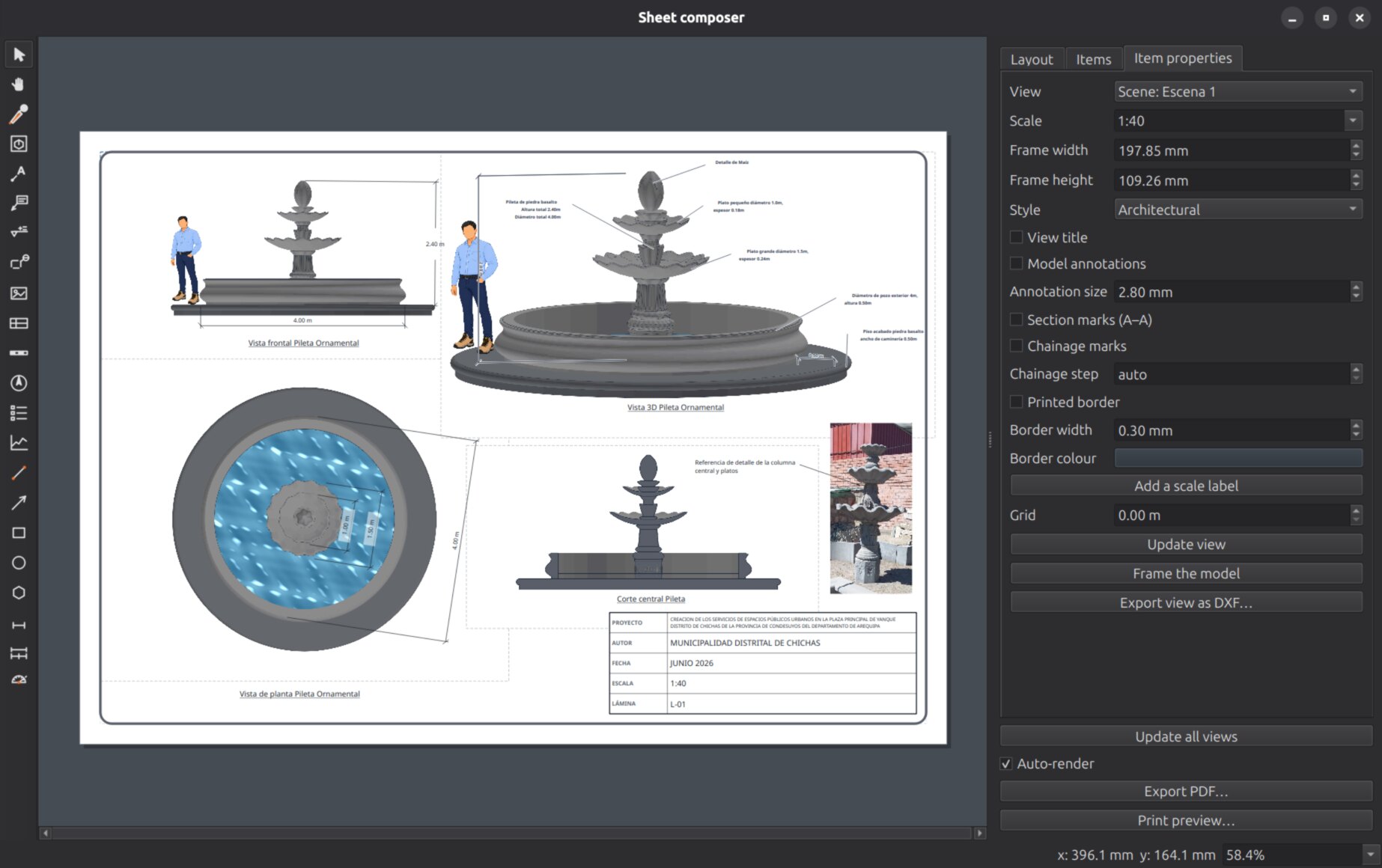
Something to open right away: examples/ holds four real
documents from the Yanque plaza project — the fountain, the bench with its
pergola and the solar lamp post with their A3 sheets and PDFs, and the
welcome arch with all its rebar (also attached to every release as
IngeTrazo-ejemplos.zip).
What works today
- Viewport — Z-up camera that orbits around the point under the cursor, grid, colored axes, perspective ↔ parallel and two-point perspective, standard views, zoom-extents, hidden-line removal, real-sun shadows.
- Walkthrough — Position Camera, Walk and Look Around at eye height.
- Drawing tools — Line, Rectangle, Rotated Rectangle, Circle, Polygon,
Arc (2-point) and 3-Point Arc, with inferencing, snapping, axis locks and a
Value Control Box (type exact lengths/coordinates,
200,100or200;100for two values), plus Freehand, Pie, 3D Text and images. Repeat the last command with Shift+R or from the right-click menu. - Push/Pull — robust, watertight extrude / recess / step / through-hole, solid-aware, with a BIM-grade hermeticity guard (never commits a broken solid — the difference that makes the geometry valid for quantity takeoff).
- Offset — walls with real thickness from a face outline.
- Follow Me and Fillet — sweep a profile along a path; round a corner.
- Move, Scale, Flip — with snap, inference and exact measured input.
- Tape Measure & guides — guide points and lines that every tool snaps to, Push/Pull included (stop a face exactly at a guide's height).
- Eraser, Hide/Unhide, Invert Selection, Intersect Faces.
- Solid tools — Outer Shell, Union, Subtract, Trim, Intersect, Split.
- Section planes — live cuts with section fill.
- Groups & components — isolate geometry, move / explode / edit as a unit, and copy/paste with a solid, textured preview under the cursor; pasted component copies share their definition. Paste in Place (Ctrl+Alt+V) drops the copy exactly where it was taken — the way to move things into and out of groups without shifting them.
- Rotate & Protractor — plane inference with
axis-coloured disc, 15° tick snapping near it, slope input as rise:run
(
3:12), rotate-a-copy (Ctrl), fold-axis by dragging, and angled guide lines that feed the snap engine; a click snapped to a point rotates by the exact angle to it. - Display styles — Default, Architectural (textures on white), Shaded, Hidden line, Monochrome, Wireframe and X-ray; scenes remember their style and the sheet composer renders each viewport in any of them.
- Curved solids — soft edges: smooth cylinders, curved-surface selection, view-dependent profile/silhouette edges.
- Materials — solid color per face and textures (planar projection with real-world tile size), applied with a Paint tool — with a named material registry: paint keeps identity, edit-and-restamp updates every use, Model Info reports quantities per material, and exports carry the real names.
- Dimensions & leader texts — static annotations with hidden-line
occlusion and styles; texts select by their glyphs, move with the anchor
pinned, and edit on double-click. Both come in from
.skpfiles. - Side tray — Entity info, Layers, Scenes, Materials (213 RAL colours and a textured library at real size), Components (scale figures, furniture, trees, vehicles, your own face-me PNGs), Dimension style.
.skpimport — open.skpfiles natively (double-click too), every era from classic 2013–2020 to current 2021+, with materials, textures, per-side face materials, translucency, layers, scenes, dimensions and leader texts. Pure Python and offline — powered by OpenSKP (see Acknowledgements). There is no.skpexport: to take a model to another program, export COLLADA.dae, OBJ or glTF.- Files — native
.igzsave/open (self-contained: textures travel inside the document), import STL (with principal-plane or advanced all-surface coplanar merging), OBJ and COLLADA.dae, export STL, OBJ, COLLADA and glTF/GLB (glTF with PBR materials and geolocation; STL goes to a slicer as is — dedicated 3D-printing tools are planned for the future). - Layers & Scenes — visibility/lock tags (plans emerge from one model)
and saved views (camera + per-layer visibility), both imported from
.skp. - BIM tagging + IFC export — tag freeform geometry with IFC classes
(walls, slabs, columns, ...); tagged objects export to
.ifcwith honest quantities (areas always; volumes only when the object is watertight) — the bridge to IngePresupuestos quantity takeoff. - Geo-referencing — UTM datum, web basemap tiles, 3D terrain (DEM), traced geo-paths with a live longitudinal profile, survey-point CSV import (total station / GPS), and photogrammetric mesh import (WebODM / ODM).
- Sheet composer — scaled viewports of the model on paper sheets (each in any display style), exact vector hidden-line rendering with three pen weights and section poché, numbered view titles, section marks (where «Corte A-A» was taken), model-anchored dimensions (chains with a stacked total, level marks that read the point's height), detail callouts, title block, vector PDF export, DXF with one layer per line class.
- Extensions — a plugin system: drop a Python file in the plugins folder and its tools appear in the Extensions menu. Reference plugins ship with the app: Model Info (model statistics), a Python Console (live scripting over the open document, undo-integrated), Solid Inspector, and two AI plugins — an in-app AI Assistant (chat that models for you; Groq/Claude/GPT/Gemini/OpenRouter/DeepSeek/local Ollama) and an AI Bridge (drive the live document from Claude Code/Desktop via MCP). Every AI action is one transactional undo step. A broken plugin can never prevent IngeTrazo from starting. Plugins are the lowest-friction way to contribute — see docs/plugins.md.
- Undo/redo — every edit is a single atomic step (console scripts included).
Planned
Contour lines from terrain · reference axes, room labels and numbered legends on sheets · DWG/DXF (with IngeCAD) · IFC import · extension manager UI · Flathub packaging.
Why IngeTrazo
There was no good native 3D modeller for the civil engineer who works on Linux: the usual tools have no Linux build, or are hard to learn. IngeTrazo is that missing tool: Linux-first, in Spanish, free software, and designed around the real workflow of tracing over a georeferenced site and tagging what you draw for takeoff.
Stack
Deliberately minimal — heavy dependencies arrive only when a feature needs them.
| Layer | What we use |
|---|---|
| UI | PySide6 6.11 (Qt 6) — the only runtime dependency |
| 3D rendering | Qt's bundled OpenGL (QOpenGLShaderProgram / QOpenGLBuffer / VAO), GLSL 3.30 Core |
| 3D math | QMatrix4x4 / QVector3D (QtGui) — no NumPy |
| Vertex packing | array (Python stdlib) |
| Snapping / inference | custom (core/snap.py) |
| Tests | pytest |
Quick start (developers)
git clone https://github.com/ingelibre/ingetrazo.git
cd ingetrazo
python3 -m venv venv
source venv/bin/activate          # Linux / macOS
# .\venv\Scripts\activate         # Windows
pip install -r requirements.txt
python main.py
Developed on Python 3.14 (3.11+ should work). Run the tests with
python -m pytest -q.
Contributing
Contributors from anywhere are welcome. See CONTRIBUTING.md
and CODE_OF_CONDUCT.md. All code, comments and commit
messages are in English; the UI speaks Spanish, English, Brazilian
Portuguese, Simplified Chinese and Italian (translations are one JSON file
each under i18n/).
Acknowledgements
- Pedro Caeiro — architectural and mechanical draftsman, and IngeTrazo's most persistent outside contributor: five merged pull requests and fifteen issues filed from real drafting work. He draws with IngeTrazo every day and writes down every gesture that does not answer the way a draftsman expects, which is how much of its everyday behaviour got polished. See AUTHORS.
- Rafael García Rodríguez — Rafael 3D, draftsman and reviewer. His filmed reviews put the program through a professional's hands and drove the sheet composer; his tutorial on drafting standards, with a reference plate drawn in AutoCAD, is the specification IngeTrazo's dimensions are being built to. A CAD program that does not meet the drafting norms is not a technical tool, and that is knowledge we did not have.
- OpenSKP (MIT) by Ahsan
Mehmood — the clean-room, pure-Python
.skpreader that powers IngeTrazo's native import. IngeTrazo contributes back upstream: material and texture fidelity, per-face UV mapping, image entities, style colors, back-side materials, edge display flags, and a full reader for the classic pre-2021 MFC container format. If you need to read.skpfiles from Python, use OpenSKP — and give it a star. - dafrobozao — the Brazilian Portuguese translation of the interface (#54), IngeTrazo's third language.
- liuandy — the Simplified Chinese translation of the interface (#123), IngeTrazo's fourth language.
- deedend — the Italian translation of the interface (#182), IngeTrazo's fifth language.
License
GPL-3.0-or-later — the same copyleft family as Blender, FreeCAD and PrusaSlicer. You are free to use, study, modify and redistribute IngeTrazo, provided derivative works stay under the same license.
Author
Marco Sumari Tellez — Civil Engineer, Arequipa, Peru. See AUTHORS.
En español
IngeTrazo (se lee in-je-TRA-so: ingeniería + trazo) es un
modelador 3D libre para arquitectura,
ingeniería y diseño 3D, hecho nativo para Linux — donde casi no
hay CAD para nuestra carrera ni para quien diseña en 3D. Es freeform en el núcleo (trazás lo que quieras,
como dibujando a mano) con una capa BIM opcional planeada encima: taggeás la
geometría como IfcWall / IfcSlab / IfcColumn, exportás a IFC y cerrás el
loop modelar → taggear → metrar → presupuestar junto a
IngePresupuestos.
Ya funciona de punta a punta: dibujás (línea, rectángulo, círculo, arco,
polígono), extruís con push/pull hermético grado-BIM, hacés muros con espesor
(offset), movés, agrupás, pintás con colores y texturas, acotás, y exportás a
STL/OBJ. Abre archivos .skp de forma nativa (con doble clic),
de cualquier época (clásico 2013–2020 y actual 2021+), gracias a
OpenSKP. En
desarrollo temprano, respaldado por ~870 tests. Software libre GPL-3.0, hecho
en Perú. Más en docs/.
IngeTrazo is an independent project, written from scratch and not affiliated with any other software vendor; the file formats it reads belong to their respective owners. IngeTrazo es un proyecto independiente, escrito desde cero y sin relación con otros fabricantes de software; los formatos de archivo que lee pertenecen a sus respectivos dueños.