BC2
Design protein binders around the biology of your experiment.
BC2 brings de novo miniproteins, scaffolded binders, cyclic peptides and multistate design into one workflow. Describe your target, choose the kind of binder you want, and add properties that matter for your experiment. Named presets supply the design settings and acceptance filters; you can adjust individual settings when needed.
BC2 combines sequence optimisation through AlphaFold 2 with ProteinMPNN redesign, then evaluates candidates with separate AlphaFold models and structural filters. It returns sequences, predicted complexes and ranked results, with measurements of the interface, fold and molecular properties to help choose candidates for testing. These are computational designs: binding, selectivity and the requested biological behaviour require experimental validation.
Installation · First design · Your target · Input tiers · Modalities · Properties · Results · Design guide · Settings · Outputs · Installing and running
Installation
On Linux, start in a terminal without an active Python or Conda environment:
git clone https://github.com/PacesaLab/BindCraft2.git
cd BindCraft2
bash install.sh
source .venv/bin/activate
In a new terminal, return to BindCraft2 and run source .venv/bin/activate again. See the installation and running guide for existing environments, older GPUs, clusters, containers and troubleshooting.
Run your first design
From the repository root, with the environment active:
bindcraft design examples/pdl1.jsonThe PD-L1 input file selects the shipped hPDL1 target and requests 10 accepted binders and sets "project_folder": "results/pdl1" for the output. BC2 continues until it reaches that number, with no limit on design attempts.
To design VHHs against the same target, with the humanization property enabled:
bindcraft design examples/pdl1.json --modality VHH --humanize --set 'project_folder=results/pdl1_vhh'This changes the binder format and saves the new experiment in results/pdl1_vhh/.
Design against your own target
Put your target structure beside a file called design.json. This complete input requests a de novo binder to chain A of target.pdb:
{
  "targets": [{"name": "my_target", "target_path": "target.pdb", "chains": "A"}],
  "modality": "binder",
  "binder_lengths": [80, 80],
  "number_of_final_designs": 10,
  "project_folder": "results/my_target"
}
bindcraft design design.jsonChange target.pdb and A to match your structure, then choose your binder length and how many accepted designs you want.
- Length:
[80, 80]requests exactly 80 residues;[60, 100]allows any length in that range. For a scaffolded format such asVHH, removebinder_lengthsand changemodality; the scaffold determines the length. - Binding site: add
"hotspots": "54,56,66-70"inside the target entry, using residue numbers from your structure. - Output:
project_foldernames the results folder. Launching this example fromBindCraft2writes toBindCraft2/results/my_target/. Give each experiment its own folder.
For a shipped target, replace the targets entry with "target": "hPDL1". List the available targets with bindcraft design --list-targets.
BC2 accepts PDB, mmCIF and FASTA inputs. See target and scaffold settings for chain selections, custom scaffolds and sequence targets.
How the input tiers work
You write one campaign file. BC2 layers the shipped baseline, an optional core profile, your chosen modality and properties, and any named target under the entries in that file. Each layer below overrides the one above it, so a target's own settings beat the generic modality and property defaults, and your campaign beats them all.
| Layer | What it provides | What you write |
|---|---|---|
| Core — settings/core/default.json | The baseline settings every campaign starts from. | Nothing. |
| Core profile — settings/core/ | An opt-in profile applied under every preset, such as benchmark for a reproducible run. | "core": "benchmark", or --core benchmark. |
| Modality — settings/modality/ | The binder format or conformational objective. | "modality": "VHH". |
| Properties — settings/property/ | Optional properties such as humanization or accessible termini. | "humanize": true. |
| Target — settings/target/ | A shipped target, including its structure and binding-site selections; its settings win over the modality and property defaults. | "target": "hPDL1", or write your own targets entry. |
| Your campaign | Desired number of designs, output folder and any adjustments. | Your JSON entries, or --set 'name=value'. |
Your explicit settings take precedence over presets. Command-line choices override matching entries in your JSON file. For example:
bindcraft design examples/pdl1.json --set 'binder_lengths=[70,90]' --set 'project_folder=results/pdl1_70_90'bindcraft design -h names the settings changed most often, and --list-settings names every one of
them.
Edit the JSON file for a persistent choice, or use the command line for a one-off change:
| In your JSON file | On the command line |
|---|---|
"modality": "VHH" | --modality VHH |
"forced_targeting": true | --forced-targeting |
"humanize": true | --humanize |
"termini_accessible": true | --termini-accessible |
Use the exact names shown here, including capitals and underscores. bindcraft design --help lists the available targets, modalities and property flags. Start from pdl1.json when choosing presets; the other example campaigns contain more specific settings that still take precedence when you add a preset. See input tiers and overrides for details.
Design modalities
Choose a binder format, then add compatible targeting or conformational options. Each name links to the preset used by the code.
Binder format
| Design goal | --modality name | When to use it |
|---|---|---|
| De novo binder | binder | A new, independently folded protein binder without a starting scaffold. |
| Larger binder | large_binder | Binders over 300 amino acids. Set your desired binder_lengths. |
| Linear peptide | peptide | Short binders below 25 amino acids that may fold only when bound. |
| Cyclic peptide | cyclic_peptide | A short peptide intended for head-to-tail cyclisation. |
| Homo-oligomer | homo_oligomer | An assembly of identical binder chains. Set copies for the number of chains. |
| Multidomain binder | multidomain | Several domains connected within one binder chain. |
| VHH | VHH | A single-domain antibody (VHH) binder built from a VHH scaffold. |
| Ankyrin Repeat protein (ARP) | ARP | A binder built from a consensus ankyrin-repeat scaffold. |
| scFv variable domains | scFv | Paired antibody variable domains. BC2 models two chains; the connecting linker must be designed separately. |
| Fab | Fab | An antibody-binding fragment with heavy and light chains, including their constant domains. |
The antibody and ARP presets use supplied scaffolds. See scaffold editing to use your own.
Target recognition
Most targeting choices are made in the targets entries of your JSON file:
| Design goal | What to write | Detailed example |
|---|---|---|
| One binder for several targets | Use "target": ["hPDL1", "mPDL1"] for shipped targets, or add each protein under targets. | Human/mouse PD-L1 |
| Avoid a specified off-target | Add the off-target under targets with "objective": "detarget". | PD-L1 with PD-1 detargeting |
| Keep a target region free | Add coldspots to its target entry, using input residue numbers. | IL-7Rα patch |
| Bind a peptide or disordered target | Point target_path to a FASTA file. Choose the binder format separately. | Dynorphin A |
| Bind a receptor assembly | Select its chains with "chains": "A,B"; use chain-prefixed hotspots such as "A54,B12-16". | IL-2 receptor |
For a focused epitope, add --forced-targeting and name hotspots on a structured target. See targeting options for the method and acceptance criteria.
Conformational design
| Design goal | --modality name | When to use it |
|---|---|---|
| Interface movement on binding | induced_fit | A binder whose binding surface changes shape between the free and bound states. |
| Whole-fold change on binding | fold_switch | A binder intended to adopt different folds when free and bound. |
These presets each use one target. Combine one with a compatible binder format, for example --modality binder,induced_fit. Conformational design details cover the structural criteria and designs with explicit groups of conformations.
Additional design properties
Add a compatible property as a command-line flag or a top-level JSON entry:
| Property | Command-line flag | JSON entry |
|---|---|---|
| Focused epitope — concentrate binding on named hotspots | --forced-targeting | "forced_targeting": true |
| Humanization — favour human-like sequence features | --humanize | "humanize": true |
| Protease resistance — reduce predicted cleavage susceptibility | --protease-stable | "protease_stable": true |
| Disulfide staple — include a predicted disulfide bond | --disulfide-staple | "disulfide_staple": true |
| Mixed topology — select for beta-sheet content and limit helicity | --mixed-topology | "mixed_topology": true |
| Nearby termini — bring the N and C termini together | --termini-together | "termini_together": true |
| Accessible termini — direct both chain ends away from the target | --termini-accessible | "termini_accessible": true |
| Initial guess — re-predict each candidate from the pose the trajectory folded | --initial-guess | "initial_guess": true |
| Big bang — seed the gradient stages too, so a binder folded from nothing starts at the origin | --bigbang | "bigbang": true |
For example:
bindcraft design examples/pdl1.json --mixed-topology --set 'project_folder=results/pdl1_mixed'These properties are judged using computational proxies. See property objectives and acceptance filters for what each one measures and requires, and starting conformations for the optional --initial-guess and --bigbang flags.
Combining modalities
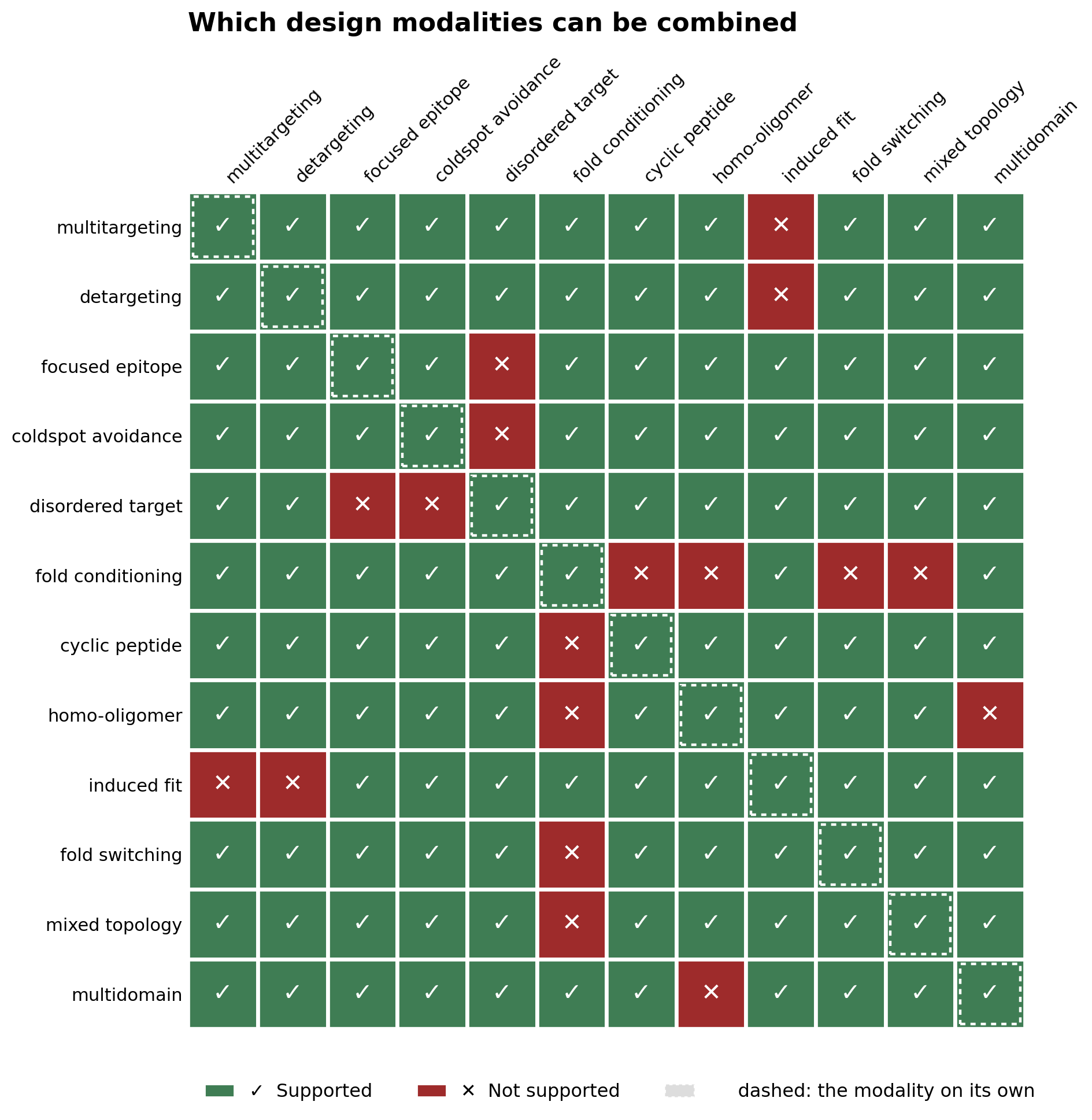
The chart shows compatible pairs of biological design objectives. The named fold_switch preset still requires one target; see conformational design. BC2 checks declared incompatibilities before starting a campaign.
Continue a campaign
A campaign resumes by default: run it again against the same folder and it carries on, claiming the trajectories it has not run yet, which is what a timed-out session or a second process added for a GPU relies on.
bindcraft design examples/pdl1.jsonRepeat any additional flags used to start that run. Add --set 'resume=false' to refuse a non-empty folder instead. See campaign records for reproducibility and optional author or project metadata.
Read your results
Start with results/pdl1/3_Ranked/!_Ranked.csv, then inspect the structures beside it. The three result folders follow the design process:
results/pdl1/
  1_Trajectories/   design attempts and their optimisation records
  2_Refolded/       redesigned sequences, predicted complexes and filter outcomes
3_Ranked/ accepted designs, ranked for selection| Output | What to use it for |
|---|---|
3_Ranked/!_Ranked.csv | Accepted designs ordered by i_pDAE, a distance-masked interface confidence score. Compare confidence, contacts, sequence and molecular properties before selecting candidates. |
3_Ranked/*.cif | Predicted complex structures in mmCIF format. Check the binding pose, epitope access and fit to the biological assembly. Multitarget designs have a complex for each target. |
2_Refolded/!_Refolded.csv | Scored ProteinMPNN candidates, including rejections and the filters they failed. |
2_Refolded/*.cif | Predicted complexes for redesigned sequences, including failed candidates by default. |
1_Trajectories/!_Trajectories.csv | A record of each design attempt, its final metrics and where it stopped. |
1_Trajectories/<design>/ | Optimisation records for individual attempts, with optional structures, plots and animations. |
campaign_metadata.json | Resolved settings, model choices, source revision, checkpoint hashes and your metadata. |
A stage folder appears when its first file is written. If no designs have been accepted yet, start with the earlier stages to see their progress and filter outcomes.
To rank by another measurement or explore different acceptance thresholds:
bindcraft rank results/pdl1 --on i_pTM
bindcraft filter results/pdl1
The filter command reports which criteria rejected candidates. See ranking and refiltering for choosing new thresholds and saving a revised shortlist without running design again.
Confidence scores are not binding affinities. For cropped targets, inspect the binder against the full structure; for cell-surface targets, consider glycans, membrane orientation and access by other proteins. The output and measurement reference explains every file and every measurement.
Running on a cluster
Submit from the repository root:
sbatch bindcraft.slurm examples/pdl1.jsonAdd your site's account and partition options if required. See Slurm and other schedulers for resource requests, containers and offline nodes.
Reference
Settings, losses and filters · Outputs and measurements · Installing and running · Example catalogue · Container recipes
Presets live in settings/ and scaffolds in scaffolds/. For code navigation, settings.py resolves the input tiers, cli.py reads the flags, loss.py defines design objectives, and filters.py defines acceptance measurements.
Acknowledgements
BC2 builds on a great deal of prior work, and we are grateful to the people and projects behind it:
- AlphaFold 2 (DeepMind) — BC2 uses AlphaFold 2 code and models for both sequence optimisation and validation.
- ColabDesign (Sergey Ovchinnikov) — the design engine is based on ColabDesign's hallucination and design framework.
- ProteinMPNN (Justas Dauparas) — used for sequence redesign.
- HyperMPNN — the "positive" design weights are taken from the MeilerLab GitHub repository.
- Special thanks to Lennart Nickel (Correia group).